RMS changes have been checked in. Apart from adding the switch between controlling the RMS and the RCS, the RMS Mode switch on panel A8 now works. At the moment, only the END EFF mode and the ORB UNL mode work.

You are using an out of date browser. It may not display this or other websites correctly.
You should upgrade or use an alternative browser.
You should upgrade or use an alternative browser.
SSU V1.25 Release
- Thread starter SiameseCat
- Start date
- Status
- Not open for further replies.
- Joined
- Feb 4, 2008
- Messages
- 9,753
- Reaction score
- 1,024
- Points
- 203
Would it be possible to tie attachment points to the various cameras on the orbiter for use with CameraMFD? And then make the MONs on the aft flightdeck operational orbiter MFDs so we can activate CameraMFD on them.

- Joined
- Feb 6, 2008
- Messages
- 38,965
- Reaction score
- 3,937
- Points
- 203
- Location
- Wolfsburg
- Preferred Pronouns
- Sire
Would it be possible to tie attachment points to the various cameras on the orbiter for use with CameraMFD? And then make the MONs on the aft flightdeck operational orbiter MFDs so we can activate CameraMFD on them.
Would mean a dangerous slow down, if we have even more MFDs.
- Joined
- Feb 4, 2008
- Messages
- 9,753
- Reaction score
- 1,024
- Points
- 203
What if we kill the forward MDUs when at any aft viewing position? It's not like we need the forward MDUs when we're flying from the aft. Then instead of 9 MDUs active, we'll only have a maximum of 3.Would mean a dangerous slow down, if we have even more MFDs.
Not much of a slow-down there, if we optimize things a bit. Then we could have the camera switches active.
- Joined
- Feb 6, 2008
- Messages
- 38,965
- Reaction score
- 3,937
- Points
- 203
- Location
- Wolfsburg
- Preferred Pronouns
- Sire
What if we kill the forward MDUs when at any aft viewing position? It's not like we need the forward MDUs when we're flying from the aft. Then instead of 9 MDUs active, we'll only have a maximum of 3.
That is not correct - we would have maximal 4 MFDs, as the CRT4 would also be visible.
Not much of a slow-down there, if we optimize things a bit. Then we could have the camera switches active.
Not really - we have no useful way to map the camera switches to the MFD buttons. It would be possible, but impossible to remember by a player.
- Joined
- Feb 6, 2008
- Messages
- 38,965
- Reaction score
- 3,937
- Points
- 203
- Location
- Wolfsburg
- Preferred Pronouns
- Sire
OK. Could you remove the MCA debug text message? It interferes with Spacecraft3.dll vessel operations.
Already removed here for weeks, but not yet committed. I am not yet happy with how I removed it and the motor code needs some improvements.
- Joined
- Feb 4, 2008
- Messages
- 9,753
- Reaction score
- 1,024
- Points
- 203
Also, what is the switch between RCS and RMS control?RMS changes have been checked in. Apart from adding the switch between controlling the RMS and the RCS, the RMS Mode switch on panel A8 now works. At the moment, only the END EFF mode and the ORB UNL mode work.
Last edited:
- Joined
- Feb 4, 2008
- Messages
- 9,753
- Reaction score
- 1,024
- Points
- 203
You man basically Ctrl-7 and not Ctrl-Numpad Divide right? I tried both and none of them have any effect for me. RMS is powered and unberthed, mode is ORB UNL.cntrl+"/" not keypad /
- Joined
- Feb 4, 2008
- Messages
- 9,753
- Reaction score
- 1,024
- Points
- 203
The one two keys to the left of the backspace key? Will try that one, thanks.Maybe you have a different keyboard, mine is the "/" key with the "?" on top to the left of the right shift key.
---------- Post added at 07:45 PM ---------- Previous post was at 07:42 PM ----------
OK, tried that one and it didn't work. No joy at all. So I suggest that we use another key-combo, let's say Ctrl-R?
Ctrl+R is used to set the HUD reference, so that key combination won't work. How about Ctrl+A?
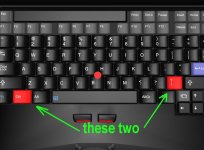
- Joined
- Feb 4, 2008
- Messages
- 9,753
- Reaction score
- 1,024
- Points
- 203
Thanks for the very informative image! That is not the SLASH key for me, it's the hyphen/underscore key for me. So we appear to have some language keyboard setting differences here.Look here !
- Joined
- Feb 4, 2008
- Messages
- 9,753
- Reaction score
- 1,024
- Points
- 203
Yep. No issues once the correct key was found.Did it work ?
To SC,
Could the EE roll become effective, so as not to need the RMS box ?
---------- Post added at 08:15 PM ---------- Previous post was at 01:27 PM ----------
Another question, since you are disabling the RCS with the switch, could you also disable what the keys A,D,W,E,Z and X to be used for translation movement at the same time the keypad is used for rotations ?
Could the EE roll become effective, so as not to need the RMS box ?
---------- Post added at 08:15 PM ---------- Previous post was at 01:27 PM ----------
Another question, since you are disabling the RCS with the switch, could you also disable what the keys A,D,W,E,Z and X to be used for translation movement at the same time the keypad is used for rotations ?
If there are language differences, would it be a good idea to use a letter key instead of the slash key?Thanks for the very informative image! That is not the SLASH key for me, it's the hyphen/underscore key for me. So we appear to have some language keyboard setting differences here.
---------- Post added at 07:20 PM ---------- Previous post was at 07:13 PM ----------
Not quite sure what you're asking here; do you want to use the A, D, W, E, Z and X keys for translating the RMS?To SC,
Could the EE roll become effective, so as not to need the RMS box ?
---------- Post added at 08:15 PM ---------- Previous post was at 01:27 PM ----------
Another question, since you are disabling the RCS with the switch, could you also disable what the keys A,D,W,E,Z and X to be used for translation movement at the same time the keypad is used for rotations ?
- Status
- Not open for further replies.
Similar threads

- Replies
- 32
- Views
- 15K

- Replies
- 165
- Views
- 63K


- Replies
- 121
- Views
- 67K
