
SSU V1.25 Release

Status
Not open for further replies.
I think we're pretty close to retiring the RMS Control dialog here! SJ ops can now be done from the aft flightdeck so the dialog buttons are no longer needed so that only leaves the grapple/release buttons.

The dialog can still be used in external view, maybe a good beginner help.
 
CTRL+V and CTRL+A sound OK for me, but maybe the short cut for the vernier mode should be closer to the arrow keys.

Speaking of key-combos, how about the NumPad Enter key for grapple/release?

I think we're pretty close to retiring the RMS Control dialog here! SJ ops can now be done from the aft flightdeck so the dialog buttons are no longer needed so that only leaves the grapple/release buttons.

How about Ctrl+Enter for Grapple? I'd prefer to use a 2-key combination for this, to avoid accidentally grappling/releasing. I can use Ctrl+M for the vernier/coarse toggle.
 
How about Ctrl+Enter for Grapple? I'd prefer to use a 2-key combination for this, to avoid accidentally grappling/releasing. I can use Ctrl+M for the vernier/coarse toggle.
Whatever is fine by you.
 
Yes, I agree with the 2-key combo for grappling.

If the monitors could ever be used, and maybe add a third in the form of a laptop, we would have one hell of a sim. Not that it's not great now.
 
We actually need separate combinations for grapple and release; how about Ctrl+Enter for grapple and Ctrl+Backspace for release?

---------- Post added at 12:08 PM ---------- Previous post was at 11:25 AM ----------

Ctrl+M (for the vern/coarse rate toggle) is used by Orbiter; I'm using Ctrl+O instead.
 
That works for me.

---------- Post added at 05:10 PM ---------- Previous post was at 04:08 PM ----------

Do you think the translation directions should be swapped ? When you press the up arrow, it translate down. The same when you press the right arrow, it moves left.
 
The translation directions with the arrow keys correspond to the translation directions from the numpad keys. IMHO, changing the directions would be confusing for someone switching between the numpad and arrow keys for translation.
 
I see, so it's set up more like a joystick.
 
I've made a new A8 panel with the lights not lit, and groups of the lights with a new .dds that can show them lit or unlit, like the ODS panel, if anyone wants to work on them.

---------- Post added at 01:29 AM ---------- Previous post was at 12:37 AM ----------

checked in new A8top.dds to show unlit lights.

---------- Post added at 03:17 AM ---------- Previous post was at 01:29 AM ----------

Checked in new RMSVC.msh with added texture and groups to light the A8top panel lights.
 
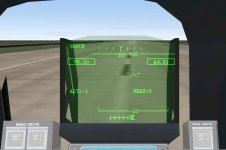
The HUD seems to be out of position; when the shuttle is landed, the horizon line on the HUD are actually below the horizon. I'm wring if the best fix for this is to move the HUD up or lower the camera view.
 

Attachments

  • hud.JPG
    hud.JPG
    76.5 KB · Views: 622
Fixed HUD alignment. I've alos added a Keyboard Reference to the Docs folder.
 
I can't move RMS POWER cover and switch. Latest SVN sources updated and compiled 10 minutes ago. Anybody have the same problem?
 
Yes, it's a known bug.
 
Are you sure the RMS PWR switch has a cover? I use SSM2007, and that switch hasn´t got a cover
 
Are you sure the RMS PWR switch has a cover? I use SSM2007, and that switch hasn´t got a cover

SSM 2007 is no reference... according to photographs on NASA, it has.
 
Are you sure the RMS PWR switch has a cover? I use SSM2007, and that switch hasn´t got a cover

If it didn't have one, I wouldn't have went to the trouble of putting one on. ;)
 
ROFL Donamy. True that, true that.
Atleast for SSU you don't have to pay 50 bucks and you pretty much get the same preformance but you can edit it with whatever payload you want too!
 
God damn just read trough the entire topic.... :OMG: Thought that some advanced x-plane model was complex... This just totally make them toys...

and WAUW cant wait to crash this one :P BIG kudos from me :speakcool:

Anariaq
 
Status
Not open for further replies.
Back
Top