IUS 1.0 Development

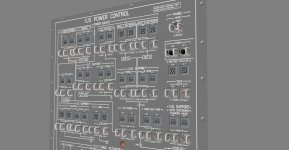
VC panel. How should the switches and talkbacks be named ?
 

Attachments

  • IUSpanelVC.jpg
    IUSpanelVC.jpg
    142.6 KB · Views: 510
NIce. I would think by what function they control for switch and talkbacks.
 
VC panel. How should the switches and talkbacks be named ?

I would say numbering by panel and location (from top left to bottom right in horizontal rows) like we did for the other panels is the least confusing one internally, since this uses the same convention as the real Space Shuttle.

Also, such a convention is better for programming the animations, since you can usually tell quickly where a switch is, but not what label it has. We only need the function names of the switches for later writing the data into the scenario file.
 
ex:

L10S1, L10TB1 ?
 
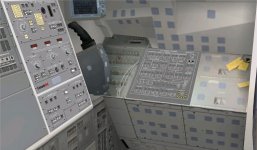
Is this the proper position for the IUS panel ? Also, any repositioning or sizing of the VC ?
 

Attachments

  • L10fit.jpg
    L10fit.jpg
    183.2 KB · Views: 492
Is this the proper position for the IUS panel ? Also, any repositioning or sizing of the VC ?
Right side but wrong location. The L10 panel goes on the right side when you're looking at the Payload Station.

AFD_locations.jpg
 
That's easy to fix, but what about the sizing ?
 
Question about the IUS: should I make arrangements for the SRM-1 nozzle cover to be hidden on ignition? (it would still show up after separation, unless it's made hidden by default in the mesh)
BTW: I think I now know how to do the Urwumpe's "texture trick" to replace the texture painting. I was going to say we could use panel L10 as a "guinea pig" for this, but it's probably not a good idea as it would put more on the plate. It's better to do it all at once after the release.
Anyway, the IUS is pretty much done! Most of the code was useful, but there was some that had to be re-done. Still some work to be done in the RCS coordinates as there're some axis couplings that shouldn't be there, and I'm now going to add the payload adapter code, and then start the panel.
 
Question about the IUS: should I make arrangements for the SRM-1 nozzle cover to be hidden on ignition? (it would still show up after separation, unless it's made hidden by default in the mesh)
BTW: I think I now know how to do the Urwumpe's "texture trick" to replace the texture painting. I was going to say we could use panel L10 as a "guinea pig" for this, but it's probably not a good idea as it would put more on the plate. It's better to do it all at once after the release.
Anyway, the IUS is pretty much done! Most of the code was useful, but there was some that had to be re-done. Still some work to be done in the RCS coordinates as there're some axis couplings that shouldn't be there, and I'm now going to add the payload adapter code, and then start the panel.
For now the cover can be deleted until the new meshes are done.
 
For now the cover can be deleted until the new meshes are done.

Deleted as in hidden on ignition like I said, or deleted as deleting that group from the mesh?
 
Donamy, could you change the IUS panel you made, so it has all the switches and levers up (perpendicular to the panel surface)? It makes life so much easier when making the code side of the switches.
Please use the attached files, as I've changed some of the group names (just the names!) so they don't collide with existing stuff, and also corrected a little typo in the texture.
 

Attachments

A question about the talkbacks and the size of the groups in the mesh: currently they are covering just the top half or the bottom half of the talkback "window"... shouldn't it be the whole "window"?
 
A question about the talkbacks and the size of the groups in the mesh: currently they are covering just the top half or the bottom half of the talkback "window"... shouldn't it be the whole "window"?

correct. What I am not sure about is: Does the cover over the indication of the talkback move, or does the indication move in the window?
 
correct. What I am not sure about is: Does the cover over the indication of the talkback move, or does the indication move in the window?
In this image from Apollo 13 it looks like there's a barberpole background, and then the gray part on top "fills" half or all of the window.

AFJ-Rcstalkbacks.jpg
 
Last edited:
The grey rectangles come down to cover the barber pole. I failed to make the rectangles single sided, so when they were converted to .msh, Orbiter made them single sided, but facing the wrong direction, so they became invisible. I turned them around to face the right direction. Do you need them all in the off or on position ?
 
The grey rectangles come down to cover the barber pole. I failed to make the rectangles single sided, so when they were converted to .msh, Orbiter made them single sided, but facing the wrong direction, so they became invisible. I turned them around to face the right direction. Do you need them all in the off or on position ?

I'd say the default should be with the barberpole showing (on the botton, and the top gray)
 
So you want the grey rectangle slid up, so the barber pole shows, on all, correct ?

---------- Post added at 12:09 PM ---------- Previous post was at 11:51 AM ----------

What about the default positions for switches 35-38, which have three position. ?
 
Back
Top