IUS 1.0 Development

Need alittle more info from your head ?

Either making the talkbacks 3D objects and animate them like the mechanic indicators that they are (move a small grey rectangle up and down)

Or make them a simple small rectangle in the mesh (2 triangles) and modify the texture coordinates (UVW) depending on status.

Advantage of both: all talkbacks could use the same static texture, no longer painting on textures and all information that needs to be transferred is either UVW coordinate updates or XYZ coordinate updates, vastly improving the performance of the SSU rendering.

Also, the talkbacks don't always change instantly on switch position changes. Usually you can have quite some delay there.

 
Something like this ?
 

Attachments

  • talkback2.jpg
    talkback2.jpg
    6.3 KB · Views: 355
Something like this ?

Yes, for example. For imagine one gray rectangle above a grey/barberpole rectangle, covering half of the lower rectangle.
 
Could you do it for one square ?
 
Do you mean code it? Isn't it if off then nothing shows so the background of the window which is gray. Then when you switch ON the barberpole slides down?
 
slides down from where ? If you mean making a 3D panel, that would mean alot unnecessary faces.
 
I think from above/beyond. I think it is like a window. When the window is open you see gray. Close the window then the barberpole. Could be wrong though. But it could be rather than slide it move forward/back depending on condition?
 
Could you do it for one square ?

Sure, as I said... its now deal, since both solutions are good.

The two rectangle solution would be IMHO better though... we could then also "slowly" slide the talkback instead of instantly switching. Would look more immersive and have the advantage of looking better in 0.1x time.

Not sure though, how fast the talkback really slides, I suspect it needs around 0.2 seconds for full motion.
 
A gray rectangle that slides up, revealing the barber pole ?
 
I guess you need to do that for all Talkbacks, right?

Then in the VC if you switch the switch the talkbalk would animate. That wouldn't be hard to animate. It would be connect to the ISu Ase vessel
 
I guess you need to do that for all Talkbacks, right?

Then in the VC if you switch the switch the talkbalk would animate. That wouldn't be hard to animate. It would be connect to the ISu Ase vessel

Yes, but we have a framework in SSU for programming VC panels. we only need to create the animation code once and apply it for multiple objects.
 
The panel is slightly angled, so the animation has to move in 2 directions.
 
The panel is slightly angled, so the animation has to move in 2 directions.

Oh come on. Our vectors have three directions. Would you demand four dimensional animations, I would have to consult martins and Stephen Hawking first.
 
The panel is slightly angled, so the animation has to move in 2 directions.
That isn't a problem. Can't wait to see our first payload panel in action.
 
That isn't a problem. Can't wait to see our first payload panel in action.

First we should get a mesh for the panel, then teach the Shuttle to talk with the ASE. Maybe we can also absorb the ASE into the orbiter vessel and avoid some inter-vessel communication.

Also, we should keep the next release at the top position of our agenda. Any luck already fixing the star tracker region and the wings?
 
First we should get a mesh for the panel, then teach the Shuttle to talk with the ASE. Maybe we can also absorb the ASE into the orbiter vessel and avoid some inter-vessel communication.

Also, we should keep the next release at the top position of our agenda. Any luck already fixing the star tracker region and the wings?
Everything is coming along. The STs should be fixed now, I'm still reworking dimension issues. Got the X-axis sorted, Y and Z remaining.
 
Oh come on. Our vectors have three directions. Would you demand four dimensional animations, I would have to consult martins and Stephen Hawking first.

I was just making a rhetorical statement.
 
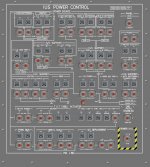
panel texture done.
 

Attachments

  • IUS_Panel_L10.jpg
    IUS_Panel_L10.jpg
    153.9 KB · Views: 483
Back
Top