3D Orbiter images?

In the good old days, graphics drivers could render stereoscopic views for nearly any game. I wonder if that would be still the case.

And in 6 months the market will be swamped with 120Hz screens with shutter glasses. This will be quite great with orbiter.
 
If orbiter could render 3D images, that means the OrbiStore would then need to sell 3D glasses!

And, to anyone who will make the 3D images:
I find it easier to focus on the 3D one when the two stereo images are separated. Maybe just a 10 pixel wise black bar, but it makes it SO much easier
 
In Orbiter we use carefully designed textures to give the impression of 3D detail on the surface of vessel meshes. I notice that this technique fall flat (pun intended) when viewed stereoscopically. The best example is Martin's stereoscopic view of the inside of the DG (second image).

I did a lot of this at university interpreting geological features from stereo aerial photographs. We tended to use an instrument with two large mirrors at 45 degrees with a binocular microscope in the centre. With smaller prints I used the parallel method (left eye looks at the left image). I can do this at will but I find that with age I am less able to make my eyes diverge. The crossover method gives me a near instant headache!
 
Not to mention the two images on either side we are not focusing on. That's why we need it done with glasses.
 
May sound silly, but how do I make the side-by-side images appear 3D? Do I need glasses?
 
You need to make your left eye look at the left-hand image and your right eye at the right-hand image (parallel method) or left eye right image and right eye left image (crosseye method). It's a knack although if you read the whole thread there are some tips to help you.
 
I've done it! That's amazing!

---------- Post added at 18:33 ---------- Previous post was at 18:24 ----------

My first one:

Asteroid11-1.png


---------- Post added at 18:41 ---------- Previous post was at 18:33 ----------

This one works well too:

moz-screenshot-1.png
DG3D.png


The effect is quite disorientating afterwards!
 
After relentless exercise, I can now cross and uncross my eyes at will (chameleon-style :thumbup:) for both types of views. I didn't find much training material on the web, except for this rather nice site: http://www.starosta.com/3dshowcase/ihome.html (all images cross-eyed). I like in particular this image: http://www.starosta.com/3dshowcase/iface07.html, where the difference between the flat 2D view and the 3D effect is amazing (apart from the drops on the pane and the girl behind, you can also see the reflections of some (power?) lines behind the camera.

Somehow, in stereo view the objects always look smaller to me than when looking at the 2D flat images. I guess this may either be because the camera distances are generally too large, and the up-scaling of the parallax effect results in an equivalent down-scaling of the scene. Or (at least for cross-eyed vision) the fact that my eyes are crossed tells my brain that the object is close, and given the apparent size, it must be small.
 
The photo of the girl is amazing! Crosseye method though but, like you, I have been practising and can now do it almost as easily as the parallel method and without the headache.

I agree about the scale thing; parallel method does make the objects look bigger than the xeye method. Eyes crossing probably does send clues to the brain.

Idea: since some enterprising developer came up with Camera MFD, could the same method not be used to create a 3DMFD?

Ed. btw it is very easy to take stereoscopic photos with an ordinary camera or phone. Simply frame the shot with a known point at the edge of the image (eg. a post or wall edge), take the shot, move the camera 3 inches or so to the right, reframe using the reference and take the second image.
 
Last edited:
In Orbiter we use carefully designed textures to give the impression of 3D detail on the surface of vessel meshes. I notice that this technique fall flat (pun intended) when viewed stereoscopically.
Hm. What about some normal mapping?

Cross:
ogla_3d_2_crs.jpg

ogla_3d_3_crs.jpg


Straight:
ogla_3d_2_str.jpg

ogla_3d_3_str.jpg


Interestingly, that split-3d rendering could be easily added to a graphics client at about 50% FPS penalty.
 
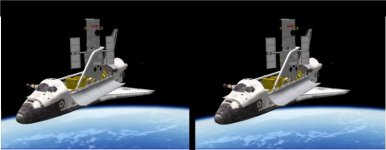
This one is alittle easier on the eyes. If I swap the images the star moves to the foreground.
 

Attachments

  • STS-125.jpg
    STS-125.jpg
    33.6 KB · Views: 69
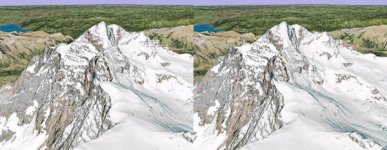
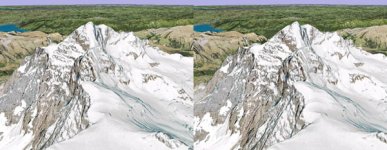
Also works nicely with google earth. Location of my last ski tour:

(First is parallel view, second is cross-eyed):
 

Attachments

  • jungfrau_parallel.jpg
    jungfrau_parallel.jpg
    55.7 KB · Views: 45
  • jungfrau_cross.jpg
    jungfrau_cross.jpg
    55.7 KB · Views: 46
My video card can do red/blue (red/cyan) analygraph 3D in treal time. Actualy, any NVIDIA GeForce 8000 and above card can to this. It's in the Nvidia Controll Panel options, with the newest drivers.

I'll take some screenshots when I get home, for anyone that has the red/blue glasses here.
 
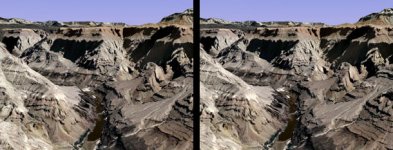
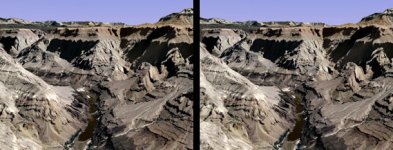
Sorry for the image spam, but I'm loving this. Grand canyon (first is parallel, second is crosseye). For some reason, I have problems with the parallel view for this one.
 

Attachments

  • grand_canyon_parallel.jpg
    grand_canyon_parallel.jpg
    60.2 KB · Views: 29
  • grand_canyon_cross.jpg
    grand_canyon_cross.jpg
    60.4 KB · Views: 48
This is easy !!

Is that real life or Orbiter?

--

And on another note, does anyone here have the red/blue glasses?
Ill post some Orbiter and real life space pics, if you guys do. The real moon shots, from orbit are stunning. It's like the mountains pop out right in front of you, and the craters are jaw droping, like you are there.


.
 
Last edited:
I can't do the parallel view, because of my projection TV screen, I just can't get my eyes to go that far apart.

---------- Post added at 09:43 PM ---------- Previous post was at 09:41 PM ----------

Is that real life or Orbiter?

--

And on another note, does anyone here have the red/blue glasses?
Ill post some Orbiter and real life space pics, if you guys do. The real moon shots, from orbit are stunning. It's like the mountains pop out right in front of you, and the craters are jaw droping, like you are there.

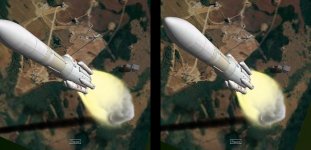
That was a first try in Orbiter. I made the view too offset, but it shows the effect.
 
Definitely perceive parallel as bigger.

btw how do you post images like this?

 
Last edited:
Back
Top