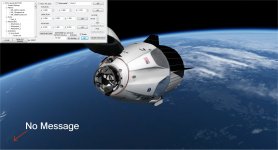
Thanks. If you need help on docs I can help. It would nice to see a set by set how how to make a vessel.

;<-------------------------DOCKS DEFINITIONS------------------------->

DOCK_0_ID = 0
DOCK_0_NAME = Dock_0
DOCK_0_POS = 0 0 3.72
DOCK_0_DIR = 0 0 1
DOCK_0_ROT = 0 1 0
DOCK_0_JETT = FALSE
DOCK_0_SOFTDOCK = TRUE
DOCK_0_SOFTDOCKDISTANCE = 45
DOCK_0_SOFTDOCKANIM = 1DM_1capsule:VesselBuilder1\DM_1capsule
STATUS Orbiting Earth
RPOS -5211040.007 -4075841.673 -1503275.440
RVEL -3170.5656 5590.7330 -4173.5853
AROT 139.332 44.814 -41.782
AFCMODE 7
PRPLEVEL 0:0.496983 1:0.480900
NAVFREQ 0 0
ANIM_0 0.00000 0
ANIM_1 1.00000 0
ANIM_2 1.00000 0
ANIM_3 0.00000 0
CURRENT_CAM 0
ENDSoft dock or hard dock?It docks fine.
But when I press the retract animation, it does not move them together.
Soft dock or hard dock?
do you mean that the mechanism retracts but the vessel does not get close and hard dock?
One thing I noticed in your screenshot is that you put 45 meters of soft dock distance, how could that be?
Thanks. If you need help on docs I can help. It would nice to see a set by set how how to make a vessel.

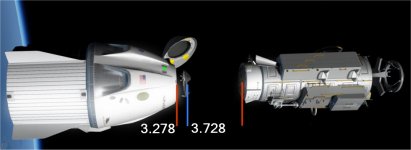
The pick shows the positions.
•0: use legacy (2006) method: snap to dock as soon as two docking ports are within 0.5m and closing.
•1 (default): use new (2010) method: snap to dock as soon as one docking reference point passes through the reference plane of the other dock within 0.5m.
What about sound call outs for events,actions,and soft docking hard docking?
What about aborts ?
Sorry, I meant aborts lower than 20,000 meters, still need to have the chutes enabled.
 .
.So on animation is it an all or nothing sequence or can one press a key to start the action and press a key to stop and another key to reverse the action? Like moving an arm?
Or a key for continuous actions like a a radar dish?
A new Sandbox to play in !!!