Project VesselBuilder for Orbiter

Thanks. If you need help on docs I can help. It would nice to see a set by set how how to make a vessel.

 
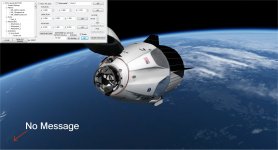
Not getting the "Soft-Dock" message at the lower left, when I press "Alt+D".

cfg:

Code:
;<-------------------------DOCKS DEFINITIONS------------------------->
 
DOCK_0_ID = 0
DOCK_0_NAME = Dock_0
DOCK_0_POS = 0 0 3.72
DOCK_0_DIR = 0 0 1
DOCK_0_ROT = 0 1 0
DOCK_0_JETT = FALSE
DOCK_0_SOFTDOCK = TRUE
DOCK_0_SOFTDOCKDISTANCE = 45
DOCK_0_SOFTDOCKANIM = 1

Scenario after exit:

Code:
DM_1capsule:VesselBuilder1\DM_1capsule
  STATUS Orbiting Earth
  RPOS -5211040.007 -4075841.673 -1503275.440
  RVEL -3170.5656 5590.7330 -4173.5853
  AROT 139.332 44.814 -41.782
  AFCMODE 7
  PRPLEVEL 0:0.496983 1:0.480900
  NAVFREQ 0 0
  ANIM_0 0.00000 0
  ANIM_1 1.00000 0
  ANIM_2 1.00000 0
  ANIM_3 0.00000 0
  CURRENT_CAM 0
END
 

Attachments

  • no message.jpg
    no message.jpg
    207.3 KB · Views: 27
for some reason I now have the same issue but from my checks it's only the message that is missing, the system is on, so if you want you can try it anyway while I try to find out this curious issue
 
It docks fine. But when I press the retract animation, it does not move them together.
 
I found out about the message: it was just that when there were multiple VB vessels in the scenario one vessel was canceling out the message of the other.

I modified it so now there is a grey note on top left of the screen, so it should appear properly now.

It docks fine.
Soft dock or hard dock?

But when I press the retract animation, it does not move them together.

do you mean that the mechanism retracts but the vessel does not get close and hard dock?

One thing I noticed in your screenshot is that you put 45 meters of soft dock distance, how could that be?
 
Sorry for the basic image but I want to be sure we understand each other on the basics.

VB_SD_DISTANCE.png


Attached also the updated dll with the message issue solved.
 

Attachments

Soft dock or hard dock?


Hard dock


do you mean that the mechanism retracts but the vessel does not get close and hard dock?


Yes


One thing I noticed in your screenshot is that you put 45 meters of soft dock distance, how could that be?


:facepalm:Fixed it


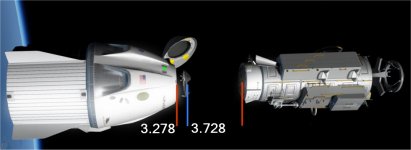
However, now I get the message, but it ignores the soft dock position and docks to the hard dock.


The pick shows the positions.
 

Attachments

  • dock positions.jpg
    dock positions.jpg
    46.5 KB · Views: 33
Thanks. If you need help on docs I can help. It would nice to see a set by set how how to make a vessel.

Yes, please I beg you and everybody who are willing to participate to do it, because the amount of work behind VB is quite big and it will take quite a while to me to prepare a good documentation. But if users starts to publish tutorials, guides, documentations etc it will be much much easier. It is an invaluable job :hailprobe:
 
The pick shows the positions.

Ok, so attached here the very latest version which now does not have a 0.5 m fixed position check but it checks for distance that is 75% of the soft docking distance.

It works:


I keep hearing in my head the voice of Kevin Bacon which says "Houston, we have hard dock"...

However here is an important point:
from the orbiter docs we find that the two modes that orbiter uses for docking are the following:
Code:
•0: use legacy (2006) method: snap to dock as soon as two docking ports are within 0.5m and closing.
•1 (default): use new (2010) method: snap to dock as soon as one docking reference point passes through the reference plane of the other dock within 0.5m.

So it is strongly recommended to use a soft docking distance greater than 0.5, at least I'd say 0.6m. otherwise some glitches are likely due to this.
 

Attachments

What about sound call outs for events,actions,and soft docking hard docking?

All right I'll add a playsound event. so it will be possible for users to playsounds at will. Soft docks won't be available as trigger option though: since it's an experiment I won't modify large sections of code for it,
The playsound will be just basic: as said in other threads OrbiterSound is not my job, and I don't want to implement anything particular, just basic.

Another thing I will add to events is the following:
I noticed that there could be the needing to enable/disable some particular events. Let me make an example: I want my capsule to open the parachutes automatically when altitude gets below 3000 meters for example. Now if I just add the event, before launch the capsule is on the ground so it's surely below 3000 but I don't want my capsule to open the chutes on the ramp of course... so a solution could be to reconfigure the events section each time I need but it can become quite nasty to set up. So I will create an event that basically will be used to enable or disable other events. So in my case I will set up an event that if the altitude get above some 20.000 meters it enables the chute opening event so from that moment on as soon as I get down to 3000 the chutes will open.
 
What about aborts ?
 
What about aborts ?

I think it will be possible to implement them with a proper series of events. I'll try to see if I can add it in an example.

For example destruction of a capsule due to wrong entry angle is easy to implement:

create a "wreck" vessel cfg

to your capsule create a spawn child event:
trigger: DYNAMIC PRESSURE , condition ABOVE , value whatever you think is high enough
event->spawn wreck

create a "DELETE ME" event, trigger: the event above

that's it, if the dynamic pressure gets too high the vessel gets destroyed and you'll have a wreck in its place!
 
Sorry, I meant aborts lower than 20,000 meters, still need to have the chutes enabled.
 
Sorry, I meant aborts lower than 20,000 meters, still need to have the chutes enabled.

Ah in that case there will be two events to set:
1) for regular launch there will be an event that enables the chutes one.
2) if there is an abort there shall be another one that does the same of the above, but this one gets activated only in the abort sequence.

Then it will be all about having fantasy to combine the events sequence. Surely besides the ones that I already included something else needed will come out... but we'll see on the go.

at the moment the possible events are:
- Child Spawn
- Dock Jettison (which means to use the "jettisonable docks" for payloads
- Start Animation (back or forward)
- Single thruster fire (with thruster level choice)
- Thruster Group Level
- Reset MET (useful for many things)
- Vessel Reconfiguration (if this works properly there are infinite options for this, since events themselves can be reconfigured)
- Texture Change (for changing a texture on a vessel)
- Shift CG (moves the vessel's Center of Gravity, useful for assembled vehicles)
- Delete Me (deletes the vessel)
- Playsound
- Enable another event (which actually means enable or disable)

Possible triggers:
- Sim start (as soon as the simulation start the event is triggered)
- Keypress (any key with any key modifier)
- Altitude (above or below)
- Main Fuel Tank Level (if the level of the primary tank gets below a set amount the event is triggered)
- Velocity (can be groundspeed, airspeed, mach or orbital speed, condition above or below)
- Time (can be an MJD ora MET)
- Dynamic Pressure (above or below)
- Other event (once the other event is done this one gets triggered)
- Dock Event (if a specific port gets docked or undocked to any vessel or to a specified vessel the event gets triggered)
 
So on animation is it an all or nothing sequence or can one press a key to start the action and press a key to stop and another key to reverse the action? Like moving an arm?

Or a key for continuous actions like a a radar dish?
 
A new Sandbox to play in !!!
 
So on animation is it an all or nothing sequence or can one press a key to start the action and press a key to stop and another key to reverse the action? Like moving an arm?

Or a key for continuous actions like a a radar dish?

you can do any combination:

animations cycles available are:

Go&Stop : meaning that the animation goes from 0 to 1 and stops there or gets from 1 to 0 and stops there
Restart : meaning that once if the animation is going forward once it gets to 1 restart from 0, while if it's going backward once it gets to 0 goes back to 1 without stopping
Manual: meaning that the animation does nothing by itself, it must be manually moved by the user
Automatic: this is for example for ailerons or rudders animations. they are there but they gets actioned automatically by orbiter once properly set.

an animation that is running either forward or backward will be stopped by pressing the relevant key or the Shift+key combination. If the key is pressed again it will restart forward or backward depending on which key is pressed.

Example: DG landing gear: ctrl + shift + g for retract. if i press shift + g in the middle of animation it will stop there. at that point if i press again ctrl + shift + g it will keep retracting, if i press shift+g it will be extended again

---------- Post added at 16:15 ---------- Previous post was at 16:13 ----------

Please note that the fact that events can trigger animation can also override this. So I can set an event (repeated always and not once) that triggers the landing gear animation forward if I press G and another one that triggers it backward if I press K. and it will just work also like that

---------- Post added at 16:51 ---------- Previous post was at 16:15 ----------

A new Sandbox to play in !!!

That's precisely the idea :thumbup:
 
How many thrusters are possible ?
 
Back
Top