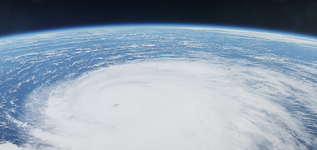
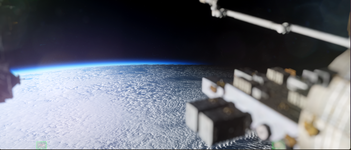
Very high resolution global cloud textures [maxCloudResolution = 11]

OHM Very high resolution global cloud textures [maxCloudResolution = 11] 1.0

lccrane

Geophysicist
Joined
Dec 2, 2008
Messages
57
Reaction score
105
Points
33
Location
Berlin
lccrane submitted a new addon:

Very high resolution global cloud textures (maxCloudResolution = 11) - A new very high resolution cloud texture map featuring lots of cloud candy

View attachment 48314View attachment 48318
View attachment 48316View attachment 48317

\\ Orbiter global level 11 cloud texture (Florida level 12 preview) V1.0 //

This version has very high quality imagery (max. resolution: 320 m/pixel, 160 m/pixel in the level 12 tiles) in various locations (see below) but still has...

Read more about this addon...
 
You mentioned "Cloud shadows". Just to note, there is a graphic settings to enable cloud shadows in Orbiter.
 
Wow, I'm really impressed with the quality! With some other additions and reshade, you wouldn't be able to tell these screenshots are from a 2016 space sim. Thanks for putting these textures together
 

Attachments

  • Screenshot 2026-04-29 223854.png
    Screenshot 2026-04-29 223854.png
    691.3 KB · Views: 24
  • Screenshot 2026-04-30 010219.png
    Screenshot 2026-04-30 010219.png
    638.4 KB · Views: 24
Oh how cool! Can you tell me how to get reshade for orbiter?
 
Oh how cool! Can you tell me how to get reshade for orbiter?
Using Orbiter 2016 on a Windows machine:

1) Get the ReShade installer at https://reshade.me/
2) Install it to \Orbiter2016\Modules\Server\orbiter.exe (any other location will not work!)
3) When prompted, select DirectX 9 (assuming you're using D3D9) and select the desired effects from the list. You can always add more later.
4) After it installs to orbiter, open \Orbiter2016\orbiter_ng.exe and launch any scenario. You should see a Reshade panel appear at the top of your screen. It will state a specific keybind (I think the home key by default) to open/close the reshade settings panel.
5) After the scene loads, open the reshade using that keybind and add whatever effects you desire. It's a good idea to add a toggle switch in the settings too to easily enable/disable Reshade.

I've attached the effects I use below. If you chose these, simply extract them into \Orbiter2016\Modules\Server after installing reshade 6.0. Replace previous files when asked. F12 toggles the Reshade panel, \ toggles the shaders and right_shift + \ goes to the next shader (no depth of field, depth of field and night vision).

Let me know if you get it to work!
 

Attachments

Back
Top