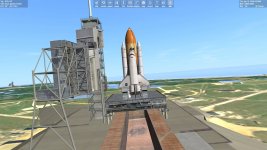
Project Space Transportation System 2016

I was looking at a bunch of the scenarios, and saw those lines, thought because there were two that it could be them. Shoulda just changed them.....LOL.

Thanks a bunch.

Tim

EDIT: Ohhhhhhhhh.....It just hit me. PETD = Port External Tank Door, and SETD = Starboard External Tank Door. ?
 
Yes. I had to reverse engineer a lot of things. I n some old scenarios I had extethatch. And then the animation state.

But in some SF scenarios they had PETD 1.0000 SETD 0.000 So we redid the scenarios and fix those.
 
Working on a n update. But one thing we have not been able to fix is the reflectors on the inside of the shuttle doors. When the doors are closed they seem to reflect the outside rather than the inside.
I have this file in the Config/GC folder
Shuttle2016BEARLY_ecam.cfg

BEGIN_CAMERA 0 LPOS 0.0 0.0 0.0 DO_NOT_OMIT_FOCUS END_CAMERA
 
I think that issue is also present in the SSU. With the bay doors closed, if you move around the 3D flight deck, and look into the bay, you see the outside reflected off of the radiators. Maybe that's a sim limitation when it comes to reflective meshes?

Speaking of the radiators, I noticed that the keyboard shortcut for the old shuttle fleet doesn't extend them in this updated version. Just curious if that's a limitation of the STS2016 package.

Tim
 
Yes that seems to be an orbiter d3d9 issue. What do you mean by extend? What was the keyboard command. I know you can open them from the interior. So[CTRL]/[L] Operate payload bay door radiators (deploy / stow)

In the scenario:
PRADIATOR 1 1.0000
SRADIATOR 0 0.0000

why would the port radiator be open and the Starboard not be open?

The radiators are a bit more complicated.
Looking at the code the latches need to ne powered.

// ============================================================== void PayloadBayOp::SetRadLatchAction (AnimState::Action action) { int i; for (i = 0; i < 2; i++) if ((action != AnimState::STOPPED) && (MechPwr[i] != MP_ON)) return; // operate radiator latches only if power is online for (i = 0; i < 2; i++) { // check both systems are set correctly if (action == AnimState::OPENING && RadLatchCtrl[i] != LC_RELEASE) return; if (action == AnimState::CLOSING && RadLatchCtrl[i] != LC_LATCH) return; } if (action == AnimState::STOPPED && RadLatchStatus.Static()) return; // stopping doesn't make sense if the radiators are already fully deployed or stowed RadLatchStatus.action = action; sts->RecordEvent ("RADLATCH", ActionString[action]); UpdateVC(); if (hDlg) UpdateDialog (hDlg); } // ==============================================================
void PayloadBayOp::SetRadiatorAction (AnimState::Action action) { int i; if (BayDoorStatus.action != AnimState::OPEN) return; // allow radiator operation only once the bay doors are fully open for (i = 0; i < 2; i++) if ((action != AnimState::STOPPED) && (MechPwr[i] != MP_ON)) return; // operate radiators only if power is online for (i = 0; i < 2; i++) { // check both systems are set correctly if (action == AnimState::OPENING && RadiatorCtrl[i] != RC_DEPLOY) return; if (action == AnimState::CLOSING && RadiatorCtrl[i] != RC_STOW) return; } if (action == AnimState::STOPPED && RadiatorStatus.Static()) return; // stopping doesn't make sense if the radiators are already fully deployed or stowed if (action == AnimState::OPENING && RadiatorStatus.Closed() && !RadLatchStatus.Open()) return; // don't deploy radiators if the latches are not fully released RadiatorStatus.action = action; sts->RecordEvent ("PRADIATOR", ActionString[action]); sts->RecordEvent("SRADIATOR", ActionString[action]); UpdateVC(); if (hDlg) UpdateDialog (hDlg); }

I tried to do a simplied version like the payload door and ku antenna.
// ============================================================== void PayloadBayOp::RevertRadAction() { SetRadiatorAction(RadiatorStatus.action == AnimState::CLOSED || RadiatorStatus.action == AnimState::CLOSING ? AnimState::OPENING : AnimState::CLOSING); } // ============================================================== [ICODE] But it didn't work:(
 
Last edited:
I think that issue is also present in the SSU. With the bay doors closed, if you move around the 3D flight deck, and look into the bay, you see the outside reflected off of the radiators. Maybe that's a sim limitation when it comes to reflective meshes?

Speaking of the radiators, I noticed that the keyboard shortcut for the old shuttle fleet doesn't extend them in this updated version. Just curious if that's a limitation of the STS2016 package.


Tim
Everything works fine with the control window (CTRL + SPACE)


or from the rear of the cockpit on the R13-L control panel

 
Thanks. I think he wanted the Control L short cut. I suppose it bypassed the power switches and deploy switches. Not been able to do that yet. I may run SF 2010 and see
 
Yes, I was thinking CTRL+L as the keyboard shortcut. Was the payload bay and KU antenna control panel that's called up with CTRL+SPACE, a part of the original Shuttle Fleet? I guess I never flew any payload missions in the old SF, and really just used it then, and now, for LEO sight seeing, and trips to the ISS. Honestly, I'm an idiot for assuming that STS2016 is a simple port of the SF4.8 into Orbiter2016...that's squarely on me. Sorry for asking about this. :confused: I don't think you should worry about the keyboard shortcut tbh. The control panel interface is much more fun.
 
Thanks. Having the things that SF had was a goal. But it has to be reverse engineered.
More question than answers though. Like having the Port and Starboard ET hatches and radiators when there is one key for each.
 
Back from vacation. We are working on a new zip for download. It will be on the first page. The first goal was to get the shuttle flying in 2016. That is done.

Next maybe going back to the missions and updating things. Things like updating the satellites and ASEs. Adding some pieces. Mainly eye candy. Any specific missions?
 
Could DSP from 44 and DXS from 54 be on the table? WSF would be fun to play around with too.
 
Hi guys, recently decided to attempt to download this even though I have only had 3 successful add ons added to orbiter, I obviously went wrong somewhere. I was actually able to load up the STS-107 launch and orbit scenarios fine, Columbia and spacehab looked normal, just one problem. The earth is a gray ball with a gray sky, I also was able to load up STS-61C. Same issue, ima probably completely reinstall orbiter and start over, think you guys maybe help me correctly install this without ruining another copy of orbiter? Thanks
 
The earth is a gray ball with a gray sky
Weird...didn't encounter this issue on my installation
think you guys maybe help me correctly install this without ruining another copy of orbiter? Thanks
STS-2016 on its own (without payloads) is mostly standalone. If you want to run it on Orbiter as is (i.e no payload attached), then Multistage2015 should be enough (for launch operations)
 
Thanks. It sounds like the cfg is bad.

"
Take care during installation and follow the instructions below:

In Space Shuttle Fleet V4.8 Release 2 of "David413" on 20-04-2012 (ShuttleFleetV4.8R2.zip)

do not install the file:
Config / Earth.cfg
"
STS-2016 on its own (without payloads) is mostly standalone. If you want to run it on Orbiter as is (i.e no payload attached), then Multistage2015 should be enough (for launch operations)

YES. We are working on a new zip. Hopefully get all the meshes, textures,... missing. Correct the scenarios.
 
Thanks. It sounds like the cfg is bad.

"
Take care during installation and follow the instructions below:

In Space Shuttle Fleet V4.8 Release 2 of "David413" on 20-04-2012 (ShuttleFleetV4.8R2.zip)

do not install the file:
Config / Earth.cfg
"


YES. We are working on a new zip. Hopefully get all the meshes, textures,... missing. Correct the scenarios.
Ima reinstall orbiter and try again once I get back from school today, I didn’t install the config/earth.cfg from that add on, but I might have from some of the others that had them. When I get home and try again, could you help me do this right?
 
Weird...didn't encounter this issue on my installation

STS-2016 on its own (without payloads) is mostly standalone. If you want to run it on Orbiter as is (i.e no payload attached), then Multistage2015 should be enough (for launch operations)
I’m lost, some say I need a bunch of other add ons that don’t even work with orbiter 2016, and now others are saying I don’t. I’m downloading this mainly for the rest of the shuttles other than Atlantis, Columbia specifically, what do I do?
 
I’m lost, some say I need a bunch of other add ons that don’t even work with orbiter 2016, and now others are saying I don’t. I’m downloading this mainly for the rest of the shuttles other than Atlantis, Columbia specifically, what do I do?
If you want to run Orbiter 2016 with the Shuttles only, then Multistage2015 and STS-2016 should be enough. Changing the specific orbiter vehicles in scenarios is quite easy, just find the OV parameter in an .SCN file and change it to either one of the numbers below:
Code:
OV 98 = Pathfinder
OV 99 = Challenger
OV 101 = Enterprise
OV 102 = Columbia
OV 103 = Discovery
OV 104 = Atlantis
OV 105 = Endeavour
...
(see the doc file for many other fictional vehicles like Explorer, Moonraker, Daedalus, etc.)
The payload add-ons (like Galileo, STS-Payloads, ISS, etc.) are only required if you want to run mission specific scenarios like STS-6, STS-51-F, and STS-135, but since most shuttle payload add-ons were originally made for 2010 and 2006 versions, some might not work unless you modified and adapted it for 2016.

Currently gattispilot is on the process of making O2016 compatible shuttle payloads in the future
 
If you want to run Orbiter 2016 with the Shuttles only, then Multistage2015 and STS-2016 should be enough. Changing the specific orbiter vehicles in scenarios is quite easy, just find the OV parameter in an .SCN file and change it to either one of the numbers below:
Code:
OV 98 = Pathfinder
OV 99 = Challenger
OV 101 = Enterprise
OV 102 = Columbia
OV 103 = Discovery
OV 104 = Atlantis
OV 105 = Endeavour
...
(see the doc file for many other fictional vehicles like Explorer, Moonraker, Daedalus, etc.)
The payload add-ons (like Galileo, STS-Payloads, ISS, etc.) are only required if you want to run mission specific scenarios like STS-6, STS-51-F, and STS-135, but since most shuttle payload add-ons were originally made for 2010 and 2006 versions, some might not work unless you modified and adapted it for 2016.

Currently gattispilot is on the process of making O2016 compatible shuttle payloads in the future
I’ve been interested in flying the STS-107 mission, so which of the addons would i need to do that specific mission, I was able to load that up albeit with a glitched out earth, and the SpaceHAB module loaded fine, ima reinstall orbiter to get everything back to normal and try again, trying not to add anything I don’t have to
 
For STS-107 (Columbia), only one additional addon is required, either one of two versions below would do:
Upon installation, exclude the scn files inside the zip since it runs on older versions of Orbiter. For the glitched out Earth, I think it's best to reinstall Orbiter instead;)
 
Last edited:
For STS-107 (Columbia), only one additional addon is required, either one of two versions below would do:
Upon installation, exclude the scn files inside the zip since it runs on older versions of Orbiter. For the glitched out Earth, I think it's best to reinstall Orbiter instead;)
finally got it to load completly normally, thank you so much for the help
 

Attachments

  • CurrentState.jpg
    CurrentState.jpg
    195.2 KB · Views: 20
Back
Top