Space Shuttle Ultra development thread

I dont know where this question goes but does SSU have a homepage, like AMSO and Mustard has, or will orbiter-forum count as it's home page, if you dont have one it will be good so you guys can promote more, not like you need promotion i bet everyone has Space Shuttle Ultra in their luanchpad, i dont cos im un-installing and re-installing orbiter ;) I could help out with it, if you need help.
 
Three Questions and An Opinion

The Questions:
In researching my upcoming Skylab Reuse addon I found a nice drawing of the Apollo-Soyuz Docking Module which shows the Soviet-style docking port with four out-turned "petals." Drawings in the Martin Merrieta Skylab Reuse study show three out-turned petals. Can one of you STS history wizards verify that the early shuttles had three-petal ports? (Also, are these properly called "petals", "alignment plates" or what?)

I plan on modeling the historically correct docking ports, regardless of what the ports look like on the various Shuttles available in Orbiter. However, Orbiter's stock Atlantis has these scenario lines: CARGO_STATIC_MESH and CARGO_STATIC_OFS. They are used to "join" a fixed satellite cradle into the cargo bay, but I could use them to show an old-style docking port on top of, and covering up, the modern one. Will (or does) the Shuttle Ultra have a similar system for "joining" a static mesh to an Ultra Shuttle (in addition to Docking and Attachement)? This looks like a simple and highly flexible device.

Finally, could the Ultra developers provide some dimensional information for the shuttle cargo bay? (Or point me to a web page) It's kind of nasty having parts of payload meshes "erupting" like boils from the Shuttle mesh! I can scale, fiddle and fit a payload by trial and error, but it would be nice to just draw it correctly from the start.

The Opinion:
...does SSU have a homepage, like AMSO and Mustard has, or will orbiter-forum count as it's home page?

I would favor having it all right here - this forum is now Orbiter's front window! At 70 pages, and growing, this thread is daunting - it would be nice to see it sorted into a four to six sub-catagories, including a link to a single users' help thread. Time spent organizing the infromation here would be better spent than devoting addtional time to working up a funtional, attractive separate site, then organizing the information there. Naturally, this would need the approval of Orbiter-Forum's administrators. Perhaps Ryan can work with the administrators to "make it so."

But this is definitely for others to decide, I am just offering one point of view. The "work horses" of the SSU development effort may appreciate lower visibility so they can spend less time responding to Forum postings and more time researching and modeling.

I favor the "homey" feel of keeping it all under this roof.

 
Urwumpe: How ready the is OTV camera code? I'm about to add them to the MLP would like to be able to play around with them once they have been added.
 
Urwumpe: How ready the is OTV camera code? I'm about to add them to the MLP would like to be able to play around with them once they have been added.

Have not yet added these views, but would not be a major pain to do.
 
Have not yet added these views, but would not be a major pain to do.
Would they really be any different from the orbiter payload bay cameras in terms of coding? They're after all going to do same thing, provide different camera views.

Another thing is implementation of a smooth zooming capability. I can add OTVs 55 and 56 as coding test and debugging implementations and add the rest once the bugs has been ironed out.
 
Would they really be any different from the orbiter payload bay cameras in terms of coding? They're after all going to do same thing, provide different camera views.

Another thing is implementation of a smooth zooming capability. I can add OTVs 55 and 56 as coding test and debugging implementations and add the rest once the bugs has been ironed out.

I the current implementation of the payload bay cameras, they will do exactly the same. But I still think about the option of switching to the camera views by a special keyboard command.
 
I the current implementation of the payload bay cameras, they will do exactly the same. But I still think about the option of switching to the camera views by a special keyboard command.
Maybe by inputting a special code? Like 0-5-5 will take to camera 55 at Pad A and inputting 1-5-5 will take you that camera at Pad B if there's an MLP there. And entering R-H-S will take you to the RHSRB high-speed film camera.

How about that?
 
Maybe by inputting a special code? Like 0-5-5 will take to camera 55 at Pad A and inputting 1-5-5 will take you that camera at Pad B if there's an MLP there. And entering R-H-S will take you to the RHSRB high-speed film camera.

How about that?

Would be possible, but the number of cameras on the MLP is rather low. I would suggest just cycling the positions and allowing short cuts via dialog.
 
Maybe by inputting a special code? Like 0-5-5 will take to camera 55 at Pad A and inputting 1-5-5 will take you that camera at Pad B if there's an MLP there. And entering R-H-S will take you to the RHSRB high-speed film camera.

How about that?
I don't think that'll work. For example, pressing R in the R-H-S will reduce the time acceleration. The only way to do this would be to use a key combination to open up a box into which the code could be entered.
 
Would be possible, but the number of cameras on the MLP is rather low. I would suggest just cycling the positions and allowing short cuts via dialog.
OK. I have counted the number of OTV cameras on the MLP and excluding the high speed film cameras, there's 9 OTV cameras on the MLP.
 
Work on camera 55 and 56 have been completed and I have checked in the latest mesh and texture. Have fun coding the cameras! I'll add the rest when we have a solid control and command system in place.
 
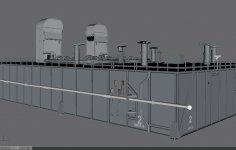
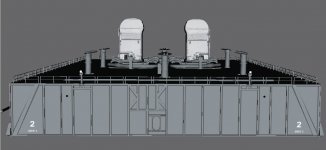
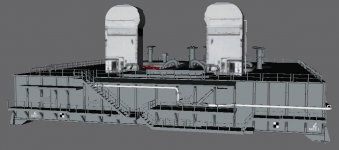
Latest screenshots of MLP-2:
 

Attachments

  • MLP-2_15A.jpg
    MLP-2_15A.jpg
    74.5 KB · Views: 682
  • MLP-2_15B.jpg
    MLP-2_15B.jpg
    64.2 KB · Views: 722
  • MLP-2_15C.jpg
    MLP-2_15C.jpg
    77.2 KB · Views: 748
I have been thinking a bit of the OTV camera controls and how does this sound? We use the Numpad arrow keys for pan/tilt control and Numpad +/- for zoom control. How does that sound? I think it's intuitive and easy.
 
I have been thinking a bit of the OTV camera controls and how does this sound? We use the Numpad arrow keys for pan/tilt control and Numpad +/- for zoom control. How does that sound? I think it's intuitive and easy.

I thought we just use the standard view controls. I don't know if we would need remote control. Or if the camera assemblies move.
 
I thought we just use the standard view controls. I don't know if we would need remote control. Or if the camera assemblies move.
Oh, yes, the OTV cameras can be both panned and tilted and they're controlled from the Firing Room in the Launch Control Center.

When the "Ice Team" is at the pad conducting the OTV cameras at the pad is used to keep an eye on them while they are also used to check up on any significant ice or frost build-ups that may have occured during the 3 hour ET tanking process. If you want to animate the cameras, do a search for OTV_Cam_55_pan_unit, OTV_Cam_55_tilt_unit, OTV_Cam_56_pan_unit and OTV_Cam_56_tilt_unit, these are the meshgroups for the pan and tilt units.
 
Gotten permission from vchamp to use his night-light code, here it is:

Code:
MATERIAL* material;
MESHHANDLE mesh;
for (UINT i = 0; i < meshCount; i++) {
    mesh = GetMesh(*oapiObjectVisualPtr(GetHandle()), i);
    DWORD materialCount = oapiMeshMaterialCount(mesh);
    for (DWORD mi = 0; mi < materialCount; mi++) {
        material = oapiMeshMaterial(mesh, mi);
        if (material->emissive.g <= 0.1) {
            material->emissive.r = 0.5;
            material->emissive.g = 0.5;
            material->emissive.b = 0.5;
        }
    }
}

Now we just need implement a trigger for this.
 
Can you also revert this effect?
 
There are two options for reverting the material change:
1) Move camera far away and then return it back. When the visual is recreated materials restore their properties.
2) Store somewhere the RGB parameters of the emissive color of each material and restore it when needed.
 
RFC: Work on a speedy release

While reading the STS-124 payload thread, I get the impression that the number of fixes and required add-ons combined with the rather old version causes problems. Maybe we can improve the situation by releasing the next version of SSU as soon as we can. What do you think?

Suggestion:
The MLP and ground infrastructure work gets moved back one release. I can also accept delaying the GLS implementation one release, though I wanted to have it in this one. It is not as important as making Don's mission packs useful, IMHO.

Instead, we finish the following tasks:
- New payload management system. Like sketched out in the thread.

- Mission definition files. Define only the payload attachment positions and the existence of ODS and RMS inside them. Any suggestion how the file format should look like is welcome. I would prefer an XML format, but any other structured format is welcome. It must be possible to extend the file contents easily. All mission related stuff gets implemented by the class mission::Mission. Including writing the mission state into the scenario file.

-Mission management dialog. Extending the main dialog of SSU (CTRL+SPACE) by a button "Mission Management" or "Mission Mngt" and a dialog displaying mission time, mission phase (PRELAUNCH, ASCENT, POST-INSERTION, ON-ORBIT, DEORBIT PREP, ENTRY, POSTLANDING, etc) and a way to progress manually to a new mission phase (correcting automatic transitions). as final section, a way to manipulate the seat states of the flight deck should exist. When we get the Mission Specialist seats in the VC, we might want to (un)seat the MS and fold/unfold the seats.

- The new ODS + panels. I am already pretty far in including it, and can estimate the time required for finishing the task at around 10-13 work hours. I will only implement the ODS panels using the new VC framework, and leave the implementation of the other panels for the future - as long as it works, why touch it now?

- VC restoration. If the MDUs and keyboards work in any thinkable dirty way, I am happy for this release. We can spent later time making it look the way, Djikstra will like it, for the sake of our immortal souls.

And additions or suggestions?

I don't want to play project lead here. First because I am the most minimal contributor to the project. Second because I am a really bad project lead.
 
Back
Top