Space Shuttle Ultra development thread

Hi everybody.

I have a request, I don't know how realistic it is nor how hard it is to implement.
With full trim the Ultra can keep an AOA of 28 deg. Under a certain altitude I can't use the KillRoll to keep a high AOA (pitch RCS is stoped) and have to keep full stick instead for a long time (for an AOA of about 34 deg).
Was wondering if it is possible to increase the trim angle so that with full trim the Ultra can keep an AOA of 35 deg or so. I guess is about editing the .dll and increase the max trim angle or increase the efficiency of the surface.
 
Dave,

I am definitly not done with the door textures. You've got mail.
Got it and it looks very, very nice. Animation is 100% solid, no issues.

You do need to move a few of the ribs below the forward panels though as they doesn't quite line up with the texture.
 
I never knew there was a difference in the two radiators before, or how the doors really operated, but I know now.;)
 
I have begun implementing the new payload bay door and radiator animations into SSU but I get these error messages when I try to build it:

Code:
[SIZE=1]1>.\Atlantis.cpp(1368) : error C2065: 'RRadiator' : undeclared identifier[/SIZE]
[SIZE=1]1>.\Atlantis.cpp(1371) : error C2065: 'LRadiator' : undeclared identifier[/SIZE]
[SIZE=1]1>.\Atlantis.cpp(1375) : error C2065: 'RRadiator' : undeclared identifier[/SIZE]
[SIZE=1]1>.\Atlantis.cpp(1376) : error C2065: 'LRadiator' : undeclared identifier[/SIZE]
I have followed the example in the API Guide for parent/child animations on page 18.

Here's the relevant code:
Code:
[SIZE=2][COLOR=#0000ff]void[/COLOR][/SIZE][SIZE=2] Atlantis::DefineAnimations ([/SIZE][SIZE=2][COLOR=#0000ff]void[/COLOR][/SIZE][SIZE=2])[/SIZE]
[SIZE=2]{[/SIZE]
[SIZE=2]ANIMATIONCOMPONENT_HANDLE parentL, parentR;[/SIZE]
 
[SIZE=2]UINT midx = 1; [/SIZE][SIZE=2][COLOR=#008000]// mesh index for all external animations[/COLOR][/SIZE]
[SIZE=2]UINT vidx = 2; [/SIZE][SIZE=2][COLOR=#008000]// mesh index for all VC animations[/COLOR][/SIZE]
[SIZE=2]UINT ridx = 3; [/SIZE][SIZE=2][COLOR=#008000]// mesh index for all RMS animations[/COLOR][/SIZE]
 
[SIZE=2][COLOR=#008000]// ***** 1. Cargo door and radiator animations *****[/COLOR][/SIZE]
[SIZE=2][COLOR=#008000]// DaveS edit: Re-did animations to work with Donamy's new orbiter mesh[/COLOR][/SIZE]
 
[SIZE=2][COLOR=#0000ff]static[/COLOR][/SIZE][SIZE=2] UINT RCargoDoorGrp[3] = {GRP_CARGODOOROUTR,GRP_CARGODOORINR,GRP_RADIATORBR};[/SIZE]
[SIZE=2][COLOR=#0000ff]static[/COLOR][/SIZE][SIZE=2] MGROUP_ROTATE RCargoDoor (midx, RCargoDoorGrp, 3,[/SIZE]
[SIZE=2]_V(2.82, 1.39, 0.0), _V(0,0,1), ([/SIZE][SIZE=2][COLOR=#0000ff]float[/COLOR][/SIZE][SIZE=2])(-175.5*RAD));[/SIZE]
[SIZE=2][COLOR=#0000ff]static[/COLOR][/SIZE][SIZE=2] UINT LCargoDoorGrp[3] = {GRP_CARGODOOROUTL,GRP_CARGODOORINL,GRP_RADIATORBL};[/SIZE]
[SIZE=2][COLOR=#0000ff]static[/COLOR][/SIZE][SIZE=2] MGROUP_ROTATE LCargoDoor (midx, LCargoDoorGrp, 3,[/SIZE]
[SIZE=2]_V(-2.80, 1.39, 0.0), _V(0,0,1), ([/SIZE][SIZE=2][COLOR=#0000ff]float[/COLOR][/SIZE][SIZE=2])(175.5*RAD));[/SIZE]
 
[SIZE=2]anim_door = CreateAnimation (0);[/SIZE]
[SIZE=2]parentR = AddAnimationComponent (anim_door, 0.0, 0.4632, &RCargoDoor);[/SIZE]
[SIZE=2]parentL = AddAnimationComponent (anim_door, 0.5368, 1.0, &LCargoDoor);[/SIZE]
 
[SIZE=2][COLOR=#0000ff]static[/COLOR][/SIZE][SIZE=2] UINT RRadiatorGrp[1] = {GRP_RADIATORFR};[/SIZE]
[SIZE=2]RRadiator = [/SIZE][SIZE=2][COLOR=#0000ff]new[/COLOR][/SIZE][SIZE=2] MGROUP_ROTATE (midx, RRadiatorGrp, 1,[/SIZE]
[SIZE=2]_V(2.71, 1.7, 0.0), _V(0,0,1), ([/SIZE][SIZE=2][COLOR=#0000ff]float[/COLOR][/SIZE][SIZE=2])(35.5*RAD));[/SIZE]
[SIZE=2][COLOR=#0000ff]static[/COLOR][/SIZE][SIZE=2] UINT LRadiatorGrp[1] = {GRP_RADIATORFL};[/SIZE]
[SIZE=2]LRadiator = [/SIZE][SIZE=2][COLOR=#0000ff]new[/COLOR][/SIZE][SIZE=2] MGROUP_ROTATE (midx, LRadiatorGrp, 1,[/SIZE]
[SIZE=2]_V(-2.71, 1.7, 0.0), _V(0,0,1), ([/SIZE][SIZE=2][COLOR=#0000ff]float[/COLOR][/SIZE][SIZE=2])(-35.5*RAD));[/SIZE]
 
[SIZE=2]anim_rad = CreateAnimation (0);[/SIZE]
[SIZE=2]AddAnimationComponent (anim_rad, 0, 1, RRadiator, parentR);[/SIZE]
[SIZE=2]AddAnimationComponent (anim_rad, 0, 1, LRadiator, parentL);[/SIZE]

 
I might be missing something here, but why do the radiator animations need a parent? You only need to have a parent animation if the radiator animation parameters change based on the door position. Since you'd only use the radiators when the doors are fully open, I don't think this is necessary.
 
I might be missing something here, but why do the radiator animations need a parent? You only need to have a parent animation if the radiator animation parameters change based on the door position. Since you'd only use the radiators when the doors are fully open, I don't think this is necessary.
Well, I am just following the INI file that Donamy sent me.

Here it is:
Code:
[ANIM_COMP_0]
;left door
SEQ=0
GROUPS=03,32,46
RANGE=(0.3656,0.7043)
ROT_PNT=(-2.80,1.39,0.0)
ROT_AXIS=(0,0,1)
ANGLE=170.5
 
[ANIM_COMP_1]
;right door
SEQ=0
GROUPS=02,31,45
RANGE=(0.0,0.3387)
ROT_PNT=(2.82,1.39,0.0)
ROT_AXIS=(0,0,1)
ANGLE=-170.5
 
[ANIM_COMP_25]
;left radiator
SEQ=10
GROUPS=43
RANGE=(0.1,0.9999)
ROT_PNT=(-2.71,1.7,0.0)
ROT_AXIS=(0,0,1)
ANGLE=-35.5
PARENT=0
 
[ANIM_COMP_26]
;right radiator
SEQ=11
GROUPS=44
RANGE=(0.1,0.9999)
ROT_PNT=(2.71,1.7,0.0)
ROT_AXIS=(0,0,1)
ANGLE=35.5
PARENT=1
 
[ANIM_COMP_27]
; bodyflap
SEQ=12
GROUPS=1
RANGE=(0.1,0.9)
ROT_PNT=(0,-2.129,-12.64)
ROT_AXIS=(1,0,0)
ANGLE=-15
 
[ANIM_COMP_28]
;Mid forward gang hooks
SEQ=13
GROUPS=63
RANGE=(0.0,0.20)
ROT_PNT=(0.05,3.47,0.0)
ROT_AXIS=(0,0,1)
ANGLE=90
PARENT=1
 
[ANIM_COMP_29]
;Mid aft gang hooks
SEQ=13
GROUPS=62
RANGE=(0.25,0.45)
ROT_PNT=(0.05,3.47,0.0)
ROT_AXIS=(0,0,1)
ANGLE=90
PARENT=1
 
[ANIM_COMP_30]
; forward gang hooks
SEQ=13
GROUPS=64
RANGE=(0.50,0.70)
ROT_PNT=(0.05,3.47,0.0)
ROT_AXIS=(0,0,1)
ANGLE=90
PARENT=1
 
[ANIM_COMP_31]
;Aft gang hooks
SEQ=13
GROUPS=61
RANGE=(0.75,1)
ROT_PNT=(0.05,3.47,0.0)
ROT_AXIS=(0,0,1)
ANGLE=90
PARENT=1
 
It looks like the parent stuff is there for convinience in getting the rotation point. It might be easiest if I code the new door animations. I can also add the hooks in.
 
It looks like the parent stuff is there for convinience in getting the rotation point. It might be easiest if I code the new door animations. I can also add the hooks in.
Great! I have checked in the latest mesh I have gotten from Donamy.
 
SiameseCat: Any updates on the new door animations?
 
Dave,

I think the only update you could expect yet, is that he got it.:lol:
 
Dave,

I think the only update you could expect yet, is that he got it.:lol:
I guess so! Any updates from your side you would like me to check in?
 
DaveS,

You've got mail.
 
Tiny bug report: The hooks of the centerline latches are now floating in their closed payload bay position, when the doors are open. Shouldn't they be child animations of the payload bay door?
 
Tiny bug report: The hooks of the centerline latches are now floating in their closed payload bay position, when the doors are open. Shouldn't they be child animations of the payload bay door?
Yes. SiameseCat said he was going to take care of the new door animations, including the animation of the centerline latches. The animation data sent to me by Donamy should be posted earlier in this thread.

If you want to take a shot at updating the animations, go ahead!
 
Fixed this problem by the ini file, but they are not yet tied to any logic yet.

I think we need the payload bay SM OPS102 to animate them correctly.
 
Fixed this problem by the ini file, but they are not yet tied to any logic yet.
Well for that we would need the appropriate GPC screen as it shows the status of each centerline latch.
 
Well for that we would need the appropriate GPC screen as it shows the status of each centerline latch.

I work on that problem with the new IDP/MDU implementation. Will take a moment to finish correctly, maybe somebody can do a evil hack of the CRT MFD to include the SM OPS until we have the 5 GPCs and the hardware between GPC and MDU screen.

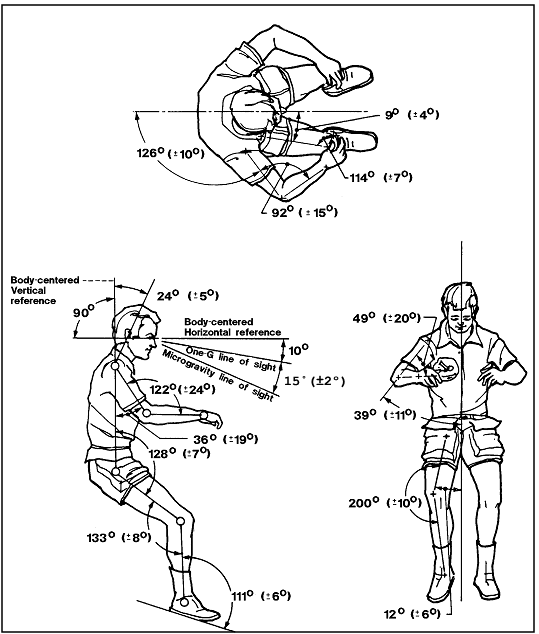
And by the way: Is this drawing useful for some of us? I have it in printed form at home.

Image108.gif
 
I work on that problem with the new IDP/MDU implementation. Will take a moment to finish correctly, maybe somebody can do a evil hack of the CRT MFD to include the SM OPS until we have the 5 GPCs and the hardware between GPC and MDU screen.
Well, something that I did discover by pure accident is that CRTMFD responds to changes of the mode switches on panel C2.

For now the only SM screen implemented is the PDRS screen. However, in this process I noticed that I just couldn't operate the event timer scroll wheels or the 3-mode switches as they were just too sensitive.
 
Back
Top