Visual Studio 2022 Orbiter Project Templates

OHM Visual Studio 2022 Orbiter Project Templates 1

Mr Martian

Orbinaut/Addon dev/Donator
Addon Developer
Donator
Joined
Jun 6, 2012
Messages
382
Reaction score
254
Points
78
Location
Sydney, Australia, Earth, Sol
Website
www.orbithangar.com
Mr Martian submitted a new addon:

Visual Studio 2022 Orbiter Project Templates - Templates for developing for Orbiter 2016 in Visual Studio 2022

View attachment 40931

About:
This file includes four templates for use in Visual Studio 2022 for making Orbiter Addons. The templates are:
  • .dll template (with platform v143 toolset)
  • .dll template (with platform v100 toolset)
  • .lib template (with platform v143 toolset)
  • .lib template (with platform v100 toolset)
Notes:
These templates are based on the project settings that I have been using to develop for...

Read more about this addon...
 
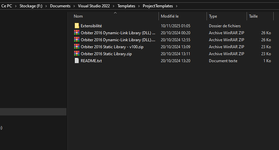
I followed the instructions and put the templates in what seems to be the correct directory :

1762741344593.png

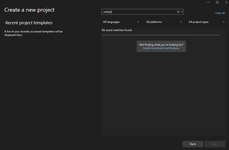
... but I still can't find them in there :

1762741402545.png

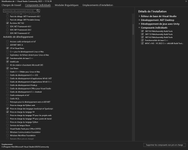
Now maybe I don't have the necessary plugin components installed, I have no idea :

1762741526026.png
 
I followed the instructions and put the templates in what seems to be the correct directory :
Hey there, that’s strange, I’ll take a look tomorrow and let you know. I’ve just reinstalled my OS so I have to add these back to my fresh copy of VS2022, so I’ll have a try and see if there’s any other step I forgot to mention.
 
Hey there, that’s strange, I’ll take a look tomorrow and let you know. I’ve just reinstalled my OS so I have to add these back to my fresh copy of VS2022, so I’ll have a try and see if there’s any other step I forgot to mention.

Hello, so after a clean re-install, VS 2022 'sees' the templates. This time I only checked the 'Desktop C++ environment' option during the install process.
 
Back
Top