
You are using an out of date browser. It may not display this or other websites correctly.
You should upgrade or use an alternative browser.
You should upgrade or use an alternative browser.
Project Vehicle Handling Simulation in Orbiter2016
- Thread starter fred18
- Start date

- Joined
- Jun 14, 2008
- Messages
- 812
- Reaction score
- 862
- Points
- 108
- Location
- FRANCE
- Website
- francophone.dansteph.com
Yes ! Me !!
Having dreamed about it... you did it !!!
I am particularly impressed by the animation in reverse gear mode !!!
Really :thumbup::thumbup::thumbup::thumbup::thumbup:
Having dreamed about it... you did it !!!
I am particularly impressed by the animation in reverse gear mode !!!
Really :thumbup::thumbup::thumbup::thumbup::thumbup:
- Joined
- Feb 2, 2012
- Messages
- 1,667
- Reaction score
- 115
- Points
- 78
I am particularly impressed by the animation in reverse gear mode !!!
I worked on the direction of the attachment to make it working phisically correctly. So once that was done, the rest is coming and working by itself. :thumbup:
Yes, you need to set it up in the scenario. The LER is parent to the tractor-trailer vessel, which in turn is parent to the trailer. Probably a moot point now Fred has got it figured :thumbup: But PM me if you need more help.Thanks. I was made a trailer mesh for testing. But I am not sure how this gets set up.So if using the LER an parent attachment is made and then the trailer has a child attachment, right?....But do I need to attach in the scn?

Anybody up for a little tow around???
I'm officially impressed! and delighted! :thumbup:
At this point, the following borders on being rude, but I can't help it...
Any chance of forklifts?
Last edited:
- Joined
- Feb 2, 2012
- Messages
- 1,667
- Reaction score
- 115
- Points
- 78
I'm officially impressed! and delighted! :thumbup:
At this point, the following borders on being rude, but I can't help it...
Any chance of forklifts?
well, since there is the possibility to attach a child vessel as upper part and drive the vehicle live from there (see posts above), anybody can create even a SC3 forklift "upper" part and attach it to the wheels and use the wheels as GeneralVehicle. I hope I was clear, if not I'll try explain better what I mean

Does it have to be sc3? Not sure what the forklift would pick up?
I made a mesh at One time I will see if I can modify it.
I made a mesh at One time I will see if I can modify it.
Last edited:
- Joined
- Feb 2, 2012
- Messages
- 1,667
- Reaction score
- 115
- Points
- 78
Does it have to be sc3? Not sure what the forklift would pick up?
I made a mesh at One time I will see if I can modify it.
It can be whatever you want
This is one I made YEARS ago:

The wheel steer from the rear. Not sure if that would be an issue. I can change that. But the fork would raise up and down and tilt. I made a Pallet for it that was UCGO. But UCGO isn't fully working in 2016.
And I guess beside the wheels in a mesh. The steering wheel need to be in that driving mesh
The wheel steer from the rear. Not sure if that would be an issue. I can change that. But the fork would raise up and down and tilt. I made a Pallet for it that was UCGO. But UCGO isn't fully working in 2016.
And I guess beside the wheels in a mesh. The steering wheel need to be in that driving mesh
- Joined
- Jun 14, 2008
- Messages
- 812
- Reaction score
- 862
- Points
- 108
- Location
- FRANCE
- Website
- francophone.dansteph.com
It works !

The mesh upper is my spacecraft car
The mesh under is (hem...will be) the wheels (for the test I took the same meshe, but that is just for the test )...
I can control the wheels and displacement (of the "general_vehicle" car) from the spacecraft car... and so, all animations of my car (doors etc) are working .
Wonderful !!! :tiphat:
The mesh upper is my spacecraft car
The mesh under is (hem...will be) the wheels (for the test I took the same meshe, but that is just for the test )...
I can control the wheels and displacement (of the "general_vehicle" car) from the spacecraft car... and so, all animations of my car (doors etc) are working .
Wonderful !!! :tiphat:
Did I miss something? The part about the Listen to?
But I can do this:

This is the UCGO forklift. I can edit the mesh so the forks can raise/lower/tilt
But I can do this:
This is the UCGO forklift. I can edit the mesh so the forks can raise/lower/tilt
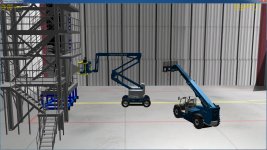
Nice forklifts
- Joined
- Feb 2, 2012
- Messages
- 1,667
- Reaction score
- 115
- Points
- 78
Hi guys,
since we're basically done I'm writing the documentation. I attach here the full inputs list of the cfg file. let me know if it's unclear somewhere
cheers

EDIT: I also attach here the latest version of the module, just the dll, almost ready.
Please note that since gattisplot was right, I changed all the "axel" words into "axle"!!!
since we're basically done I'm writing the documentation. I attach here the full inputs list of the cfg file. let me know if it's unclear somewhere
cheers
EDIT: I also attach here the latest version of the module, just the dll, almost ready.
Please note that since gattisplot was right, I changed all the "axel" words into "axle"!!!
Attachments
Last edited:
THANKS. You need to explain how to do the sit in a vehicle and drive the wheel part
- Joined
- Jun 14, 2008
- Messages
- 812
- Reaction score
- 862
- Points
- 108
- Location
- FRANCE
- Website
- francophone.dansteph.com
Right.THANKS. You need to explain how to do the sit in a vehicle and drive the wheel part
Perfect !:thumbup:let me know if it's unclear somewhere
May be in the section "Listen_From = abc" :
- Specify that "abc" is the name of a declared vessel in the same scn file
and attached to the GV_vessel (or someting like that) like this :
ATTACHED 0:0,abc
- and a quick explanation about the control keys (8/2, 4/6, and Ctrl + 2)
:tiphat:

- Joined
- Sep 12, 2010
- Messages
- 3,133
- Reaction score
- 415
- Points
- 123
- Location
- Rome
- Website
- www.tuttovola.org
Most excellent job, Fred!!

Isn't it "axis"?
...I changed all the "axel" words into "axle"!!!
Isn't it "axis"?
Isn't it "axis"?
Axes are for coordinates. Axles are for wheels...
Axels are for Rock Bands...
Well i have in the GV_LERWHEEL cfg :
Listen_from=LERBODY
LERBODY is the cfg for the body. But no movement in the GV_LERWHEELS. I guess the display have not be seen in the vessel sitting in?
Listen_from=LERBODY
LERBODY is the cfg for the body. But no movement in the GV_LERWHEELS. I guess the display have not be seen in the vessel sitting in?
Axes are for coordinates. Axles are for wheels...
Axels are for Rock Bands...
Axes are for chopping. :rofl:
Similar threads

- Replies
- 37
- Views
- 13K

- Replies
- 175
- Views
- 40K

- Replies
- 0
- Views
- 2K
- Replies
- 13
- Views
- 5K