
You are using an out of date browser. It may not display this or other websites correctly.
You should upgrade or use an alternative browser.
You should upgrade or use an alternative browser.
Project Vehicle Handling Simulation in Orbiter2016
- Thread starter fred18
- Start date

Ok. So how many wheels can it have? My LER has 6. But I think if someone wanted a Semi it has more than 4.
I will figured out what the wheel animations are.
I will figured out what the wheel animations are.

4throck
Enthusiast !
- Joined
- Jun 19, 2008
- Messages
- 3,502
- Reaction score
- 1,012
- Points
- 153
- Location
- Lisbon
- Website
- orbiterspaceport.blogspot.com
Just add invisible or very small mesh groups, and assign those groups to animations.
Not a very "clean" solution but... it should work
Not a very "clean" solution but... it should work
Hi Fred,Towing/Pushing is NOT implemented yet.
here's a thing I made some time ago for Orbiter2010-P1 (I think it should work with Orbiter2016) - it's a "Tractor-Trailer Hitch-Point" vessel. It acts as a link between the tractor and trailer. It should be attached to the tractor (parent) and trailer (child) at the "hitch point". It calculates the rotation of the trailer as the tractor moves, and rotates the attachment point accordingly. Can pull or push

The user must input the trailer "wheelbase" (distance from hitch point to rear axle) in the tractor_trailer.cfg file.
For vehicle vessels where z=forward, y=up, then:
The tractor hitch-point attachment should have the following orientation
BEGIN_ATTACHMENT
C x y z 0 1 0 0 0 1
END_ATTACHMENT
The trailer hitch-point attachment should have the following orientation
BEGIN_ATTACHMENT
P x y z 0 -1 0 0 0 1
END_ATTACHMENT
I'm not sure how well it works if the tractor hitch-point is very far from the vessel origin(0,0,0), you might need to add code to account for that. Not sure (been a while since I looked at it!)
EDIT: Yes, it should have an extra term to account for a tractor hitch-point that is not at the tractor centre of rotation. I might have a go at that later today
Don't know if this is a help, code included in .zip. Once you have the trailer "wheelbase" and tractor velocity vector, it's just simple geometry
Good luck!Attachments
Last edited:
- Joined
- Feb 2, 2012
- Messages
- 1,667
- Reaction score
- 115
- Points
- 78
Hi Fred,
here's a thing I made some time ago for Orbiter2010-P1 (I think it should work with Orbiter2016) - it's a "Tractor-Trailer Hitch-Point" vessel. It acts as a link between the tractor and trailer. It should be attached to the tractor (parent) and trailer (child) at the "hitch point". It calculates the rotation of the trailer as the tractor moves, and rotates the attachment point accordingly. Can pull or push
The user must input the trailer "wheelbase" (distance from hitch point to rear axle) in the tractor_trailer.cfg file.
For vehicle vessels where z=forward, y=up, then:
The tractor hitch-point attachment should have the following orientation
BEGIN_ATTACHMENT
C x y z 0 1 0 0 0 1
END_ATTACHMENT
The trailer hitch-point attachment should have the following orientation
BEGIN_ATTACHMENT
P x y z 0 -1 0 0 0 1
END_ATTACHMENT
I'm not sure how well it works if the tractor hitch-point is very far from the vessel origin(0,0,0), you might need to add code to account for that. Not sure (been a while since I looked at it!)
EDIT: Yes, it should have an extra term to account for a tractor hitch-point that is not at the tractor centre of rotation. I might have a go at that later today
Don't know if this is a help, code included in .zip. Once you have the trailer "wheelbase" and tractor velocity vector, it's just simple geometry
Wow! Thank you very much Brian!! I'll give a deep look at it. You're super kind as usual! :tiphat:
---------- Post added at 13:54 ---------- Previous post was at 13:04 ----------
Ok. So how many wheels can it have? My LER has 6. But I think if someone wanted a Semi it has more than 4.
I will figured out what the wheel animations are.
I will add just a middle axel option, for rotating wheels, not steering, just rotation as Rear Wheels.
I need a mesh with 6 wheels to test, can you pass me your LER mesh?
Yes. I can but it will take me a couple of hours til I get home.
The mesh is here though:
https://www.orbithangar.com/searchid.php?ID=6997
The mesh is here though:
https://www.orbithangar.com/searchid.php?ID=6997
- Joined
- Feb 2, 2012
- Messages
- 1,667
- Reaction score
- 115
- Points
- 78
Yes. I can but it will take me a couple of hours til I get home.
The mesh is here though:
https://www.orbithangar.com/searchid.php?ID=6997
That's enough, thank you
Hi Fred,
I've just had another look at my "Tractor-Trailer" hitch-point vessel - I just remembered the reason I never released it is because I never could get the extra term to compensate for a Tractor hitch-point that is offset from (0,0,0). I'm having another think about it now
I've just had another look at my "Tractor-Trailer" hitch-point vessel - I just remembered the reason I never released it is because I never could get the extra term to compensate for a Tractor hitch-point that is offset from (0,0,0). I'm having another think about it now

- Joined
- Jun 14, 2008
- Messages
- 812
- Reaction score
- 862
- Points
- 108
- Location
- FRANCE
- Website
- francophone.dansteph.com
So I did a little test in the islands of Salvation (iles du Salut) , near Kourou.
The car works great !!!


I have 2 suggestions :
1) for the steering wheels, I think it would be better to keep the wheels steady as long as the 4 or 6 key is pressed, and that the wheels come back straight by releasing the key.
Because I find that pressing 5 to make the wheels straight is not very easy for driving.
2) The engine sound is missing ... Would that be possible?
Anyway, in my opinion, it's great !!! :tiphat:
The car works great !!!
I have 2 suggestions :
1) for the steering wheels, I think it would be better to keep the wheels steady as long as the 4 or 6 key is pressed, and that the wheels come back straight by releasing the key.
Because I find that pressing 5 to make the wheels straight is not very easy for driving.
2) The engine sound is missing ... Would that be possible?
Anyway, in my opinion, it's great !!! :tiphat:
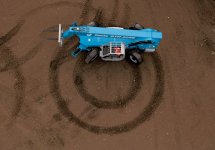
For me 6 wheel steering would be great. But I think once the code is released I can add that.
Also maybe a no wheel version might be good if someone wanted to do a person mesh?
I might try it with a motorcycle
Also maybe a no wheel version might be good if someone wanted to do a person mesh?
I might try it with a motorcycle
Last edited:
- Joined
- Feb 2, 2012
- Messages
- 1,667
- Reaction score
- 115
- Points
- 78
I have 2 suggestions :
1) for the steering wheels, I think it would be better to keep the wheels steady as long as the 4 or 6 key is pressed, and that the wheels come back straight by releasing the key.
ok, that's easy to do and correct. And I'll take out the 5 key then.
Yeah, I thought about it, but I don't know how to relate the sound with the engine level. I'll have to check on that.2) The engine sound is missing ... Would that be possible?
:tiphat:Anyway, in my opinion, it's great !!! :tiphat:
It's possible, I'm just afraid to overcomplicate things for the final user with too many parameters... I'll give it a try, something like a parameter called "4_Wheels_Steering=TRUE" and that's it.This steering config would be useful for rovers and such. BrianJ may be able to help you with this also.
For me 6 wheel steering would be great. But I think once the code is released I can add that.
I just added 6 wheels rotating (using the LER you pointed me to) and it works, I'll post everything later tonight. I'll add the 4 wheels steering, but I think 6 wheels steering would be a mess, so I'll do the 4 and that's it.
Also maybe a no wheel version might be good if someone wanted to do a person mesh?
I added it as well, if no groups are defined it will work without rotating meshes.
I might try it with a motorcycle
It won't lean. It's possible to make it lean, but you have to calculate properly the lean angles then. It could be the next module if we find the way to calculate the lean angles.
It won't lean. It's possible to make it lean, but you have to calculate properly the lean angles then. It could be the next module if we find the way to calculate the lean angles.
That would be just the angle of the sum of weight mg (down) and centripetal force mv^2/R (inward) where v is the speed and R is the turn radius.
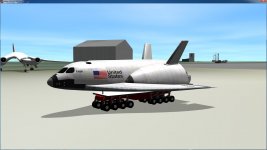
OK, there we go. Attached is a much better tractor-trailer hitch-point vessel. Can handle tractor attachment point offset. Disregard the previous package. Code included, cleaned up and commented as much as possible.
Thanks for making me revisit this project and get it working properly
Thanks for making me revisit this project and get it working properly
Attachments
- Joined
- Feb 2, 2012
- Messages
- 1,667
- Reaction score
- 115
- Points
- 78
Got wheels ?? :rofl:
:lol: Too many!!! I won't code that :rofl:
Would be good, to be able to attach a vessel to the chassis, to do animated stuff.
Sure, that'll be easy, just put the attachment details in the config and you'll have it.
Wow!!! Thank you very much! I'll give a deep look at it!!!OK, there we go. Attached is a much better tractor-trailer hitch-point vessel. Can handle tractor attachment point offset. Disregard the previous package. Code included, cleaned up and commented as much as possible.
Thanks for making me revisit this project and get it working properly
- Joined
- Feb 4, 2008
- Messages
- 9,753
- Reaction score
- 1,024
- Points
- 203
That would be an SPMT (Self Propelled Modular Transporter.Got wheels ?? :rofl:

No more than 6 will be coded.
Why exactly? As long as you don't have any actual traction physics going on, additional wheels are merely another rotating mesh group. You shouldn't have to code them explicitly, it's a basic loop operation.
Similar threads

- Replies
- 37
- Views
- 13K

- Replies
- 175
- Views
- 40K

- Replies
- 0
- Views
- 2K
- Replies
- 13
- Views
- 5K