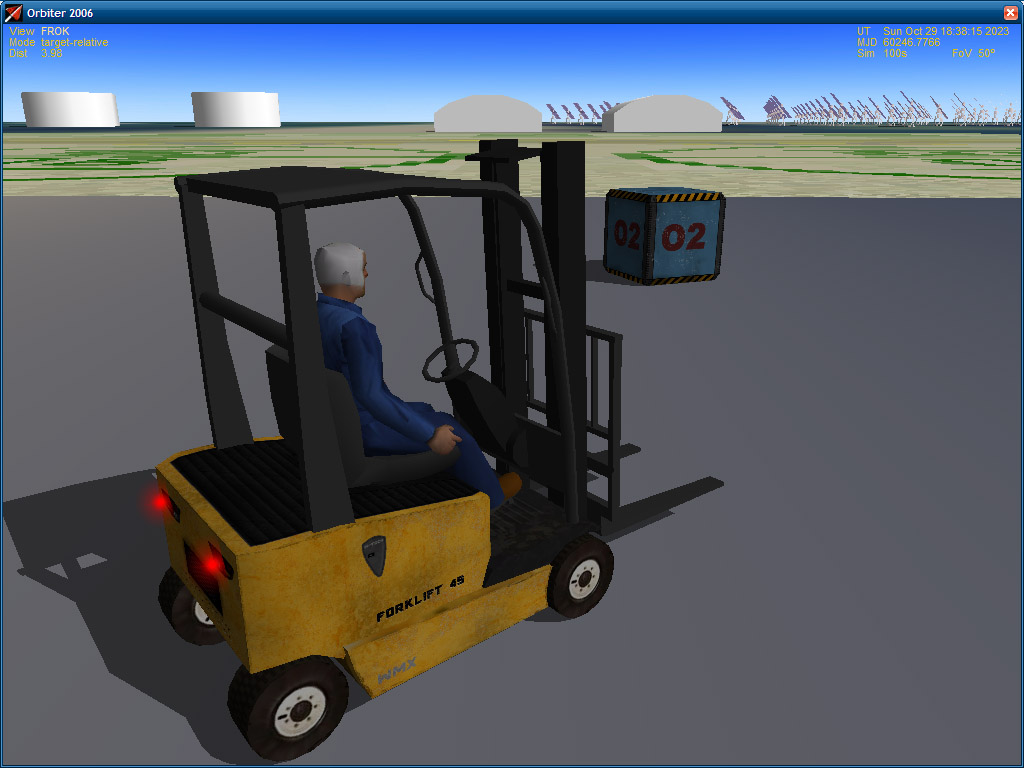
Project Universal Car for Orbiter (UCO)

Well, if the config file modification is not too difficult, I agree.

Here are the config lines that allow a car to load normalised payload: (Azure example, 2 cargo in line on roof)

:CARGO

CargoSlotPos = 0 3.23 3.20 ; front left pos of first cargo slot X Y Z (see doc)
CargoRowColumnNbr = 1 2 ; number of slot row & column (max 20 slots, see doc)
CargoSlotInterval = 0.05 ; Interval beetween each slot
CargoReleasePos = 0.0 -2.8 ; X Z pos at wich cargo will be placed when released (see doooc)

Of course all we be explained in doc with image, and SDK will provide *.max and *.3ds example.

Designing new "normalised" cargo is not difficult either, just a mesh and a 10 lines config file. You can have tank, box, tool etc as long as the mesh fit in a 1.5x1.5x1.5 box i'ts ok. Also those payload can be loaded in DGIV and I'll release also the code to grapple/release so one can design more vessel that can load release such payload. (it would be nice to have some mother ship that could carry 20 of them as well as truck, but I'll see if I can do a truck myself for UCO)

Cheers

Dan
 
Would the containers be able to be carried by the DGIV?
 
I just thought of an idea. Since the cargo is a normalized payload, and the shuttle folks might like to use the UCO to say, transport the ET off the barge into the VAB, would it be possible to create a payload that used both the UCO CARGO standards above and the standard attachment points? The idea would be to use a "UCO Container" as an intermediary to the object you want to carry and the Universal Car. For Example:

External Tank with Orbiter Standard attach points---------------attachment point-UCO Container-Normalized Cargo attachment--------------------------UCO vehicle with the Tank Transport mesh.

This way, you could use Dan's UCO to create a "transporter" mesh, and use a universal container with a "dot" for a mesh, and attach it to an attachment point on an External Tank...This way, everyone is happy!!!! The big thing being that Dan takes no responsibility for your mesh looking funny using a standard attachment point ;)
 
This way, you could use Dan's UCO to create a "transporter" mesh, and use a universal container with a "dot" for a mesh, and attach it to an attachment point on an External Tank...This way, everyone is happy!!!! The big thing being that Dan takes no responsibility for your mesh looking funny using a standard attachment point ;)

UCO would be even able to grapple one (or up to 20) shuttles as payload and release them as a fully functionnal vessel ready to take-off. The config file of Shuttle would only need 5 special lines in it to be recognised as UCO cargo. (there is by design absolutely no check of weight or shape of cargo)

Such lines and the "normalised payload" ensure the coherence of what can be done, you cannot attach everything (as basic attachment point allow) because not everything is likely to be attached on everything (A shuttle carried by the forklift ? ;) )

Now if peoples want to carry shuttle with forklift or a dedicated UCO car it's possible and even simple. That's the beauty: common peoples cannot do by mistake unrealistic things but advanced users (or authors) can do almost everything they want.

Cheers

Dan

---------- Post added at 01:37 AM ---------- Previous post was at 01:27 AM ----------

You keep mentioning normalized payload? What happens if something is larger than 1.5m^3? Does it just not get loaded or strange things happen?

Only visual bug with model that count on those size. As said above there is no check of size & weight (by choice)

Example: a truck designed for "normalised" payload would look strange with 20 ShuttleA meshes on the roof instead of 1.5^3 mesh.

Now authors can use UCO to make a shuttleA transporter, charge to them to explain speciffically how it work in the doc. A "universal" things should allow such things but can't provide them by default.

Hope it explain ?

Dan
 
UCO would be even able to grapple one (or up to 20) shuttles as payload and release them as a fully functionnal vessel ready to take-off. The config file of Shuttle would only need 5 special lines in it to be recognised as UCO cargo. (there is by design absolutely no check of weight or shape of cargo)

Such lines and the "normalised payload" ensure the coherence of what can be done, you cannot attach everything (as basic attachment point allow) because not everything is likely to be attached on everything (A shuttle carried by the forklift ? ;) )

Now if peoples want to carry shuttle with forklift or a dedicated UCO car it's possible and even simple. That's the beauty: common peoples cannot do by mistake unrealistic things but advanced users (or authors) can do almost everything they want.

Cheers

Dan


I'm getting excited! When do we start beta testing??:speakcool:
 
this is such a cool idea, dan never ceases to amaze me.
 
Will you be able ride in the car? That is exit and walk around and get in the car and drive?
 
Will you be able ride in the car? That is exit and walk around and get in the car and drive?

That's exactly the point of UCO :)


NEWS:
-I had uggly CTD with VC the whole day, finally found the bug, pfeew.

-Just added a "darken screen" when in cockpit help or setting texts are displayed, this will render them much more lisible.

New method with dark screen when help or setting are displayed:
UCO3108news2.jpg


Old method, some text where not very lisible:
UCO3108news1.jpg


Seem nothing but the beauty is that it' doesn't use GDI to fill the whole screen, so it's not a problem for performances, also this method allow transparency.

Cheers

Dan
 
Dan: Is UCO going to be released with the city addon we saw in a video a while back on your website? Your mention of an "AI bus" in the text of those screenshots reminded me of it.

Regardless, nice work! Looking forward to seeing some UCO products on OH! :)
 
We planned with picto to do also some mars & moon base but as he have no time I'll just release UCO with his town.

Cheers

Dan
 
I like your menu interfaces Dan. That is what I liked about your UMMUs. Integrated help makes for easier utilization.
 
Spacetech is not so rich, this is why they use cheap and dirty material :)

UCO3108news3.jpg


I can do better and texture also the rest, but at the expense of 3-5 more days and one more 1024 texture (performance concern) So I stop now, it's good enough and I have other models to do.

Next move: a racing car (F1) or a truck, not decided yet. (I want to provide at least a truck that show multi cargo feature and the supercar is just for fun :) )

Cheers

Dan
 
A truck would be really cool. A flatbed that could carry your containers would be best. Next Addon- UMMU compatible Holiday Inn.

Cheers,
 
Ok, I will do this one, it's not the best looking flatbed truck ever but it's square and promise to be easy to do:
http://www.ironmax.com/extimages/paper\9610\75757163.jpg

UCO is first made so *OTHER* can add their models ;)

Also there is a 3 view blueprint:
http://exssrerion.com/Car/Blueprints/Commercial/hino-sg3325.gif

Dan


That looks good Dan. That was what I figured, a flatbed would be easy to do, and not as constrained as a closed bed truck might be. You wouldn't have to worries of the texture bleeding through the side of the truck.

Kind Regards,
 
Back
Top