SSU V1.25 Release

Status
Not open for further replies.
Just wondering how it is coming with the ODS?

Still working on having the GPCs ready for running the basic system software. When I have the PASS base software simulated (So communication with IDPs and memory configuration management works), I wanted to skip GNC and concentrate on the SM software - first the little bit of major function base software, I know already, then the two OPS. Finally, the three DISPs for the ODS and the external airlock.

When this is done, I wanted to work on the P/L data busses and the connected MDMs. One of these should connect to the ODS hardware over a number of interface boards. In parallel I can connect the switches and lights to the ODS hardware and implement the behavior.

Well, that is what I intend to do, of course, people know that I have no discipline, and that I will sure NOT do that.

But the distractions so far are:
- GLS might need limited implementations of the GNC stuff so communication with the EIUs takes place.
- I want to (quickly) implement saving panel states in the scenarios in a hierarchical format:

Code:
PANEL O15
   [object id] [state]
ENDPANEL

I also want to have a similar stuff for the subsystems, but not before the next release.
 
Donamy: Can you email me the O6 panel as separate mesh (with the same coordinates as in the complete VC). Something makes the full VC mesh poison meshwizard so that it quickly explodes to use all available memory.

Also, it would be good if you could move all talkbacks in the overhead panel into a "SSU/talkback_overhead.dds" texture or into "SSU/talkback.dds" maybe with extending it?

Would make me feel more comfortable as making the O6 panel texture dynamic. I will also soon need to paint GPC FAILURE CAM (The indicator matrix on O1).
 
Donamy: Can you email me the O6 panel as separate mesh (with the same coordinates as in the complete VC). Something makes the full VC mesh poison meshwizard so that it quickly explodes to use all available memory.

No problem !!

Also, it would be good if you could move all talkbacks in the overhead panel into a "SSU/talkback_overhead.dds" texture or into "SSU/talkback.dds" maybe with extending it?

Would make me feel more comfortable as making the O6 panel texture dynamic. I will also soon need to paint GPC FAILURE CAM (The indicator matrix on O1).

Can you give me an example ?
 
Can you give me an example ?

I want to make a class to paint the talkbacks. currently, the talkbacks are on the basic panel texture, which is quite huge for O6. As making this texture dynamic means, this huge texture would be stored uncompressed in the GPU memory, pushing us further to the point where the GPU has to also swap textures.

Instead, I would prefer having a simple rectangular mesh over each TB, like we do the MFD surfaces, with each rectangle having unique texture coordinates in the same texture (So I can paint the TBs there).

As single large textures are considered better, it might make sense to have all talkbacks on a single texture... but I don't know how much work this would cause on your side.
 
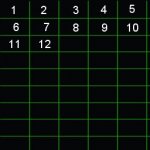
Now I get it. Disregard the panel I just sent you. I have to move them around to have different coords, there are 12 talkbacks on the O6, I just need to know what to put on the .dds
 
Now I get it. Disregard the panel I just sent you. I have to move them around to have different coords, there are 12 talkbacks on the O6, I just need to know what to put on the .dds

I can make a census of the overhead panels if you like to. I just worked on the ODS panel again and noticed a strange bug, which I currently can't resolve.
 
What's that ?
 
Would something like this work ?
 

Attachments

Would something like this work ?

Well, is at least a better source bitmap for painting, but what I mean is more have one field on the texture for each talk back (not kind of talk back or state of talkback) to paint during runtime.


Small dev Update: The bug with the third APDS panel power switch prevails, but the open pushbuttons are now animated. When you click on them, they get pushed down as feedback.
 
More like this ?
 

Attachments

  • O6talkbacks.jpg
    O6talkbacks.jpg
    12.6 KB · Views: 594
Small dev Update: The bug with the third APDS panel power switch prevails, but the open pushbuttons are now animated. When you click on them, they get pushed down as feedback.
Nice going! Looks and works great here! Keep up the great work!
 
DaveS, you have mail.
 
OK, got it. Urwumpe: you should also animated the "UNDOCK COMPLETE" button. It's both an indicator light and pushbutton. It starts the actual undock sequence which takes approx. 2 minutes and 30 seconds from button depress to physical separation by the ODS springs.
 
OK, got it. Urwumpe: you should also animated the "UNDOCK COMPLETE" button. It's both an indicator light and pushbutton. It starts the actual undock sequence which takes approx. 2 minutes and 30 seconds from button depress to physical separation by the ODS springs.

Are you sure it is also an indicator light? In my docs, I have two separated entities, the indicator light and the button.

What I need to implement first, before I can do that, is a class for the button guards. But I currently work on implementing the lights first.


-----Posted Added-----


More like this ?

Yeah, like this. And this for at least the whole overhead panels - which is quite a lot as you have many talkbacks on the OMS/RCS panels.
 
Donamy: tested the new meshes and the ET LH2 tank has a weired black, almost burned backside. Fix please.


-----Posted Added-----


Are you sure it is also an indicator light? In my docs, I have two separated entities, the indicator light and the button.
Seems like you're right. UNDOCK is a pushbutton while COMPLETE is the indicator light.
 
Donamy: tested the new meshes and the ET LH2 tank has a weired black, almost burned backside. Fix please.

Is it the texture or the shading ?
 
Is it the texture or the shading ?
Got to be shading I have attached a screenshot of the problem. Also, the LOX IFRs are too much depressed into the LOX tank.
 

Attachments

  • ET-129_shading_problem.jpg
    ET-129_shading_problem.jpg
    122.5 KB · Views: 620
Seems like you're right. UNDOCK is a pushbutton while COMPLETE is the indicator light.

Well, yes, but you still have a small misconception: What you currently see is a pair of lights "UNDOCK | COMPLET".

The button for triggering the action is behind the guards on the right of the panel.

New problem: When redrawing the lights, the oapiBlt function seems to be doing nothing. No crash, but the lights still appear lighted.
 
Well, yes, but you still have a small misconception: What you currently see is a pair of lights "UNDOCK | COMPLET".

The button for triggering the action is behind the guards on the right of the panel.
OK.
 
Urwumpe, would it be alright to have talkback .dds's for each panel ?
 
Status
Not open for further replies.
Back
Top