SSU Development Thread (2.0 to 3.0)

Status
Not open for further replies.
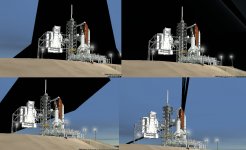
There seem to be some issues with the new mesh using the default Orbiter graphics client (everything looks fine using the DX9 client):
I'm not sure where the problem is. Is this a high priority or can we just live with it for now?
 
I'm not sure where the problem is. Is this a high priority or can we just live with it for now?
It needs to be fixed before release, so I would consider this fairly high priority. I don't want to force people to use the DX9 client to run SSU.
 
It needs to be fixed before release, so I would consider this fairly high priority. I don't want to force people to use the DX9 client to run SSU.
I'll see if I can't track the the problems.

---------- Post added at 07:43 PM ---------- Previous post was at 06:28 PM ----------

I have checked in an update that should hopefully fix the problems. It isn't present on my install anymore so let me know if you still have it.
 
I'm working on fixing the ODS C/L camera and related issues (the docking port/attachment positions also need to be corrected). Once that's done, I'll merge the newmesh branch with the trunk.
 
Just wondering, why you need it to work with the old inline client?
The inline client is the default client used by Orbiter, and I don't want to force people to use an external graphics client so SSU works. Also, if the mesh doesn't work in the inline client, that indicates that there might be a problem somewhere with the mesh, so there might also be problems with future versions of the DX9 client or other graphics clients. I don't see any disadvantages in ensuring SSU works with the old graphics client, and it probably avoids a lot of bug reports from people who still use the Orbiter inline client.

---------- Post added at 06:36 PM ---------- Previous post was at 06:05 PM ----------

The 2.1-newmesh branch has been merged into the trunk.
 
Back in the SSU office for some days now, pretty much finished the helium system, just some tweeks remaining here and there and then I'll get back to you in a few days.
In the mean time there's a few issues I'd like to go over. Due to the change of mesh I need somebody to give me the positions of the LH2 backup dump vent, LH2 fill/drain, and the position of the center of the SSME nozzles at the exit of the nozzle (for the LOX dump vents).
Another thing: is anybody here using the default graphics client? I recently changed laptops and the default client now shows all kinds of "artifacts", black surfaces swirling all around the vehicle, sometimes there's missing parts on the orbiter and the swirling surfaces appear to be the orbiter textures. The more effects I turn on, the more likely this is to occur. And this only happens on SSU, DG & co. work fine. Using the D3D9 client everything is fine.
Probably not related to this, in both clients, in the STS-1 scenario the texture on the right side of the FRCS doesn't look right, and the textures of the ET umbilical and it's doors look like they have some offset. (Just looked at the SLC-6 launch scenario and there it shows a dark texture that looks like it belongs somewhere else)
Still on the textures, the ET burned texture that shows during second stage looks like it has some problems in the LOX feedline (it has some gray and red bands).
Back to STS-1, Columbia has the drag chute "place" in the tail, which did not happen until STS-50... (wrong mesh being used or there's only one mesh?)
Sorry about all the "complaining"... every thing else looks super! :cheers:
 
Back in the SSU office for some days now, pretty much finished the helium system, just some tweeks remaining here and there and then I'll get back to you in a few days.
In the mean time there's a few issues I'd like to go over. Due to the change of mesh I need somebody to give me the positions of the LH2 backup dump vent, LH2 fill/drain, and the position of the center of the SSME nozzles at the exit of the nozzle (for the LOX dump vents).
Check in what you got and I'll correct the positions.

Another thing: is anybody here using the default graphics client? I recently changed laptops and the default client now shows all kinds of "artifacts", black surfaces swirling all around the vehicle, sometimes there's missing parts on the orbiter and the swirling surfaces appear to be the orbiter textures. The more effects I turn on, the more likely this is to occur. And this only happens on SSU, DG & co. work fine. Using the D3D9 client everything is fine.
Could you post a screenshot? I corrected something like this in revision 1599 of the 2.1-newmesh branch.

Probably not related to this, in both clients, in the STS-1 scenario the texture on the right side of the FRCS doesn't look right, and the textures of the ET umbilical and it's doors look like they have some offset. (Just looked at the SLC-6 launch scenario and there it shows a dark texture that looks like it belongs somewhere else)
Still on the textures, the ET burned texture that shows during second stage looks like it has some problems in the LOX feedline (it has some gray and red bands).
This is a known problem due to the age of the Columbia/Challenger textures. Only the Discovery, Atlantis and Endeavour textures have been updated.

Back to STS-1, Columbia has the drag chute "place" in the tail, which did not happen until STS-50... (wrong mesh being used or there's only one mesh?)
There's only one orbiter mesh, so the early missions look out of place with the drag-chute equipped vertical tail. Besides there's no code to deactivate the deployment of the drag-chute any way.
 
Check in what you got and I'll correct the positions.
hhmmm, that's the part that I was refering to in the begining of my previous post... there needs to be a discussion on whether I upload to the trunk of create a branch (need to read about that). Anyway I'd like to have everything done before upload. In the meantime I could post that portion of the code here...

Could you post a screenshot? I corrected something like this in revision 1599 of the 2.1-newmesh branch.
I'm using the last revision, and this happened before the merge.
Montage of the artifacts below. This shows the "bad" bug, the black planes that tend to desappear after it gets above the clouds. There's a "very bad" bug where the wings and nose are missing and there are orbiter textures "swirling" all around, so much that you almost can't see the vehicle.
 

Attachments

  • swirl.jpg
    swirl.jpg
    192.4 KB · Views: 556
I'm using the last revision, and this happened before the merge.
Montage of the artifacts below. This shows the "bad" bug, the black planes that tend to desappear after it gets above the clouds. There's a "very bad" bug where the wings and nose are missing and there are orbiter textures "swirling" all around, so much that you almost can't see the vehicle.
I checked and it is present here as well. So far I have exonerated the orbiter, the pad, and MLP. I'm testing the ET and SRBs now.
 
One on one testing reveals nothing wrong. All meshes are good. More troubleshooting reveals that that problem is with the vessel shadows. Deactivating that option clears the issue. I'm trying to track down the problem mesh(es).
 
Problem mesh and mesh group have been identified. I'm in the process of fixing it now.

---------- Post added at 11:08 PM ---------- Previous post was at 10:56 PM ----------

I have checked in a updated orbiter mesh that should fix the problem. Please confirm that the problem is gone.
 
hhmmm, that's the part that I was refering to in the begining of my previous post... there needs to be a discussion on whether I upload to the trunk of create a branch (need to read about that). Anyway I'd like to have everything done before upload. In the meantime I could post that portion of the code here...
Can you post a bit more information on what exactly is being changed? If you've already made all the changes required (and everything works) and the only thing left is to fix the positions to work with the new mesh, you may as well go ahead and check everything in, and DaveS can update the positions. The main advantage of creating a branch is that you can check stuff in (and potentially break existing code) without disrupting regular development. Creating a branch for the helium system is probably overkill.

I'm hoping to release SSU v2.1 with the new meshes fairly soon, once the remaining tickets on sourceforge are dealt with. How long will it take to complete the helium system work?
 
Looks fixed from here! Thanks DaveS. :thumbup:

Can you post a bit more information on what exactly is being changed? If you've already made all the changes required (and everything works) and the only thing left is to fix the positions to work with the new mesh, you may as well go ahead and check everything in, and DaveS can update the positions. The main advantage of creating a branch is that you can check stuff in (and potentially break existing code) without disrupting regular development. Creating a branch for the helium system is probably overkill.

I'm hoping to release SSU v2.1 with the new meshes fairly soon, once the remaining tickets on sourceforge are dealt with. How long will it take to complete the helium system work?

Well, it's not just the helium system... here are the changes I was logging for the commit entry:
tweaked the SSME vents and the ET GOX vents (looked too long)
changed the pre-launch "T-HH:MM:SS" output to oapiDebugString() to also display tenths of seconds
modified the SSME throttle commands in AscentGuidance, and added AGT (Adaptive Guidance Throttling) (not perfect due to lack of info)
added the post-MECO LH2 dump
added Sensor, SolenoidValve, PressureActuatedValve and PressureSource classes to libUltra
added the SSME S/D PBs functionality (possible bug: PBs are activated most of the times just by opening the covers)
added the SSME S/D limit switch functionality
added a bunch of valves to the MPS
improved the functionality of SSME controller and its software
added commands and more redlines to RSLS
added SSME_Operations class to contain GPC control logic of the SSMEs
added IO_control class to interface panel switches and GPC commands to valves
added the MPS/SSME He Systems, and made the associated switches on panel R2 functional
added various MPS/SSME HeSys and MPS manifold parameters to the OMS/MPS display on CRTMFD
added code to SSULCC to "fill" the Helium system
removed the SSME shutdown thru the "*" key (now done by the S/D PBs)
removed some unused MPS variables from the Atlantis class
simplified scn entries for the SSMEs and added entries for Helium system
probalby went a little overboard on the number of changes don't you think? :facepalm:
Because of that and the scenario file changes I'm thinking branch. Also, according the "SSU roadmap" somewhere in the forum, scn changes should only be made in major updates, so the changes above should probably wait for a version 3 or 4...
Please discuss :cheers:
 
Re the ET/MPS GOX vents: They're correct. The MPS GOX vents through the SSMEs prelaunch do reach down to the flame trench on calm wind days. Also, here's a video from STS-122 that shows the ET GH2 venting in action post ET-sep. Updating the scenarios shouldn't be a problem.

 
Re the ET/MPS GOX vents: They're correct. The MPS GOX vents through the SSMEs prelaunch do reach down to the flame trench on calm wind days.
Yes they get to the flame deflector, but I think they are a little too long because but they are going thru the flame deflector. And the LOX vent I think was also too long because it was reaching the OAA. After I commit the changes you can see them, and if it's worse there's always the chance to return to the original values.
 
Yes they get to the flame deflector, but I think they are a little too long because but they are going thru the flame deflector. And the LOX vent I think was also too long because it was reaching the OAA. After I commit the changes you can see them, and if it's worse there's always the chance to return to the original values.
Actually, that is also correct. This is from STS-26R:

237-STS26-KSC-388C-2608.27-WCDDT%20ICE%20FROST%20INSPECT-8.1.88.jpg
 
Whao that's big!
Still I think that's rare.... feel free to change it back afterwards
 
Status
Not open for further replies.
Back
Top