Space Shuttle Ultra development thread

DaveS: Looks really nice now. Do you have any wishes on the basic implementation of the MLP? I think you are well capable of working on the module yourself, as long as a basic framework for the more complex parts exists, am I right?
 
DaveS: Looks really nice now. Do you have any wishes on the basic implementation of the MLP? I think you are well capable of working on the module yourself, as long as a basic framework for the more complex parts exists, am I right?
I looked over everything and the only wishes I have is for the previously mentioned OTV system and retraction of the T0 umbilicals from the orbiter at T0.
 
I looked over everything and the only wishes I have is for the previously mentioned OTV system and retraction of the T0 umbilicals from the orbiter at T0.

Can be done. I wanted to include water particle streams as small effect into the MLP.

For cameras and animation, I just need the camera positions in mesh coordinates and labels for the animated parts of the Tail service mast.

Also, I want to install make the MLP the current home of the GLS simulation until we get something better (for example a mesh of the LCC with firing room, so we can control the launch sequence of the shuttle from there).

Until such a realistic sequence is possible, I just want to assign a keyboard command to activate the T-20Min launch sequence in the MLP from within the shuttle and a second command to confirm go for launch by the crew during the final hold.

Any suggestions for the keyboard interface for that? I think using TAB for switching from normal keyboard mode to a voice communication mode and back is a good idea. This way, we could get almost any keys for communication and have the rapid keyboard commands for flight still available.
 
Until such a realistic sequence is possible, I just want to assign a keyboard command to activate the T-20Min launch sequence in the MLP from within the shuttle and a second command to confirm go for launch by the crew during the final hold.

Any suggestions for the keyboard interface for that? I think using TAB for switching from normal keyboard mode to a voice communication mode and back is a good idea. This way, we could get almost any keys for communication and have the rapid keyboard commands for flight still available.
TAB sounds good. Are you sure that you mean T-20 minutes? There's a final hold at T-9 minutes. It's during this hold that the final Launch Team and management poll is done.

GLS is initialized at T-9 minutes. It's also GLS that controls the countdown clock.

Callsign for the GLS console in the Firing Room is CGLS.
 
TAB sounds good. Are you sure that you mean T-20 minutes? There's a final hold at T-9 minutes. It's during this hold that the final Launch Team and management poll is done.

GLS is initialized at T-9 minutes. It's also GLS that controls the countdown clock.

Callsign for the GLS console in the Firing Room is CGLS.

Yes, I am sure.

The GLS is already initialized and active 2 hours before launch. But it is only observing until T-20 minutes.

The GLS gets enabled at T-20 minutes, where it starts issuing commands and synchronizes the GPCs to its countdown. But it is still under human command.

At T-9 minutes, the GLS switches into automatic mode. Now it has full control of the sequence and the human controller can only abort it.

http://science.ksc.nasa.gov/shuttle/countdown/launch-team.html
http://enterfiringroom.ksc.nasa.gov/systemSPE.htm


Thats why I decide to use T-20 minutes as time where the player could enable the GLS. Usually, in our T-9 minutes scenario (I would propose we make them actually T-10 minutes, so the player has some time to orient himself), the GLS would already be loaded in the enabled state, and the player would just have to give his own go for launch.
 
OK. But how exactly would the comm system function? Yse OrbiterSound 3.5?
 
OK. But how exactly would the comm system function? Use OrbiterSound 3.5?

Would be perfect, but I consider OrbiterSound 3.5 currently an extension feature - we lack the game data (Sound files) to make use of it.

I would use the annotation approach. We can either use annotations for displaying the last communication and possible replies, or try drawing them directly on the Orbiter screen. Both would be possible, one allows more freedom in design and capabilities, the other would be more compatible with future Orbiter developments.

(Braindump: )

So, lets say, we display the last three lines of communication in the top-left corner. When the player presses TAB, the whole screen area gets used for displaying the replies. We should offer a set of quick replies to the last request from mission control and a number of categories for other communication.

For example, when the roll program takes place, pressing TAB could show "COPY ROLL" as possible quick answer. TAB and Enter could just be a quick "COPY" or "YES" in general. TAB and "N" a quick "NEGATIVE".
Pressing TAB again just aborts the communication - you say nothing at all.

TAB + Escape could get used for getting to the menu for reporting failures, aborts or problems.

This should be possible, like in most better military flight simulator games.

So, when the player enters the game at T-10, at roughly T-9 the communication "Atlantis, go for launch" would get sent from the MCC/LCC simulation (or from improvisatory from the GLS). The keyboard sequence TAB + ENTER would result in the player confirming "COPY, GO FOR LAUNCH".

This would be the moment you start the event timer.

 
OK. But really, mots comms come from the LCC/MCC as they have better insight into vehicle performance than the crew.
 
Yes, thats why I think such communication will be important for the shuttle. Other than the DG, you can't fly the shuttle without MCC aid. So, getting information from MCC will be crucial for making the SSU a useful add-on. We will have more communication from MCC up to the Orbiter, but being able to also give player feedback into the system might make it better - and also simpler for us. The software we can write can't be smarter than any of us, so it would be good to avoid letting the software be trying to be smart at all.
 
Where are Kwan and SiameseCat ?? Did they not find this forum ?
 
I just found the forum. I haven't looked at the latest updates, since I've been busy adding keyboard entry support to CRT MFD.
 
Glad you found it !! The keypad interface sounds great, I did a new texture for the keypad, and changed them to black with white letters, if you prefer.
 
Are all you folks beta testers? I know Donamy and DaveS is...

Urwumpe, do I have you listed correctly as an addon developer?

Also to the beta testers... would it be helpful if you guys had your own private forum here which only beta testers can access or would you rather use the current forum your using? Just trying to help you guys anyway I can, I'm open to ideas. ;)
 
This way is fine, thanks much.
 
Urwumpe, do I have you listed correctly as an addon developer?

I just develop few add-ons, does that make me an add-on developer? ;)

But you could also list me as "Former employee of the German Aerospace Center", "Practicing Heavy Metal Fan", ...

Choose which drawer suits me more, but I think "Just Orbitin'" is well enough.
 
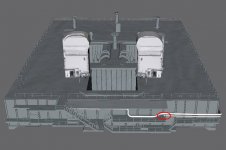
I have hit a snag on the MLP. I need help locating either drawings or photos of the area circled in red on the attached screenshot.

I have really looked but can't find any photos of how the pipe circled in the screenshot entered the MLP.

It's the hydrogen vent line. The line above is the hydrogen fill/drain line.
 

Attachments

  • MLP-2_10A.jpg
    MLP-2_10A.jpg
    39.5 KB · Views: 704
Thanks. Let me know if you find a good shot of the area in question.
 
Slight problem.

When I'm in the outside view, looking at the rightside of the shuttle, with the doors open, panning the view the KU takes on the texture of the RMS. Anyone else see this ??
 
Slight problem.

When I'm in the outside view, looking at the rightside of the shuttle, with the doors open, panning the view the KU takes on the texture of the RMS. Anyone else see this ??
I first had it when I had modified the KU, but I haven't seen it since. I don't know what caused it to appear/disappear. I assumed it was my computer that was suffering from some sort of graphics glitch.
 
Back
Top