Space Shuttle Ultra development thread

You mean what the debug string outputs?

Yes - it contains all state variables currently assigned to the MLP. You could also use the flight recorder - the MLP records some events.
 
Found the problem. Had forgot to attach the Shuttle to the MLP vessel in the scenario. Once I did that, it worked just fine.
 
Found the problem. Had forgot to attach the Shuttle to the MLP vessel in the scenario. Once I did that, it worked just fine.

OK, without attaching, the shuttle of course can't send data to the MLP. the interface functions I added to the orbiter, use the attachment point for the connection.
 
OK, now with the MLP problems sorted out, how about taking a look on the reported bugs in the shuttle itself?
 
OK, now with the MLP problems sorted out, how about taking a look on the reported bugs in the shuttle itself?

Already at it. Can't help you on the SSME Gimbal - the positions of the nozzles is just like the thrust vector of the engines it seems, a guidance failure is also ruled out - otherwise we would have control problems.

The next I have to check is the position of the ET doors - its possible that just the animation got damaged.

EDIT: OK, ET Door behavior is strange. will take a moment to fiddle out.It looks like it does a 360° rotation in the wrong direction, which should not happen.

The SSME exhaust looks like it requires to be redefined at the moment of SRB separation, so the offset to the thruster is corrected. I suggest we replace the SSME exhaust completely at that moment and don't show any Mach diamonds anymore at that point... anybody making a replacement texture?
 
Last edited:
I think just a whitish glow would be fine.
 
Why not making the inside of the SSME cones white, from the heat/flame?
 
they should do that from the start, but after SRB sep it should be 3 big white glowing blobs IMO.
 
Well, anyway. I don't come further with the ET umbilical door animation. Its strange.
I launch with opened doors (State=1).
I separate the ET and move the switch to close. Now the State should be around 0.998... but the door is suddenly reverted into closed position and opens again.

I suspect we miss one ClearMeshes(true) at a point and forget to redefine the animations afterwards. But no idea where to look.
 
How do I attach the MLP to the shuttle? Here's what I thought to do, but it didn't work:

"PAD:Atlantis_MLP
STATUS Landed Earth
;BASE Cape Canaveral:11
POS -80.6232502 28.6197342
HEADING 2.00
ATTACHED 0:0,STS-101
END"

Is my attached line correct, or what do I need to do?
Thanks
 
Is my attached line correct, or what do I need to do?

Wrong order. The MLP is parent of the shuttle, so you need to add the attached line to the Shuttle, not to the MLP.

Code:
ATTACHED 0:0,MLP
 
Is the reason the SSME's are so aggressive, when they roll the stack, is because the SRB nozzles are not used ??
 
Is the reason the SSME's are so aggressive, when they roll the stack, is because the SRB nozzles are not used ??

i think the srbs are also used, but the algorithm for the nozzle position seems to be not adaptive.
 
I think it would be better to have a scripted nozzle and flame animation so it looks better.

1. Red orange flash then turn to diamond thrust, in the order the engines fire.

2. All 3 engines move to launch position, stack TWANG, then lift off.

3. Roll at 10 sec, finish roll at 18 sec. Bright glowing ET bottom(SRB light reflection)

4. MaxQ shock wave at a 40 - 46 sec

5. Slightly tapering SRB flame at 2:18, SRB sep 2:24 sec (switch to burnt ET texture)
 
3. Roll at 10 sec, finish roll at 18 sec. Bright glowing ET bottom(SRB light reflection)
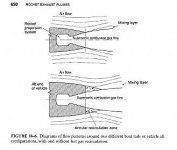
That is not light reflection. It's a phenonama known as plume recirculation. That is what is causing the foam on the aft dome to become charred.
 
That is not light reflection. It's a phenonama known as plume recirculation. That is what is causing the foam on the aft dome to become charred.

Right. You can actually create a plume recirculation yourself...well, sort of. When you drive fast over a wet highway, the water spray can get caught behind your car and form a visible dense cloud (that is also the reason why your rear windows can get wet at all).


That file explains well how exhaust plumes form in real life and which properties they have:
http://file.astrospot.net/files/public/book/avaxe/Rocket Propulsion Elements/26429_18.pdf
 

Attachments

  • ExhaustRecirculation.jpg
    ExhaustRecirculation.jpg
    16.7 KB · Views: 724
Well, anyway. I don't come further with the ET umbilical door animation. Its strange.
I launch with opened doors (State=1).
I separate the ET and move the switch to close. Now the State should be around 0.998... but the door is suddenly reverted into closed position and opens again.

I suspect we miss one ClearMeshes(true) at a point and forget to redefine the animations afterwards. But no idea where to look.
The really confusing is that they used to work correctly! Same thing with the RMS deployment bug.

I'm not sure, but I think it started after the new KU band antenna was added.

So you might want to see if removing it again clears up the bugs.
 
So you might want to see if removing it again clears up the bugs.

If its that, we could also just count which code changes happened since that time and look for side effects.

I can't imagine why adding a single mesh in the same pass as the orbiter mesh can cause problems, but maybe the mesh order changed. Maybe we should use a fixed order of meshes.

Orbiter = 0
VC = 1
RMS = 2
KU = 3
Static_Payload_mesh = 4
ET = 5
LSRB = 6
RSRB = 7

etc...
 
If its that, we could also just count which code changes happened since that time and look for side effects.

I can't imagine why adding a single mesh in the same pass as the orbiter mesh can cause problems, but maybe the mesh order changed. Maybe we should use a fixed order of meshes.

Orbiter = 0
VC = 1
RMS = 2
KU = 3
Static_Payload_mesh = 4
ET = 5
LSRB = 6
RSRB = 7

etc...
Both sounds like good ideas to me. Since it's all we have right now, how about putting it in work?
 
Back
Top