Idea Shuttle Fleet recompile for Orbiter 2016

So maybe delete the dock. Move the ring and new dock position. Then create a dock with new position.

---------- Post added at 11:29 AM ---------- Previous post was at 10:20 AM ----------

So this moves the ring in/out and set the new dock y pos.
Code:
	if (ODS == 1){//ODS is  present
		//SetDockParams(dockpos, _V(0, 1, 0), _V(0, 0, -1));
		if (DOCKRING_status >= HATCH_RAISING) {
			double da = simdt * .1;
			if (DOCKRING_status == HATCH_RAISING) {
				if (DOCKRING_proc > 0.0) DOCKRING_proc = max(0.0, DOCKRING_proc - da);
				else DOCKRING_status = HATCH_UP;
			}
			else {
				if (DOCKRING_proc < 1.0) DOCKRING_proc = min(1.0, DOCKRING_proc + da);
				else DOCKRING_status = HATCH_DOWN;
			}
			SetODSDock();
			SetAnimation(anim_DOCKRING, DOCKRING_proc);
			ringpos.y = 2.259 + (DOCKRING_proc * .45);  //move dock post on y axis  to follow ring position  rign move up.45 when extended
		//	SetAttachmentParams(Dockring, ringpos, _V(0, 1, 0), _V(0, 0, 1));

			//SetDockParams(dockpos, _V(0, 1, 0), _V(0, 0, -1));
				//sprintf(oapiDebugString(), "%0.4f ", dockpos.y);
			//SetODSDock();
		}
	}

Code:
void Atlantis::SetODSDock(void) {
	DelDock(hDockODS);
	sprintf(oapiDebugString(), "%0.4f ", ringpos.y);
	hDockODS = CreateDock(ringpos, _V(0, 1, 0), _V(0, 0, -1));
	//SetDockParams(hDockODS, dockpos, _V(0, 1, 0), _V(0, 0, -1));

}

The dock jumps to place.
 
Not sure why isn't working.

Code:
if (ODS == 1){//ODS is  present
		//SetDockParams(dockpos, _V(0, 1, 0), _V(0, 0, -1));
		if (DOCKRING_status >= HATCH_RAISING) {
			double da = simdt * .1;
			if (DOCKRING_status == HATCH_RAISING) {
				if (DOCKRING_proc > 0.0) DOCKRING_proc = max(0.0, DOCKRING_proc - da);
				else DOCKRING_status = HATCH_UP;
			}
			else {
				if (DOCKRING_proc < 1.0) DOCKRING_proc = min(1.0, DOCKRING_proc + da);
				else DOCKRING_status = HATCH_DOWN;
			}
			if (olddockpos != ringpos.y){  // old pos is not the same as the new position so move the dock

				DelDock(hDockODS);  //del dock
				//ringpos.y = 2.259 + (DOCKRING_proc * .45);//change
				olddockpos = ringpos.y;  //set old to current ring pos
				ringpos.y = 2.259 + (DOCKRING_proc * 5);//change
				sprintf(oapiDebugString(), "ring  %2.2f oldring %2.2f", ringpos.y, olddockpos);
				hDockODS = CreateDock(_V(0, ringpos.y, 10.14), _V(0, 1, 0), _V(0, 0, -1));//make new dock at new current y pos
				

			}


		//	SetODSDock();
			SetAnimation(anim_DOCKRING, DOCKRING_proc);
			//ringpos.y = 2.259 + (DOCKRING_proc * .45); 


			//move dock post on y axis  to follow ring position  rign move up.45 when extended
		//	SetAttachmentParams(Dockring, ringpos, _V(0, 1, 0), _V(0, 0, 1));

			//SetDockParams(dockpos, _V(0, 1, 0), _V(0, 0, -1));
				//sprintf(oapiDebugString(), "%0.4f ", dockpos.y);
			//SetODSDock();
		}
	}

If the y value are different delete the dock and make a new dock at the new y position. Keep doing it til animation proc =1.


I know there is a add-on to see dock position. But can't find it

Well I think is happening is the dock is deleted. then moved but the vessel is no longer docked. Not sure about that?

Went with new code:
Code:
if (ODS == 1){//ODS is  present
		//SetDockParams(dockpos, _V(0, 1, 0), _V(0, 0, -1));
		if (DOCKRING_status >= HATCH_RAISING) {
			double da = simdt * .1;
			if (DOCKRING_status == HATCH_RAISING) {
				if (DOCKRING_proc > 0.0) DOCKRING_proc = max(0.0, DOCKRING_proc - da);
				else DOCKRING_status = HATCH_UP;
			}
			else {
				if (DOCKRING_proc < 1.0) DOCKRING_proc = min(1.0, DOCKRING_proc + da);
				else DOCKRING_status = HATCH_DOWN;
			}
			if (olddockpos != ringpos.y){  // old pos is not the same as the new position so move the dock

				//DelDock(hDockODS);  //del dock
				//ringpos.y = 2.259 + (DOCKRING_proc * .45);//change
				olddockpos = ringpos.y;  //set old to current ring pos
				ringpos.y = 2.259 + (DOCKRING_proc * .45);//change
				//sprintf(oapiDebugString(), "ring  %2.2f oldring %2.2f", ringpos.y, olddockpos);
				//hDockODS = CreateDock(_V(0, ringpos.y, 10.14), _V(0, 1, 0), _V(0, 0, -1));//make new dock at new current y pos
				SetDockParams(_V(0, ringpos.y, 10.15), _V(0, 1, 0), _V(0, 0, -1));
				GetDockParams(hDockODS, dockpos1,  _V(0, 1, 0), _V(0, 0, -1));
				sprintf(oapiDebugString(), "ring  %2.2f oldring %2.2f  dock %2.2f", ringpos.y, olddockpos,dockpos1.y);

			}
same result. But the position moved just I expected the shuttle to move with the docking point.

---------- Post added at 05:14 PM ---------- Previous post was at 07:19 AM ----------

Well maybe it isn't possible. I will just stick to animation moving out. In someways that seems worthless as the dock doesn't move?
 
Last edited:
So my goal was to try to use Sf as an example. Right now I have a lot of the same things. Using ms2015 for launches. So when you add the new shuttle to a SF scenario you need to add the ET. Really other than that and repositioning you are good.
I have the use which mesh for OV and Original or Mid. 1 full rms. Lights part of the dll so no need to add them. I have the read the scn for attachments. All the camera settings.

Things That I believe to be different not sure if needed?
Landing Gear: Right now you just press G. I think in Sf you have to arm the gear CTRL +G and then the gear deploys. I believe the gear also deploys if you add the vessel to the land.
Speed Brake: I added the 5% change for speed brake. But I think SF has a auto speed brake that adjusts to keep a certain speed. Not sure how to add that.
Docking: In Sf if you CTRL Z you get a docking circle on the HUD. I believe Sf has its own docking mfd. So I can add if in that view add a docking target to the HUD?
MFD. Since I haven't been able to code a mfd yet none available.


One thing not sure about is on other side in the cargo bay there seems to be a place for the OBSS. I can do that but it seems it may need to rotate out like the RMS? So was it straight up?


Any other ideas.
 
Last edited:
It does "roll out" like the RMS.
 
Thanks. I thought so. But not sure what key does it.

I can make the attachment move (MPM?) and move the OBSS. Make it so the OBSS will attach is close by.
 
So you are saying the OBSS MPM rotate out. With the OBSS?

jCfLFup.jpg


Code:
	//obss tilt
	if (OBSS_status >= HATCH_RAISING) {
		double da = simdt * .1;
		if (OBSS_status == HATCH_RAISING) {
			if (OBSS_proc > 0.0) OBSS_proc = max(0.0, OBSS_proc - da);
			else OBSS_status = HATCH_UP;
		}
		else {
			if (OBSS_proc < 1.0) OBSS_proc = min(1.0, OBSS_proc + da);
			else OBSS_status = HATCH_DOWN;
		}
		//OBSS_COS = (cos(30*DEG) / OBSS_proc-1);
		//OBSS_SIN = (sin(30*DEG) / OBSS_proc-0);
		OBSS_COS = ((-.5 * OBSS_proc)-0);
		OBSS_SIN = ((.866 * OBSS_proc) );
		
		SetAttachmentParams(sat_attach7, _V(2.850, .850, 1.760), _V(OBSS_COS, OBSS_SIN, 0), _V(0, 0, 1));
	}


But with your permission I might use the Ultra MPM? and have as a mesh that I can rotate out. And then figure out how to rotate the attachment
 
Thanks. The code is stumping me. The OBSS is attached. But it is not moving but the attachment is. The position is not changing though?
Code:
VECTOR3 arm_tip[6], armobss_tip[3];
Animation defintion
Code:
//mpmobss
	static UINT OBSSmpm[1] = { 0 };
	static MGROUP_ROTATE OBSS_A(7, OBSSmpm, 1,_V(2.544, 1.187, 9.613), _V(0, 0, 1), (float)(-30 * RAD)); // -180 .. +180
	anim_MPMOBSS = CreateAnimation(0.0);
	AddAnimationComponent(anim_MPMOBSS, 0, 1, &OBSS_A);
	obss_anim[0] = new MGROUP_ROTATE(LOCALVERTEXLIST, MAKEGROUPARRAY(armobss_tip), 3, OBSS_POS, _V(0, 0, 1), (float)(-30 * RAD));
	AddAnimationComponent(anim_MPMOBSS, 0, 1, obss_anim[0]);

if MPM is moving move attachment
Code:
if (OBSS_proc > 0 && OBSS_proc < 1) {
	SetAttachmentParams(OBSS_attach, armobss_tip[0], armobss_tip[1] - armobss_tip[0], armobss_tip[2] - armobss_tip[0]);
	//armOBSS_moved = false;
	}

tip is set up:
Code:
	armobss_tip[0] = OBSS_POS;
	armobss_tip[1] = OBSS_POS + _V(0.0, 1.0, 0.0);
	armobss_tip[2] = OBSS_POS + _V(0.0, 0.0, 1.0);


oenNFDP.jpg


---------- Post added 08-27-18 at 05:42 AM ---------- Previous post was 08-26-18 at 05:15 PM ----------

So I got the OBSS to roll out:)

Code:
//mpmobss
	static UINT OBSSmpm[1] = { 0 };
	static MGROUP_ROTATE OBSS_A(7, OBSSmpm, 1,_V(2.544, 1.187, 9.613), _V(0, 0, 1), (float)(-30 * RAD)); // -180 .. +180
	anim_MPMOBSS = CreateAnimation(0.0);
	obssparent = AddAnimationComponent(anim_MPMOBSS, 0, 1, &OBSS_A);
	obss_anim[0] = new MGROUP_ROTATE(LOCALVERTEXLIST, MAKEGROUPARRAY(armobss_tip), 3, OBSS_POS, _V(0, 0, 1), (float)(0.0));
	AddAnimationComponent(anim_MPMOBSS, 0, 1, obss_anim[0], obssparent);

So I added the Starboard MPM rollout and attach to the control panel
Q5DaHGT.jpg


So in SF They have this in the scn:
Code:
  PAYLOAD_MASS1 0.0000
  PAYLOAD_MASS2 0.0000
  PAYLOAD_MASS3 0.0000

From the manual
"PAYLOAD_MASS1 <xxxxx.xxx> Allows the addition of various payloads’ mass to the
vehicle. <xxxxx.xxx> is the payload mass, in
kilograms.
NOTE: This will associate the mass with the object
attached to the payload 1 position in the cargo bay.
Vehicle performance, particularly during ascent, will
suffer as the payload mass is increased. When a
payload is released on orbit, the mass is released as
well. If an object is grappled on-orbit, the mass IS
NOT added to the vehicle until a scenario file is
made.
PAYLOAD_MASS2 <xxxxx.xxx> This will associate the mass with the object attached
to the payload 2 position in the cargo bay, similar to
the usage of “PAYLOAD_MASS1” referenced
above.
PAYLOAD_MASS3 <xxxxx.xxx> This will associate the mass with the object attached
to the payload 3 position in the cargo bay, similar to
the usage of “PAYLOAD_MASS1” referenced
above."

So I guess it just adds the mass to the total mass of the shuttle?

---------- Post added 08-28-18 at 04:39 AM ---------- Previous post was 08-27-18 at 05:42 AM ----------

So added if payload is mentioned in the scn add it to the mass.

An Issue that is also in the SSU with the rms? Donamy had mention this but Iam not sure what.

I got the rms to translate

e7NBOTt.jpg
 
It is a progression bug, with the rotation of a grappled attachment point. It doesn't hold steady on the grapple fixture when it is rotated.
 
So I were to grap something. Then rotate the end I would see the issue?
 
SiameseCat fixed it for the SSRMS, with a hack I believe, by constantly releasing and resetting it in the code.
 
Well it seems to be an orbiter bug.

Sure I can say if attached then release and reattach. I need to further see what it is doing.
 
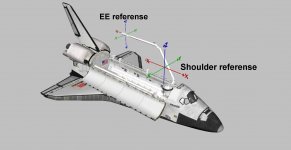
here is a pic of the two references for the RMS. The EE reference goes through the center of the EE. The shoulder reference uses the shoulder joint.
 

Attachments

  • RMS referense.jpg
    RMS referense.jpg
    114.4 KB · Views: 16
Thanks. I guess I am having a struggle with the value of the reference points?

Does it affect the animation yes/no?
 
Right now you have single joint rotation, and the payload bay(shoulder) reference translation only.
 
Right now you have single joint rotation, and the payload bay(shoulder) reference translation only.


I am confused::idk:


So if the reference is the payload bay it is the base and all animation is based off that, right?


And if I select the EE the animation would be based off the EE?


No idea how to code the different reference point?


Does SSU have it?
 
Yes !!! And the code is available.
 
Back
Top