

- Joined
- Mar 17, 2008
- Messages
- 179
- Reaction score
- 116
- Points
- 43
- Location
- Southwest Pennsylginia
- Website
- sites.google.com
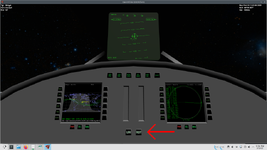
I'm hoping to use a lighted button effect for NAVMODE and RCSMODE in a simple VC. I've got NAVMODE working fine with this code:
A lighter image is copied over a darker one when the buttons are pressed.
I tried the same thing with RCSMODE using:
The source image is copied over the target but it's always there. No matter what mode it's in or if it's off, it looks like the buttons are always lit up.
What am I doing wrong?
Code:
function redraw_panel_navmode(surf)

  for i = NAVMODE.KILLROT, NAVMODE.HOLDALT - 1 do
    if vi:get_navmode(i) then
      oapi.blt(surf, tex4, (6-i)*85.3, 0, (6-i)*85.3, 0, 85.3, 64)
    end
  end

endI tried the same thing with RCSMODE using:
Code:
function redraw_panel_rcsmode(surf)

  for i = RCSMODE.ROT, RCSMODE.LIN do
    if vi:get_rcsmode(i) then
      oapi.blt(surf, tex6, (2-i)*64, 0, (2-i)*64, 0, 64, 64)
    end
  end

endWhat am I doing wrong?


