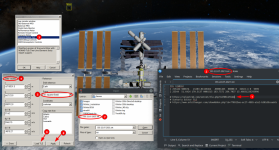
My "Load TLE" data button is greyed out in ScnEditorTLE. Anyone know what might be causing this? Does this tool work in Orbiter 2016?
EDIT: I found out why. So to make this work for me I had to:
1. Create a scenario that does not have an MJD date under the BEGIN ENVIRONMENT section. So I copied Space Shuttle to ISS.scn and renamed it.
2. Edited the new scenario with Notepad++ and changed the section that looks like this:
Code:
BEGIN_ENVIRONMENT
  System Sol
  Date MJD 55278.4979646848
END_ENVIRONMENT
to this...
Code:
BEGIN_ENVIRONMENT
  System Sol
END_ENVIRONMENT
This forces the scenario to start at Now. For me the Space Shuttle Orbiter was at KSC at UTC time.
3. I then went to this webpage:
https://celestrak.org/NORAD/elements/table.php?GROUP=stations&FORMAT=tle which is a list of Space Stations
4. Found this station: ISS (ZARYA)
5. Clicked on the little notepad thingy icon under the column titled: "Latest Data"
6. A page comes up with data that looks like this:
Code:
ISS (ZARYA)
1 25544U 98067A   25203.73240839  .00010456  00000+0  19082-3 0  9996
2 25544  51.6353 130.8857 0002081  97.6914 346.6167 15.50017352520676
7. I then copy this text to a notepad document and save it in my Orbiter Root directory with the name of the satellite and today's date on it. (i.e. ISS-25-07-22)
8. Then I open my Orbiter scenario that I created that takes me to Now date and time.
9. Un-pause the sim.
10. Open Function in main menu, Scenario TLE.
11. In this window I choose the ISS on the list.
12. Click Edit
13. Click on State Vectors (The Load TLE is greyed out).
14. Set Frame to: "ref. equator (fixed)" (Load TLE button is now active and available).
15. Click Load TLE
16. Navigate to where my latest TLE text file is for the ISS "ISS-25-07-22.txt" in my root Orbiter folder.
17. All state vectors (besides rotation) are populated.
18. Click Apply.
19. Click Done and Done again.
20. Click back on my launch vehicle "Atlantis".
Now I'm ready to look for my more realistic launch date that is under 10 days.
Thanks guys for this. I hope I was able to help a tiny bit.
There are several sites that will give the TLE info on the ISS. Here are a few:
https://live.ariss.org/tle/
https://live.ariss.org/iss.txt
Also, I checked the position of the ISS in game using the map and it exactly matched the real-time map shown on this NASA sites here:
https://www.nasa.gov/spot-the-station/
https://www.esa.int
I'm so proud of myself!