Problem DGIV-2 Graphics Glitch?

matmat57

Widowmakr
Joined
Jan 28, 2010
Messages
22
Reaction score
0
Points
0
Website
www.16thaccw.org
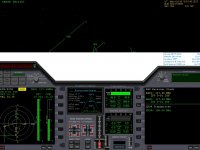
I am new to the sim so please bear with me. I downloaded and installed the new Delta Glider and have a couple issues. One the screen resolution is too high for my monitor causing part of the panel to be off screen. Two there is an area right above the panel where I should see the outside texture but it is white. In the cockpit view there is a white area between the top of the panel and the top of the HUD and even with the top of the HUD all the way across the screen. I don't yet know how to take a screenshot or I would post a picture of it. I assume there is a way to change the screen size but not sure if the white area is related to it. Anyone else run into this? Thanks
 
Here is a screenshot of the problem... besides the white area the panel is wider than the screen resolution so the edges of the panel are off the screen. Thanks
 

Attachments

  • 10.01.28 21-58-10 GL-01.jpg
    10.01.28 21-58-10 GL-01.jpg
    355.8 KB · Views: 27
OK figured it out I think. The screenshot above was taken with the sim in full screen mode @ 1024X768. I ran the same scenario in Windowed mode @ 1280X960 and everything was fine. I will go back and try full screen @ 1280X960 and see if everything is still ok. My guess is it will be. Anyway thanks for the screenshot utility!
 
Set the full screen mode to 1280X960 and the white area came back! Set full screen mode to 1280X1024 and everything is good again! I guess you have to have certain size screens selected. Is that what you meant by graphical settings?
 
If the panel edges go offscreen you can scroll them with the cursor (arrow) keys.

By graphics settings he meant more than just the resolution. Look in Orbiter's launchpad settings pages and give us details of what options are selected in there, including 3D Device, colour depth, the Visual Effects tab, and the like.

Also, if it isn't already, tick the box marked "Always Enumerate Devices" in the video tab.
 
32 instead of 16 did the trick. I have an ATI HD2400PRO 256MB AGP video card. I haven't changed a lot of the settings so most are at the default. did change the screen resolution to 1280X960X32 and everything looks ok. The Video card is selected and uses HAL? Haven't changed any other settings or check boxes. I will have to look for the "Always Enumerate Divices" box. What does it do?
 
Always enumerate devices makes Orbiter retrieve a full list of devices instead of just the default Direct3D devices. It is indeed advisable to check that box and select the device entry with the name of your graphics card and T&L in the name.
 
Back
Top