
You are using an out of date browser. It may not display this or other websites correctly.
You should upgrade or use an alternative browser.
You should upgrade or use an alternative browser.
Update Arrow Freighter version 2012 updated (screenshots)
- Thread starter dansteph
- Start date
- Status
- Not open for further replies.

Marvin42
Mostly Harmless
- Joined
- Nov 1, 2011
- Messages
- 67
- Reaction score
- 0
- Points
- 6
Oh, great news, guys/girls. Dan's got only 1% to finish. Although, that's kind of a relative thing when it comes to the "how much time untill it's done". So, to recap, it's not going to be finished today  , but maybe in a tuesday we'll get some updates. Counting down...:hail:
PS. source: (dansteph's forum).
Dan:
, but maybe in a tuesday we'll get some updates. Counting down...:hail:PS. source: (dansteph's forum).
Dan:
Could be finished in a Saturday...
-"What saturday ? THIS saturday !?"
-"I don't know"
-"And the next news of the development, when that's gona be?"
-"I can't tell, could be in a saturday... or, eventually, in a tuesday..."
-"grrr"
I'm almost done hitting the end (doc, alpha/beta test), but as it's been said, it's the last 1% which takes the 99% of the time.

luki1997a
Active member
Sorry if this question was arleady asked. But can't those displays just display live view of outside? e.g. one directed to ref. planet etc. If not, will it be able to display real time data such as ApA, PeA etc.

It has already been asked and answered multiple times. The answer is no; they're there for aesthetic purposes only.Sorry if this question was arleady asked. But can't those displays just display live view of outside? e.g. one directed to ref. planet etc. If not, will it be able to display real time data such as ApA, PeA etc.
 hsnap:
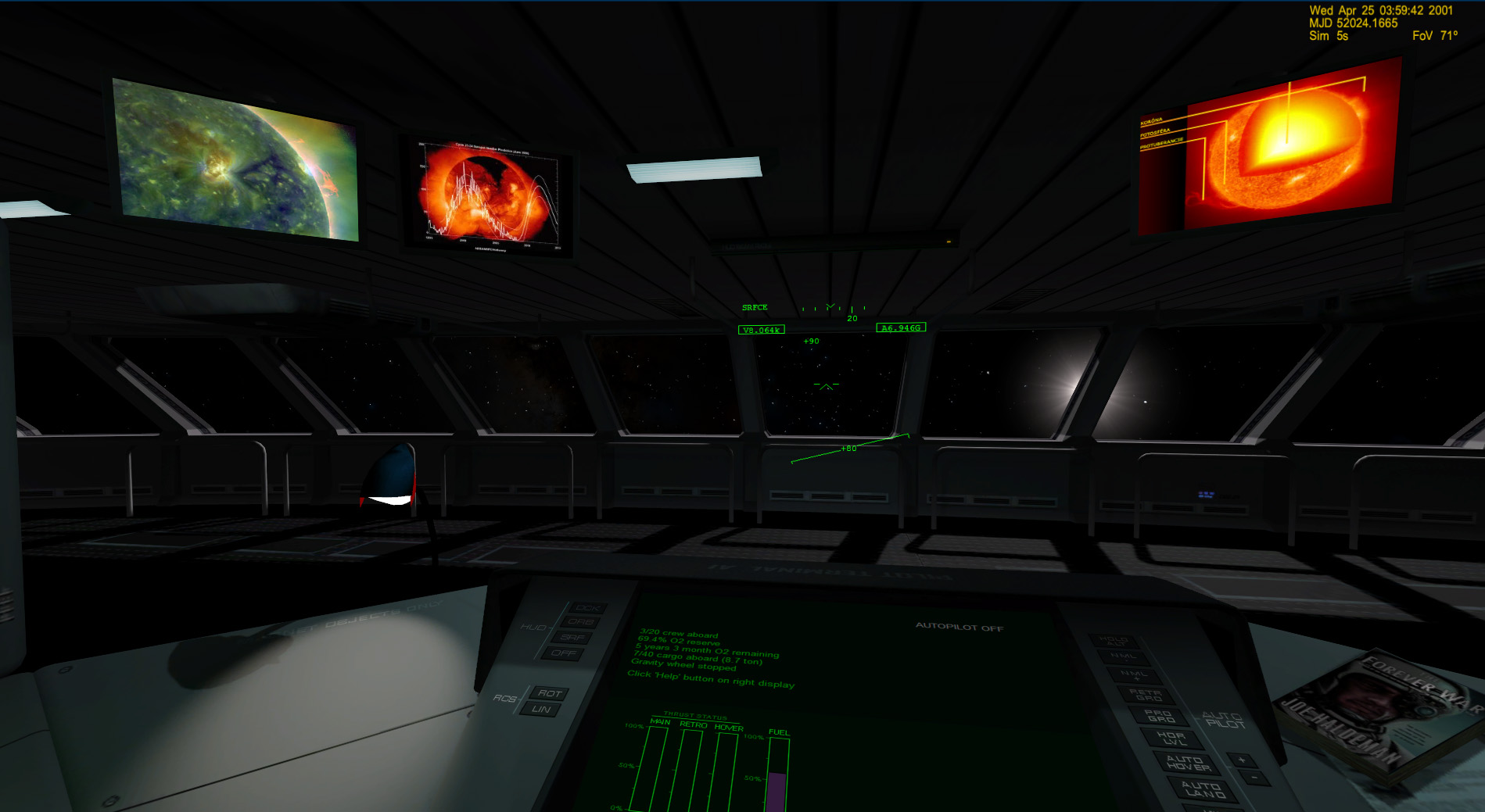
From an Idea of Joffrey and after he gave me 80 images I've made also the code for the Sun and the asteroid zone.
For user/author it's also pretty simple to add new image just drop mosaic with name "Scr_Sun_MyUserName.dds" or "Scr_Asteroid_MrJohnDoe.dds" and you have 24 image more for those zones.
Yet there will be 48 for each by default.
(Warning 1920 wide)
---------- Post added 06-03-12 at 09:25 PM ---------- Previous post was 06-02-12 at 10:56 PM ----------
The new left pad:
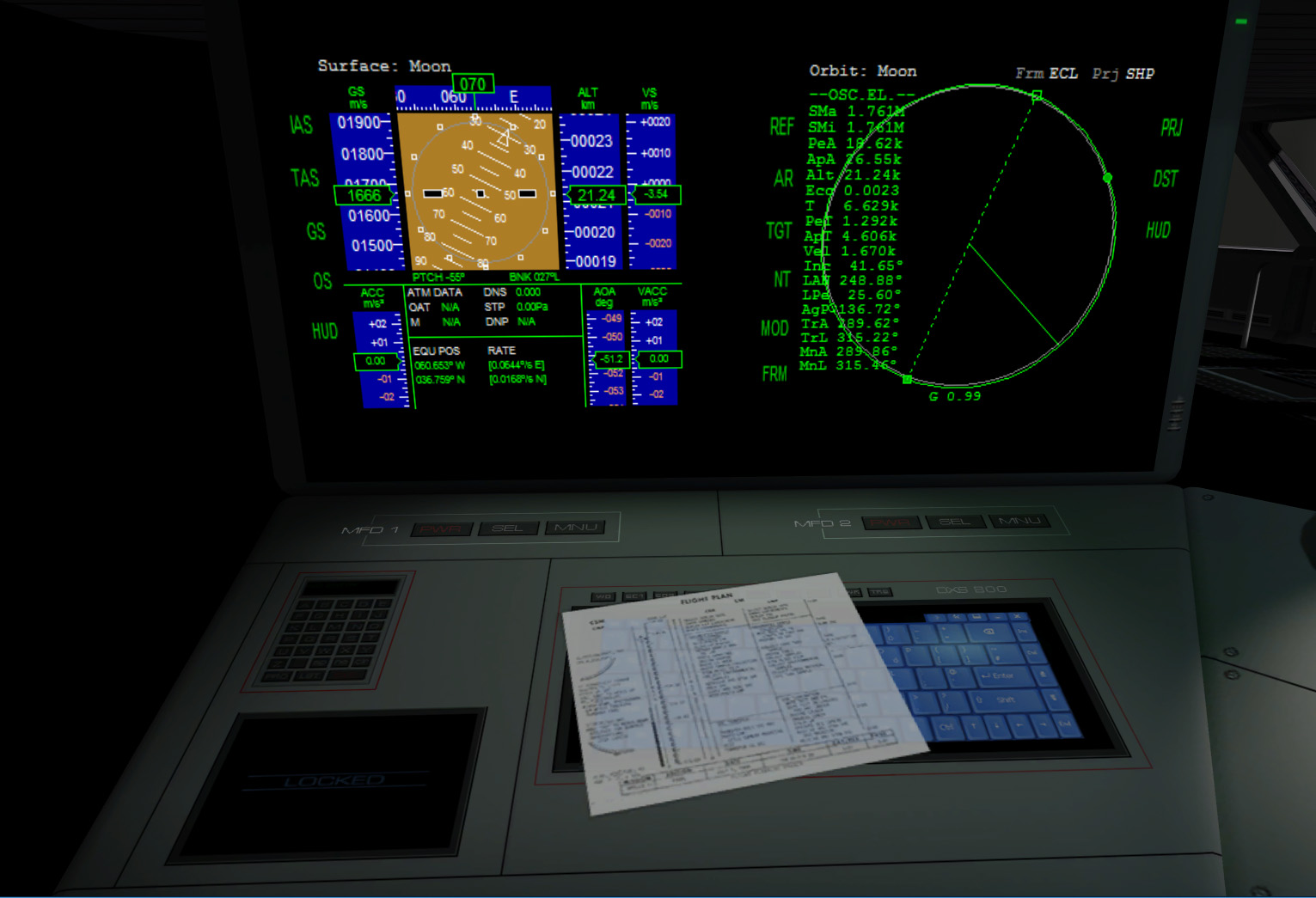
I'm working for the mosaics by default, yet 14 done for a total of 336 images. (2 moon, 2 sun, 2 asteroid, 1 io, 1 Enceladus, 1 Titan etc. etc.)
Dan
For user/author it's also pretty simple to add new image just drop mosaic with name "Scr_Sun_MyUserName.dds" or "Scr_Asteroid_MrJohnDoe.dds" and you have 24 image more for those zones.
Yet there will be 48 for each by default.
(Warning 1920 wide)
---------- Post added 06-03-12 at 09:25 PM ---------- Previous post was 06-02-12 at 10:56 PM ----------
The new left pad:
I'm working for the mosaics by default, yet 14 done for a total of 336 images. (2 moon, 2 sun, 2 asteroid, 1 io, 1 Enceladus, 1 Titan etc. etc.)
Dan

jangofett287
Heat shield 'tester'
- Joined
- Oct 14, 2010
- Messages
- 1,150
- Reaction score
- 13
- Points
- 53
I'd say that's too much work for something your probably not going to notice.

TMac3000
Evil Republican
- Joined
- Nov 16, 2008
- Messages
- 2,773
- Reaction score
- 0
- Points
- 36
- Location
- Flying an air liner to the moon
I think it would be cool if you made that calculator-like panel under the left MFD to work. It could be used for entering autopilot codes, like in the DG-IV
Considering the present Arrow ships with only one autopilot, this doesn't sound very useful without major additions to the autopilot selection, which is outside of the scope of this update.I think it would be cool if you made that calculator-like panel under the left MFD to work. It could be used for entering autopilot codes, like in the DG-IV
That aside, even considering eventual updates...the Arrow is a half-kilometre long technological behemoth. Apollo or Shuttle-era codes would be a thing of the past, eh?

It would be cool to have the book and flight plan papers blow off under full thrust!
Without Joke a pen or other things that fly trough the cabin at zero G was always in my mind but it's technically hard to do to be convincing.
(I should use anim so it would always be the same and the movement would not be natural)
Maybe one time using a hack.
TMac3000
Evil Republican
- Joined
- Nov 16, 2008
- Messages
- 2,773
- Reaction score
- 0
- Points
- 36
- Location
- Flying an air liner to the moon
Considering the present Arrow ships with only one autopilot, this doesn't sound very useful without major additions to the autopilot selection, which is outside of the scope of this update.
That aside, even considering eventual updates...the Arrow is a half-kilometre long technological behemoth. Apollo or Shuttle-era codes would be a thing of the past, eh?
Perhaps radio codes or something:idk:

- Joined
- Aug 13, 2008
- Messages
- 185
- Reaction score
- 0
- Points
- 31
- Location
- Chicago
- Website
- www.frogisis.com
Or just a straight-up calculator. Sometimes it's a little more fun to work out what you need to do on your own.
One thing I didn't see mentioned and wanted to ask: Are the robot arm(s) on the back of the forward section by the cargo rack going to be usable? Deploying cargoes was always the hardest part of using the Arrow, I thought - This way you could move the arm over to, say, a probe or satellite of some kind, pluck it off the rack manually, and deploy it right there.
One thing I didn't see mentioned and wanted to ask: Are the robot arm(s) on the back of the forward section by the cargo rack going to be usable? Deploying cargoes was always the hardest part of using the Arrow, I thought - This way you could move the arm over to, say, a probe or satellite of some kind, pluck it off the rack manually, and deploy it right there.
Deploying cargoes was always the hardest part of using the Arrow, I thought - This way you could move the arm over to, say, a probe or satellite of some kind, pluck it off the rack manually, and deploy it right there.
Cargo/Arm is not only coding difficult but it would be completely boring to use. Of course it could be automatic instead of manual but this would be a hell of coding and also not very realistic unless you place the cargo on ground right under the arm. (and still boring) After 5-6 just to try you'd left it for the "cargo/warp" method.
Better spend coding time for more systems but this release is almost done.
About difficulty of actual method I don't see your point ? Click grapple/release and voilà.
- Joined
- Aug 13, 2008
- Messages
- 185
- Reaction score
- 0
- Points
- 31
- Location
- Chicago
- Website
- www.frogisis.com
Yeah, I can see what you mean about it being an extra step - I just meant there's no way to manipulate a crate short of an EVA, although that can be more fun (maybe that was your intention, or maybe I'm just crappy at UCGO). I looked around in the Arrow config files for any "release speed" parameters, but when I release a cargo from the rack it goes ptchooooooo off into space at a respectable walking pace, and I was just thinking it'd be nice if I could use those arms to calmly lay out the individual crates I wanted to use/transfer to another ship, and then go outside to move them, instead of catching them individually.
But yeah, the new Arrow's got more on it already than I ever hoped for - I just want to get my hands on it.
But yeah, the new Arrow's got more on it already than I ever hoped for - I just want to get my hands on it.
Last edited:
but when I release a cargo from the rack it goes ptchooooooo off into space at a respectable walking pace
Ah yes, this is a bug, it's supposed to be ejected at 0.10 m/s.
Does it do the same with the DGIV ?
Dan

- Joined
- Apr 14, 2012
- Messages
- 2,585
- Reaction score
- 0
- Points
- 36

- Joined
- Sep 12, 2010
- Messages
- 3,133
- Reaction score
- 415
- Points
- 123
- Location
- Rome
- Website
- www.tuttovola.org
Not really a txt reader, but anyway there's this one, tooThanks, should be useful
[ame="http://orbithangar.com/searchid.php?ID=683"]Checklist MFD[/ame]
Last edited:
- Joined
- Aug 13, 2008
- Messages
- 185
- Reaction score
- 0
- Points
- 31
- Location
- Chicago
- Website
- www.frogisis.com
Ah yes, this is a bug, it's supposed to be ejected at 0.10 m/s.
Does it do the same with the DGIV ?
Dan
Old "trapezoid" DGIV cargoes are released at the appropriate crawl but UCGO crates are given a pretty big push.
Old "trapezoid" DGIV cargoes are released at the appropriate crawl but UCGO crates are given a pretty big push.
Ok, I'll solve this one.
Dan
- Status
- Not open for further replies.
Similar threads

- Replies
- 11
- Views
- 3K

- Replies
- 98
- Views
- 53K


- Replies
- 2
- Views
- 4K


- Replies
- 6
- Views
- 5K