Question Advanced networking problem

Bj

Addon Developer
Addon Developer
Donator
Joined
Oct 16, 2007
Messages
1,886
Reaction score
11
Points
0
Location
USA-WA
Website
www.orbiter-forum.com
OK so I thought it would be a good idea to get a little experience using server-client style network so I downloaded the trial version of Windows server 2008.

Now that its installed (standard version) I have the DNS set up and serving a domain called 'home' OK on the XP pro I can connect to it and everything. I have 3 users on the domain, 'administrator', 'BJ' and 'me'.

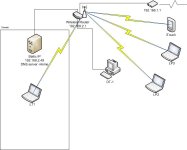
'me' has almost full administrative rights like administrator does. 'BJ' user is just a standard user. Now then, here is the network setup;

attachment.php


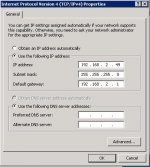
and here is the server's IP configuration;

attachment.php


OK I want LP1 to be connected to the domain server. (I named the computer white-server) I can ping it, connect to it with remote desktop and everything.

Now to the issue;
It takes forever for the computer to log in. It took 12 minutes* for the user profile to be created and logged in. After the user profile has been created, (I logged back off and logged back in) it took 4 minutes* to connect. It hangs on applying personal settings.

OK where I work it takes less than 30 seconds to create the initial profile then login to the system. I think it has to do with the server settings that might be causing the server lagging.

Does anyone have any ideas why its taking so long?

(if I ever find the issue I will re-post it here because I cannot find a solution from google.)


*Time is measured by when I click login to the time I get actual usability out of the system.
 

Attachments

  • our net.JPG
    our net.JPG
    36.5 KB · Views: 165
  • server-address.JPG
    server-address.JPG
    35.8 KB · Views: 165
Is it only one computer or is there a problem along the entire wireless route?

What's the DHCP scheme in the subnet?

Is the client configured correctly to the DNS?

What kind of router/firmware are you using?
 
Is it only one computer or is there a problem along the entire wireless route?

What's the DHCP scheme in the subnet?

Is the client configured correctly to the DNS?

What kind of router/firmware are you using?


I only have 1 version of PRO so I cannot test if it happens to multiple computers.


The DHCP is built right into the wireless router, which is a
Linksys WRT56G firmware V4.20.

The client has it set to obtain DNS and IP automatically.

There is only one DHCP and DNS server on this network, the DNS is the white-tower, and the DHCP is from the router.
 
I've had problem using domains over wireless before. Especially if you are in an area where other wireless networks are operating and there is a lot of cross-talk/noise reducing your throughput. A lot of samba traffic is used when setting up a profile and logging on/off, which is not especially good over latent networks.
 
What AG said, You might need to try logging on to the domain over a wired connection first and then try it over wireless. Make sure you are not using anything like romaing profiles and check the event logs for any errors, especially GPO processing errors.

The 12 minute lag suggests a lot of packing dropping/retransmits and other networking oddities.
 
Some more diagnostics

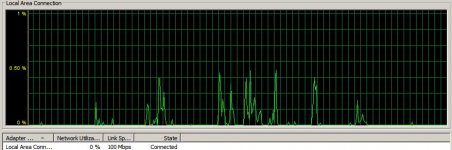
OK I tried the wired network (disabled wireless) and that didn't do anything whatsoever. I also logged on the server and used the task manager to watch the network stats when the computer was logging on; here is the first login;

attachment.php


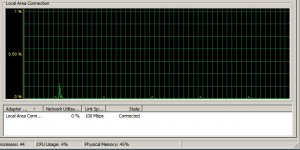
...and second time;

attachment.php


At the time of logging in, the LAN was quiet. The only machines on was the router, laptop and server.

Also my router is the only wireless my laptop can currently see. AFAIK it is the only signals being sent on the wireless.

I know the microwave operates on the same frequency, but the microwave is off. Also one of the wireless phone systems operate on the same frequency, but they are also off. (Took the batteries out and unplugged from wall temporary.) Even though this wouldn't effect the wired(which I believe is a CAT5e) network.
 

Attachments

  • LAN stat.jpg
    LAN stat.jpg
    58.4 KB · Views: 108
  • stats2.jpg
    stats2.jpg
    55.1 KB · Views: 108
Anything in the event logs of the clients referring to processing errors at logon?
 
Anything in the event logs of the clients referring to processing errors at logon?

OK here is the server side for today; Note: this was after I logged on and no issues came up. OH yeah this also only happens at startup. Otherwise its all clear.
________________________________________


Level Date and Time Source Event ID Task Category


Information 9/27/2009 9:34:10 AM Microsoft-Windows-DNS-Server-Service 4 None The DNS server has finished the background loading of zones. All zones are now available for DNS updates and zone transfers, as allowed by their individual zone configuration.


Information 9/27/2009 9:34:10 AM Microsoft-Windows-DNS-Server-Service 2 None The DNS server has started.


Error 9/27/2009 9:34:09 AM Microsoft-Windows-DNS-Server-Service 4007 None The DNS server was unable to open zone _msdcs.white.home.com in the Active Directory from the application directory partition ForestDnsZones.white.home.com. This DNS server is configured to obtain and use information from the directory for this zone and is unable to load the zone without it. Check that the Active Directory is functioning properly and reload the zone. The event data is the error code.


Error 9/27/2009 9:34:09 AM Microsoft-Windows-DNS-Server-Service 4007 None The DNS server was unable to open zone _msdcs.root.home.com in the Active Directory from the application directory partition ForestDnsZones.root.home.com. This DNS server is configured to obtain and use information from the directory for this zone and is unable to load the zone without it. Check that the Active Directory is functioning properly and reload the zone. The event data is the error code.


Error 9/27/2009 9:34:09 AM Microsoft-Windows-DNS-Server-Service 4007 None The DNS server was unable to open zone white.home.com in the Active Directory from the application directory partition DomainDnsZones.white.home.com. This DNS server is configured to obtain and use information from the directory for this zone and is unable to load the zone without it. Check that the Active Directory is functioning properly and reload the zone. The event data is the error code.


Error 9/27/2009 9:34:09 AM Microsoft-Windows-DNS-Server-Service 4007 None The DNS server was unable to open zone root.home.com in the Active Directory from the application directory partition DomainDnsZones.root.home.com. This DNS server is configured to obtain and use information from the directory for this zone and is unable to load the zone without it. Check that the Active Directory is functioning properly and reload the zone. The event data is the error code.
 
There is a problem with DNS and I think that could be causing the problem with the slow logons as AD is heavily dependant on DNS. what's the actual error codes?
 
There is a problem with DNS and I think that could be causing the problem with the slow logons as AD is heavily dependant on DNS. what's the actual error codes?

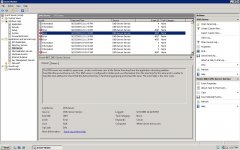
Well here is the screen shot of the error;

Also the details tab only says

+ System - Provider [ Name] Microsoft-Windows-DNS-Server-Service [ Guid] {71A551F5-C893-4849-886B-B5EC8502641E} [ EventSourceName] DNS
- EventID 4007 [ Qualifiers] 49152
Version 0 Level 2 Task 0 Opcode 0 Keywords 0x80000000000000 - TimeCreated [ SystemTime] 2009-09-27T19:11:39.000Z
EventRecordID 267 Correlation - Execution [ ProcessID] 0 [ ThreadID] 0
Channel DNS Server Computer White-Server.home.com Security
- EventData

param1 _msdcs.root.home.com

param2 ForestDnsZones.root.home.com


0D000000
Binary data:

In Words
0000: 0000000D

In Bytes
0000: 0D 00 00 00 ....


attachment.php
 

Attachments

  • screen2.JPG
    screen2.JPG
    153.5 KB · Views: 81
I think I have an answer, though not a solution for the issue;

The computer I have acting as a server is not really designed for doing server duties let alone using Windows Server. I think that may be related to the issue with long login time.

Ubuntu server looks like it is less intensive on the computer, Ill try that to see if that would fix it.
 
I quite like Ubuntu server, but it requires a bit of linux know-how to get it to run like you want it to. I don't know what you mean by 'serving' duties as even a simple computer can serve up most content (do you mean doesn't meet the requirements for Windows Server?). I have a really old Compaq with windows 98 at my parents house that I used to use as an http and ftp server (now I have a dedicated Ubuntu server for almost everything).

One thing you might try: switching the router's firmware to run DD-WRT. I've had problems running servers behind a subnet with the default firmware. In any event, when you get a working server you can define quality of service rules so that certain services have network priority.
 
I don't know what you mean by 'serving' duties as even a simple computer can serve up most content (do you mean doesn't meet the requirements for Windows Server?). I have a really old Compaq with windows 98 at my parents house that I used to use as an http and ftp server (now I have a dedicated Ubuntu server for almost everything).

Yes the computer meets the 'minimum standards'

60GB HD
1.77 Ghz (I think) CPU (single core only)
1GB ram
w/ a small to moderate video card

and serving duties are the roles from the server that include DNS, AD-DS, file services, and remote desktop.

I mostly installed it just to get comfortable with the environment. After all, I can get through my classes a lot faster if I know how to do everything before hand. ;)
 
The computer I have acting as a server is not really designed for doing server duties let alone using Windows Server. I think that may be related to the issue with long login time.

Unlikely. I have a very old Dell PC serving as my DC and I my logon time is about 3 seconds. your issue is related to the DNS errors in the DC's event logs.
 
Yes the computer meets the 'minimum standards'

60GB HD
1.77 Ghz (I think) CPU (single core only)
1GB ram
w/ a small to moderate video card

Your issues are definitely related to the configuration of your server. I'm not familiar with the windows server setup so I can't help you there, but I'm sure google will help.
 
garyw;123453DC said:
and I my logon time is about 3 seconds. your issue is related to the DNS errors in the DC's event logs.

Are you using 2008 version or 2003? Perhaps that is making the difference. It looks like I can get the standard and enterprise separate at about 500MB each so Ill try 2003 and see how that goes.

---------- Post added at 11:31 PM ---------- Previous post was at 11:21 PM ----------

but I'm sure google will help.

My first try was google, You know I have been on this forum long enough to know that posting a question without researching it first is tacking up a target on your back. ;)

I have seen many theories, relating to DNS, AD-DS, network config, router config, subnet config, even the client config. I still have yet to find a solution though.

I assume since 2008 server is fairly new there wouldn't be a lot of (free) support for it. 2003 probably will, even if of course it even happens again on the install.

BTW I followed a procedure like this though I didnot use a tutorial, I just really followed the 'add roles' tool and went from there.
 
Are you using 2008 version or 2003? Perhaps that is making the difference. It looks like I can get the standard and enterprise separate at about 500MB each so Ill try 2003 and see how that goes.

2003 SP2 with all patches and updates running in Windows 2003 native mode.

I'd also suggest eventid.net which is really useful for checking out those event id errors.

I'll install 2008 this weekend as a test dc and see if I can replicate your problem.
 
2003 SP2 with all patches and updates running in Windows 2003 native mode.

I'd also suggest eventid.net which is really useful for checking out those event id errors.

I'll install 2008 this weekend as a test dc and see if I can replicate your problem.


Thanks for the testing, Could there be any chance that it would be in the user profiles or policy settings? (Either local or for the domain?)
 
Thanks for the testing, Could there be any chance that it would be in the user profiles or policy settings? (Either local or for the domain?)

very unlikey unless you have some massive policy downloading. It's more likely to be a DNS configuration error
 
Back
Top