
Meshing Question Faces invisible in Orbiter

eveningsky339

Resident Orbiter Slave
Addon Developer
Donator
Joined
May 3, 2008
Messages
1,062
Reaction score
1
Points
0
Location
Western Maine
Me again... :lol:

The transparent windows look lovely, but when I look through them, I cannot see the back "wall" of the vessel. It seems that flat faces don't appear in Orbiter.
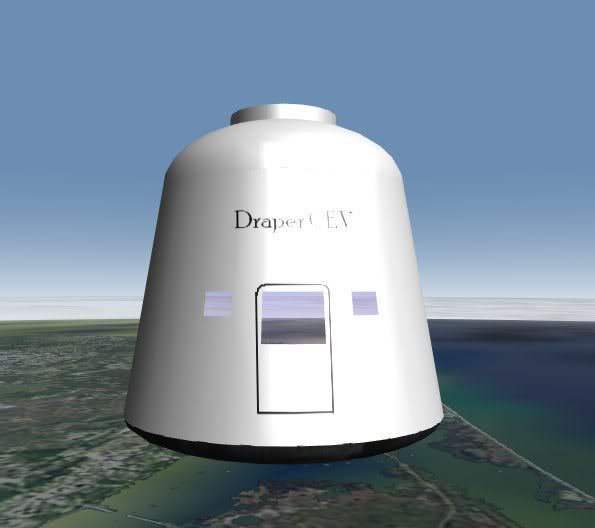
problem.jpg


Has anyone else encountered this problem and/or have a solution?


(If you are interested, this is the Draper MIT CEV... LINK)
 
Last edited:
Yeah, seen this problem before. It has to do with the order in which parts of the model are rendered in the mesh file. I'm sure there was a thread on the forum discussing this not too long ago.
I think you have to make sure that the window comes last in the mesh file for it to work properly... someone should clarify that for you though.
 
Don't you also need a double-skin on the capsule to see the inside?
One wall only has one set of normals, so you only see one side?

N.
 
yes, essentially orbiters engine treats faces as only having one shaded side... that side is determined by the direction the normal points in. currently all your normals are pointing out... If you want to show an inside you'll have to build an inside or else make the glass opaque. If you have built an inside then its probably what WHAP suggested though i've never encountered that problem within a model... I thought that was something to do with the order that models were loaded from a scenario file?
 
Thanks for the replies.

How would I go about making the capsule double-skinned?

I will throw an interior together to see if that helps.
 
there are quick ways to make an interior for sure, depending on your app... in max i could 'shell' the outside to give it thickness and an interior wall. otherwise you might have luck with copying then extruding the copy and flipping your normals if needed (generally dependant on whether you extrude in or out.)

however a real space capsule will have less internal space than a shell will give you so i'd start with a shell technique then start filling the space in where you'd need to keep fuel, thrusters, avionics, life support, etc.
 
there are quick ways to make an interior for sure, depending on your app... in max i could 'shell' the outside to give it thickness and an interior wall. otherwise you might have luck with copying then extruding the copy and flipping your normals if needed (generally dependant on whether you extrude in or out.)

however a real space capsule will have less internal space than a shell will give you so i'd start with a shell technique then start filling the space in where you'd need to keep fuel, thrusters, avionics, life support, etc.
Ah, I didn't think about shelling. I'll give it a whirl. It looks as though I need to flip the normals on the windows to see the interior, but that shouldn't be too difficult.
 
This comes down to optimizing the rendering in DirectX (and OpenGl as well as far as I know) and goes beyond just Orbiter.

If you have a mesh where you only see the outside skin, you're always seeing only the side facing you. As someone before me mentioned, it has to do with how the normals of the face are turned. If they're turned -90° < X < 90 where X is the angle you're looking the poly at, it will get rendered. If not, that means the poly is one of the back sides and need not be rendered.

That alone can decrease the amount of polys for rendering by a factor of 2 on average and can substantially improve performance, while losing the polys that the player wouldn't see anyway :)
 
Back
Top