Anim8or will not load texture

eveningsky339

Resident Orbiter Slave
Addon Developer
Donator
Joined
May 3, 2008
Messages
1,062
Reaction score
1
Points
0
Location
Western Maine
I created a texture in gimp 2.4 and saved it as a 24-bit bitmap. I went to anim8or to load the texture, but a window always pops up saying that the texture failed to load. I have "re-saved" this texture in paint without success. Other file formats are not compatible.

Is there a reason for this?


-----Posted Added-----


Apologize for the double post, but I have tried something else. I loaded the texture into photobucket and saved its image as a bmp with another name, and still no success. This doesn't make sense...
 
I sometimes run into this problem. I find that I have to tweak it a little in Paint, like increasing the size of the pic by one pixel, saving it, then reducing it by pixel, and saving it again, etc. I don't think just saving it without changing it changes anything. I have no idea why these things get corrupted.
 
I think anim8or can only handle 256 color bitmaps.
 
forget anim8tor , try metasequoia get the free version here

http://www.metaseq.net/english/index.html

direct link to download (4 MB)
http://www.metaseq.net/metaseq/mqle24.zip

the only thing is that u must export in .cob format then use 'blender' (freeware) to make it .3ds or .obj - but i think its the best freeware 3d program.
I am not spaming , i'm just reading anim8tor this anim8tor that in this forum , anim8tor is not made for modelling its made (obviouslly) for creating animations and its very hard to make a model.
 
Let me jump on the pro-Anim8or bandwagon and say that I use Anim8or exclusively and it is very capable, it like Orbiter has a sharp learning curve. I only just learned a week ago how to produce a torus shape. I also think GregBurch uses Anim8or almost exclusively for his outstanding models.
That said, Anim8or could stand some improvements IMHO, but it's free, easy, and very capable if you know what you're doing.
 
Very hard is relative. I find it relative hard to use Blender, though blender is sure the better modelling program.

I just needed 40 minutes to get this far in anim8or (excluding the 6 hours of frustration between start and where I left it, because anim8or crashed because of ICQ with 10 minutes of work not saved).
 

Attachments

  • Warspite_wip1.jpg
    Warspite_wip1.jpg
    16.9 KB · Views: 24
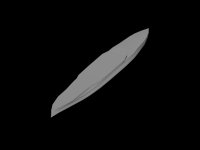
Urwumpe just curious,what's on photo?

A quick test of making a water line mesh of a warship from body plan drawings. Needed some experimentation to get it right. In this case, it is the HMS Warspite.
 
blender is worse than anim8tor the reason is simple those progs are not designed to make complex meshes their made for controlling their behavior.
(in blender u can make even games)

one last time

http://www.metaseq.net/metaseq/mqle24.zip

trust me you will forget anim8tor in seconds
its metasequoia or PAY ,ur choice :)
 
blender is worse than anim8tor the reason is simple those progs are not designed to make complex meshes their made for controlling their behavior.
(in blender u can make even games)

You could turn this foolish argumentation around say, that MetaSeq is thus not made for making good real-time rendering meshes, as it has no direct use for such work.

Both Anim8or and Blender have VERY good control over the actual output for freeware and support now Orbiters mesh format directly (by providing export filters for both programs). And I really like the capability of Anim8or to allow entering the dimensions of parts directly. It just lacks better tools to join two meshes and a better UV unwrapper.

I know somebody here also uses AC3D (but I don't know with certainty who), which got support for Orbiter coded in by the main developer of it. But for 45 USD, I would rather pay 30 USD more to get AC3D than MetaSeq.

From reading the feature list, MetaSeq is even worse than anim8or, unless you pay 45 USD. Of course, Anim8or is not perfect. But for freeware it is great. And pretty good for making accurate technical models.
 
A quick test of making a water line mesh of a warship from body plan drawings. Needed some experimentation to get it right. In this case, it is the HMS Warspite.

Urwumpe it's remind me on ship hull but was not been shure...making for orbiter or some other sim.
 
Urwumpe it's remind me on ship hull but was not been shure...making for orbiter or some other sim.

In this case, for nothing special at all. I made it as a test, how to make ship meshes. I think about one day adding some ships to orbiter, but if at all, I would make some rather civilian vessels, like tankers or cargo ships.
 
Anim8tor is good but to heavy for modeling at least for me,did you try Sketch Up,not the best tool,but to me is easyes for modeling.
 
ok i like the 'spline' feature of anim8tor but thats as far as it goes

the gui is bad u cant rotate,view ur model with a single click
cant select what u want to select in a click (see 'rope' 'belt' 'rect' feat. of metaseq) cant make polys connecting vectors (see 'create') ,cant move /rotate / join vertices / transform /strech /resize(see '3d arrows' GUI and magnet feat. of metaseq) in a click , cant extrude faces ,cant hide show parts in a click when the mesh is getting complex
cant cant cant cant cant..

metaseq is far from perfect but u must pay to get perfect and i suggested
a free prog to use , if u like the 'cant' use the 'cant'
there's no argument
 
  • That is true, I need maximal three clicks for that. Unless I finally learn the keyboard short cuts. I can also just rotate my current editing view around all directions with a single mouse press and restore it with two.
  • I can select all I want in two clicks (Or more, if I have to scroll the list)
  • I can extrude faces
  • I can merge points
  • I can rotate, scale, translate objects. And that in three coordinate systems.
  • I can create bended pipes with more mouse clicks as I consider good, but I can create them with a special tool.
  • I can create polygons.
  • I can detach faces and make them a new separate mesh.
  • I can hide parts with two clicks or a single keyboard shortcut
  • I can show all hidden parts with two clicks or a keyboard shortcut
  • I can... :cheers:
For example, I can create my large mesh out of many objects in the same session, test if the objects fit, collect relative positions of stage meshes...
 
  • That is true, I need maximal three clicks for that. Unless I finally learn the keyboard short cuts. I can also just rotate my current editing view around all directions with a single mouse press and restore it with two.
  • I can select all I want in two clicks (Or more, if I have to scroll the list)
  • I can extrude faces
  • I can merge points
  • I can rotate, scale, translate objects. And that in three coordinate systems.
  • I can create bended pipes with more mouse clicks as I consider good, but I can create them with a special tool.
  • I can create polygons.
  • I can detach faces and make them a new separate mesh.
  • I can hide parts with two clicks or a single keyboard shortcut
  • I can show all hidden parts with two clicks or a keyboard shortcut
  • I can... :cheers:
For example, I can create my large mesh out of many objects in the same session, test if the objects fit, collect relative positions of stage meshes...

Can you write a manual explaining how u cant do all those things ? ppl need it :compbash:
 
Can you write a manual explaining how u cant do all those things ? ppl need it :compbash:
There is a tiny PDF file called the "Anim8or user manual". ;) I recommend reading it... I have it even here in printed form, though I rarely look into it.

http://www.anim8or.com/download/animv095dPDF.zip

EDIT: Hey, looks like my constant complaints about the texturing had been heard, the current development preview has a better UV texturing system.
 
I created a texture in gimp 2.4 and saved it as a 24-bit bitmap. I went to anim8or to load the texture, but a window always pops up saying that the texture failed to load. I have "re-saved" this texture in paint without success. Other file formats are not compatible.

Is there a reason for this?

I ran into the exact same issue. I found a solution to this problem on the Anim8or forum that worked for me. When exporting a .bmp file in Gimp, make sure the option under Compatibility Options: 'Do not write color space information' is checked (selected). Apparently the color space information in the file is not compatible with Anim8or.

Note I was also able to import into Anim8or in 24 Bit colors as was suggested may not be possible elsewhere in this thread.

Hope this may be helpful to someone else in the future that runs into the same issue.
 
Back
Top