
You are using an out of date browser. It may not display this or other websites correctly.
You should upgrade or use an alternative browser.
You should upgrade or use an alternative browser.
Help with NASSP versions
- Thread starter sw34669
- Start date

it's also not clear here what i need to enter given the first part of setting an SPS P40 burn up. It looks like 5 green digits will be entered into the computer but actually, only 2 get entered, as there are no ABC keys. In a prev checklist, items like this are not shown. i.e. enter single digit for LM or LM/CSM then the computer puts the other 4 in.
I am guessing, as i'm doing an SPS burn, 211
It's also not clear, if B used alone, what it should be quantized to
also if Ullage 2 jet, should what you enter be 00 to keep 5 digits
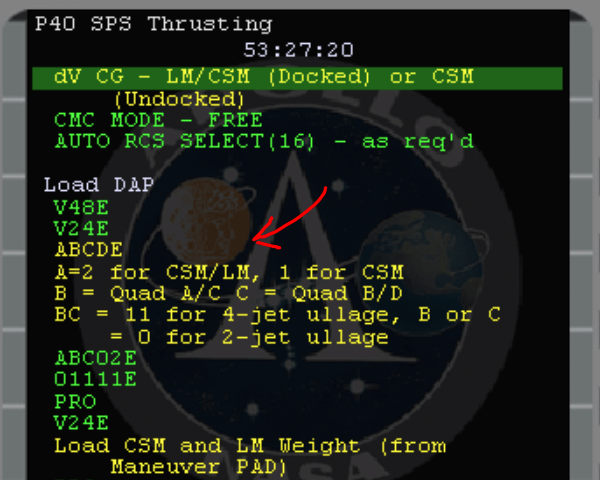
I am guessing, as i'm doing an SPS burn, 211
It's also not clear, if B used alone, what it should be quantized to
also if Ullage 2 jet, should what you enter be 00 to keep 5 digits
Last edited:
ok i have another one that's not clear. 1) I filled out 62745 in R1 from the PAD but there is no sign of the LM weight but there is a default in R2 of 33528. The problem is in prev checklists each R1 nd R2 has an ENTER in the checklist so for the one below , before i press PRO on the "Load CSM and LM Weight" checklist item, should I press enter twice 1) to accept R1 and 2 to accept the default thats in R2 before the checklist gets to hitting PRO on the computer.
I've looked at the original flight plan but i cant exactly match up whats on the checklist and what should be happening.
Same with the gimbal angles, should I make sure i press enter after entering r1 then R2 to make sure the comp is in the right input mode?
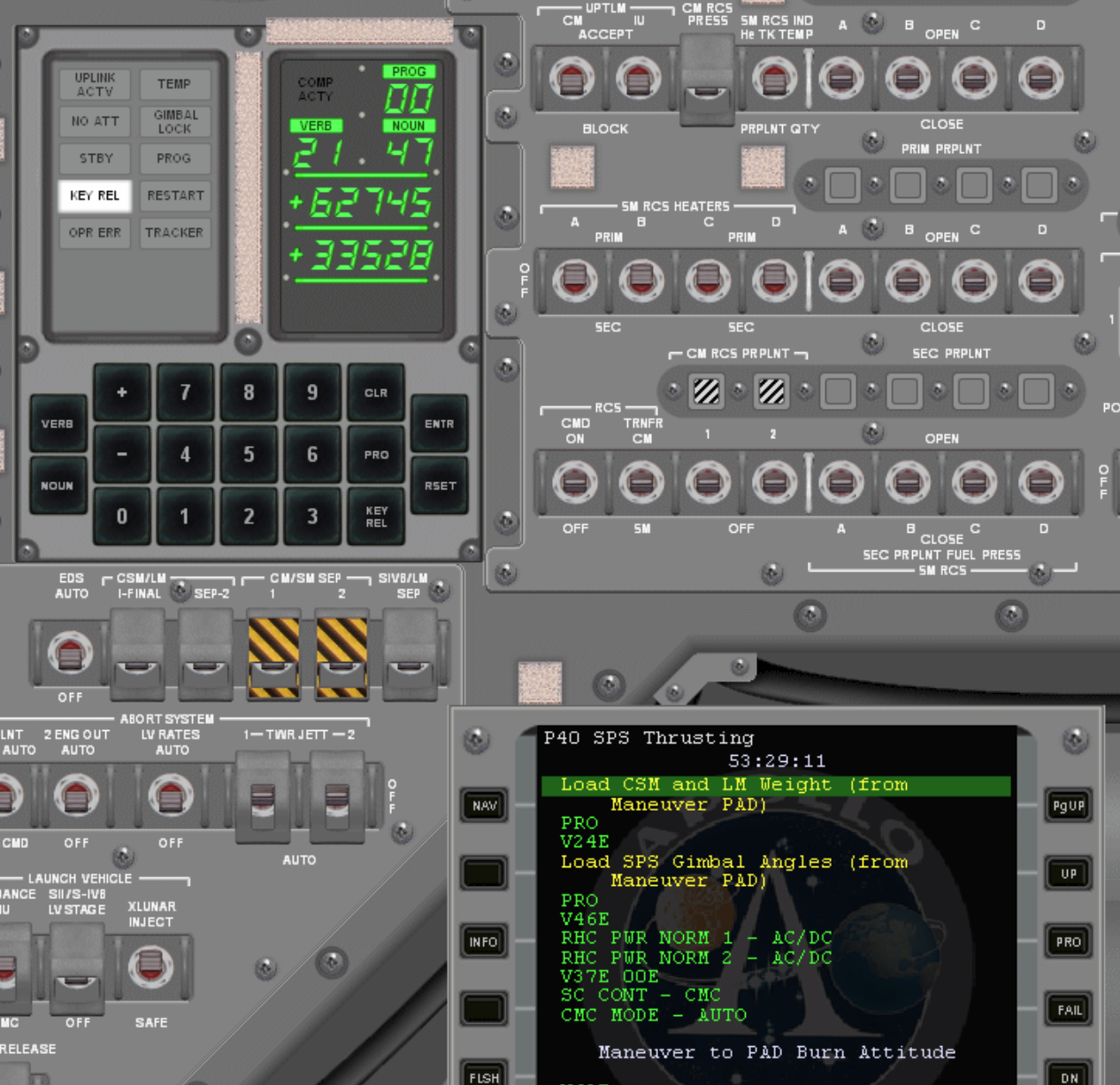
I've looked at the original flight plan but i cant exactly match up whats on the checklist and what should be happening.
Same with the gimbal angles, should I make sure i press enter after entering r1 then R2 to make sure the comp is in the right input mode?
First, I think this is still a good primer on the EMS: http://nassp.sourceforge.net/wiki/Entry_Monitoring_System (disclaimer, haven’t actually read it in a while)The numbers on a pad that relate to pitch and yaw trim get fed to N48. Is there anything else I need to do post SPS burn to trim with thrusters other than nulling out any small dv on the EMS.
And to make sure we’re on the same page regarding “trim,” it is used in two different contexts: the first is the N48 values for the pitch and yaw settings of the thrust-vectored SPS; the second is when talking about ”trimming“ residuals after a burn. Both are completely separate, in case you were not aware. With that in mind, I do not think there is anything to do after a SPS burn apart from trimming residuals (or as you say, nulling out small dv). I believe you should technically use the numbers on the DSKY (N83 or 85, can’t recall off top of my head), as they are theoretically more accurate than the EMS, which uses its own accelerometer as a back-up mode of counting DV changes. But for NASSP, and for small SPS burns, both EMS and the CMC should be pretty close to each other, in terms of residuals.
Indeed that appears to be a typois there a small typo on the checklist (MAG instead of MGA)
That confused me too, initially. This comes down to understanding what V48 - DAP settings - is really about, and even then it’s a bit strange. The first register has 5 ”spaces” (A-E) each of which can be a 1 or 0. The checklist here expects you to know what A will be, depending on whether you have the LM attached etc. B and C relate to how many +X thrusters fire if commanded to translate that way, specifically for ullage. What you put there depends on what the burn requires, and the flight plan will generally state a) if ullage is required, b) how long, and c) whether 2 or 4 jets. If 2, then B and C will be either 1 0, or 0 1. Your pick, depending on which thruster pairs you want to use (generally those with more fuel I guess).11 or 00 will mean 4 jets. D is the deadband (low or max) and directly impacts how tightly the spacecraft will stick to its assigned attitude. Finally, E is the rate it will move under DAP control (I am typing this all from memory, so there may be some inaccuracy but hopefully enough to get you roughly acquaintedit's also not clear here what i need to enter given the first part of setting an SPS P40 burn up. It looks like 5 green digits will be entered into the computer but actually, only 2 get entered, as there are no ABC keys.
What I do is this: if I only get a new CSM weight, and not a new LM weight, I will assume the LM weight is still valid, and therefore only change R1 - V21E. That leaves R2 alone. You just Pro from there. V24E means you have to change both, which you do not want to do (unless you remember what was already in R2 before it blanks out).1) I filled out 62745 in R1 from the PAD but there is no sign of the LM weight but there is a default in R2 of 33528. The problem is in prev checklists each R1 nd R2 has an ENTER in the checklist so for the one below , before i press PRO on the "Load CSM and LM Weight" checklist item, should I press enter twice 1) to accept R1 and 2 to accept the default thats in R2 before the checklist gets to hitting PRO on the computer.
).
bingo thanks i understand the register stuff it was just the switching between different ways the checklist interacts with R1 2 and 3 and I have now learned from you that hitting PRO after R1 2 or 3 will leave the defaults in.
Reminds me of setting octal disk boot vectors on old HP machines . Ah, dealing with paper tape and repairing it !
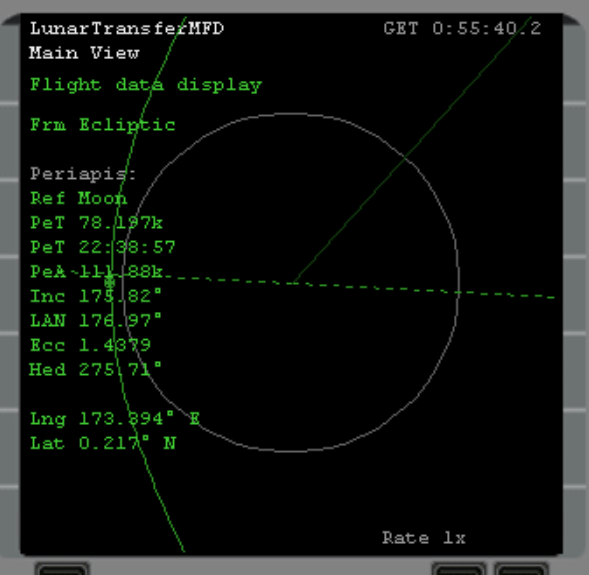
An afternoon well spent ..... my residuals were -.3dv and -00001 in pr and y ... i nulled pry and left the dv for the moment ...... with trepidation, i opened lunatic transfer MFD and ..... behold, not crashing into the moon now.
Reminds me of setting octal disk boot vectors on old HP machines . Ah, dealing with paper tape and repairing it !
An afternoon well spent ..... my residuals were -.3dv and -00001 in pr and y ... i nulled pry and left the dv for the moment ...... with trepidation, i opened lunatic transfer MFD and ..... behold, not crashing into the moon now.
is the ullage fire automatic at the start of the burn or is it something you have to manually trigger .There is a ullage yellow line in the checklist i remember I just PROd past it. Also there were a few times lines saying to check MTVC (manual thrust vector control) so i suspect answering my own question this is what the ullage button is for but the checklist didnt say to press it.
I now know where my last burn error came from . I burned the wrong way as the burn att numbers on the pad are XXXRRR XXXPPP XXXYYY but when entering these into V49 to move to burn att 2 decimal places get added so it's RRR00 ....etc.
Anyway thanks for your help i'm nearly there and then the horrors of the LM fire-up, descent and crash landing I have planned.
Did some reading that suggested the code in A10 had less problems with throttle pulsing and over-correction than 11 in the LM.
I now know where my last burn error came from . I burned the wrong way as the burn att numbers on the pad are XXXRRR XXXPPP XXXYYY but when entering these into V49 to move to burn att 2 decimal places get added so it's RRR00 ....etc.
Anyway thanks for your help i'm nearly there and then the horrors of the LM fire-up, descent and crash landing I have planned.
Did some reading that suggested the code in A10 had less problems with throttle pulsing and over-correction than 11 in the LM.

- Joined
- Oct 26, 2011
- Messages
- 1,267
- Reaction score
- 733
- Points
- 128
is the ullage fire automatic at the start of the burn or is it something you have to manually trigger .There is a ullage yellow line in the checklist i remember I just PROd past it. Also there were a few times lines saying to check MTVC (manual thrust vector control) so i suspect answering my own question this is what the ullage button is for but the checklist didnt say to press it.
Ullage in the CSM would have to be done manually. There are no negative effects simulated from not doing ullage in NASSP, so it's not really required to do. But you would do it by thrusting forward with the RCS (so Numpad 6 in translation mode). In the LM ullage is actually automatic.
MTVC is done with the RHC, so whatever you are using for attitude control, joystick, Numpad or whatever. When it tells you to check just do a bit of pitch up/down and yaw left/right and see if the needles on the Gimbal Position Indicator are moving.
Thanks Indy, understood. I'm just using the keypad as my warthog and saitek peddles I cannot get to work. I have disabled joytick in std orbiter but when setting the axis numbers in NASSP it always seems my yaw peddles are causing rolling or translation. Any hints or should i unplug the throttle and peddles and just have the joystick. Being a poor computer child of the late 70s I am more than used to sub logic Fsim 1.0 with the just keyboard and 4 fps.
Into the LM now. Would be great to have some sort of sub sim to haul that lump of probe out in 0g without injury or wrecking anything.
Into the LM now. Would be great to have some sort of sub sim to haul that lump of probe out in 0g without injury or wrecking anything.
I have the same throttle/stick, as well as rudder pedals. I think I had the same issue as you did. I think I experimented with plugging some in or out, but ultimately the way I managed to resolve the problem was buying a cheapie joystick and unplugging the others. The advantage of the cheapie is that it has a yaw twist function, like the real RHC. I use the numpad for translation. Seems to work very well for me.Thanks Indy, understood. I'm just using the keypad as my warthog and saitek peddles I cannot get to work. I have disabled joytick in std orbiter but when setting the axis numbers in NASSP it always seems my yaw peddles are causing rolling or translation. Any hints or should i unplug the throttle and peddles and just have the joystick.
Just when you think it's going well ....... SM RCS B and D warning lights for the second time. Some time ago I hit the open sec for all 4 ABCD.
B and D look like this, not sure how I have managed to get through it all i've done all the star sightings and PTC positioning (with long periods of acceleration rest done with auto thrusters off ie PTC roll on).
1) Where could it have gone ? Is someone sniffing it !
2) What can I do (trying to avoid F4/Scenario edit/Prop)
3) What are the orbiter tank numbers mapped to 1-7
current 70h in on A11.
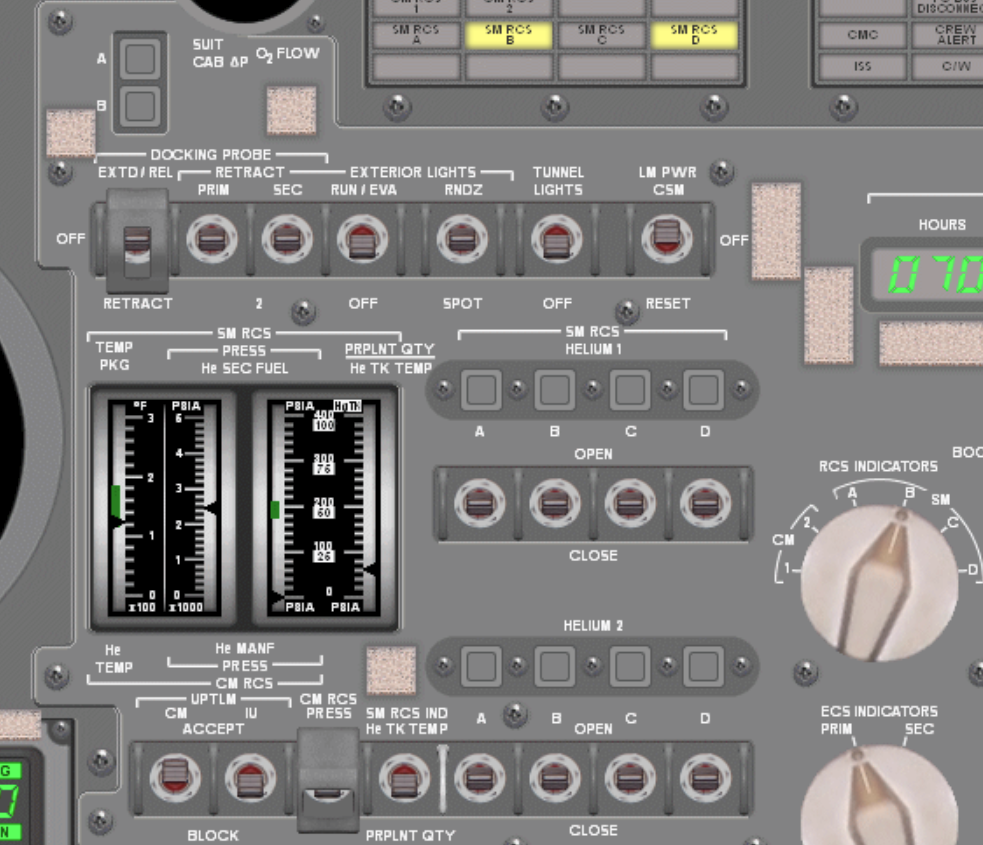
a&c
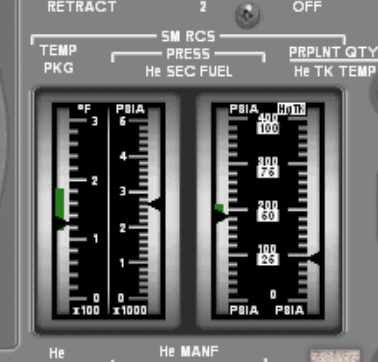
B and D look like this, not sure how I have managed to get through it all i've done all the star sightings and PTC positioning (with long periods of acceleration rest done with auto thrusters off ie PTC roll on).
1) Where could it have gone ? Is someone sniffing it !
2) What can I do (trying to avoid F4/Scenario edit/Prop)
3) What are the orbiter tank numbers mapped to 1-7
current 70h in on A11.
a&c
Last edited:
My 4 RCS (2-5) tanks appear to be 50kg in Orbiter but show in my current save as
I somehow have become borkborkborkedPROPELLANTMASS 152.500000000000
Similar threads

- Replies
- 0
- Views
- 857


- Replies
- 0
- Views
- 2K