

- Joined
- Jun 6, 2012
- Messages
- 382
- Reaction score
- 254
- Points
- 78
- Location
- Sydney, Australia, Earth, Sol
- Website
- www.orbithangar.com
Hi All,
I am having a go at creating a vessel class with a 2D panel. It's the first time Iv'e attempted this, and I'm having some issues with redrawing a display screen.
My vessel has some display screens much like the DeltaGlider's fuel status screen. I have these working perfectly in the virtual cockpit, but I'm getting some unexpected results in the 2d panel mode. When I first 'enter' the 2d panel, all halues/shapes etc (all HDC objects) work normally, but after exiting the 2d panel mode to a different cockpit mode and returning, it's as if the panel's background now has a snapshot of what was last displayed on it, and any HDC objects are now superimposed on top of that, Some images below show what I mean:
I call this function from clbkLoadPanel2D:
Note that in the above code, the two RECTs are the same. I have tried changing the seccond one (const RECT &texpos in RegisterPanelArea's declaration) to move halfway up from the first:
In clbkPanelRedrawEvent I have this:
This is the RedrawPanel_CabinPress function, it's pretty simple, and I went off the ShuttleA's as a reference:
If you got through all this, thank you! This is my first time trying a 2D panel and this has got me really stuck, any help is really appreciated.
Thanks all,
MrMartian
I am having a go at creating a vessel class with a 2D panel. It's the first time Iv'e attempted this, and I'm having some issues with redrawing a display screen.
My vessel has some display screens much like the DeltaGlider's fuel status screen. I have these working perfectly in the virtual cockpit, but I'm getting some unexpected results in the 2d panel mode. When I first 'enter' the 2d panel, all halues/shapes etc (all HDC objects) work normally, but after exiting the 2d panel mode to a different cockpit mode and returning, it's as if the panel's background now has a snapshot of what was last displayed on it, and any HDC objects are now superimposed on top of that, Some images below show what I mean:
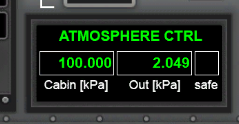 | 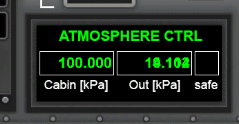 |
| outside pressure numbers roll as normal as I reenter the atmosphere. | after changing cockpit views, the numbers are now superimposed over those last displayed at the moment of view-change. |
I call this function from clbkLoadPanel2D:
C++:
void MyVessel::DefineMainPanel(PANELHANDLE hPanel)
{
    hPanelMesh = hPanelMesh1;
    SURFHANDLE tex[2] = { oapiGetTextureHandle(hPanelMesh1, 1), oapiGetTextureHandle(hPanelMesh1, 2) };

    RegisterPanelArea(hPanel, AID_PRESS_DISPLAY, _R(16, 104, 284, 213), 1, _R(16, 104, 284, 213), PANEL_REDRAW_ALWAYS | PANEL_REDRAW_GDI, PANEL_MOUSE_IGNORE, PANEL_MAP_BACKGROUND);
    RegisterPanelArea(hPanel, AID_FUEL_DISPLAY,  _R(16, 245, 360, 496), 1, _R(16, 245, 360, 496), PANEL_REDRAW_ALWAYS | PANEL_REDRAW_GDI, PANEL_MOUSE_IGNORE, PANEL_MAP_BACKGROUND);
}
Note that in the above code, the two RECTs are the same. I have tried changing the seccond one (const RECT &texpos in RegisterPanelArea's declaration) to move halfway up from the first:
RegisterPanelArea(hPanel, AID_PRESS_DISPLAY, _R(16, 104, 284, 213), 1, _R(16, 104, 284, 155), PANEL_REDRAW_ALWAYS | PANEL_REDRAW_GDI, PANEL_MOUSE_IGNORE, PANEL_MAP_BACKGROUND); This will correct the issue of the text superimposing as in the pictures above, but it will also stop the background image from showing at the lower half (there will just be a black area where the texture is supposed to be, HDC objects appearing perfectly though). Once I cycle through the cockpit modes and return to the 2D panel however, the background texture and the HDC objects work totally normally, except for the top half only, where now the HDC objects appear superimposed (see below)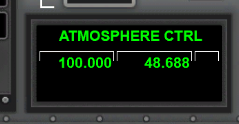 | 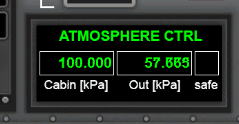 |
| on sim-start, lower half is black only. No texture | After cycling through cockpit modes, texture appears normal, but the top half is still superimposed. |
In clbkPanelRedrawEvent I have this:
C++:
bool MyVessel::clbkPanelRedrawEvent(int id, int event, SURFHANDLE surf)
{
    switch (id) {
    case AID_PRESS_DISPLAY:
        RedrawPanel_CabinPress(surf, AID_PRESS_DISPLAY);
        return true;
    case AID_FUEL_DISPLAY:
        RedrawPanel_FuelDisplay(surf, AID_FUEL_DISPLAY);
        return true;
    }
    return false;
}
This is the RedrawPanel_CabinPress function, it's pretty simple, and I went off the ShuttleA's as a reference:
C++:
void MyVessel::RedrawPanel_CabinPress (SURFHANDLE surf, int disp, bool panel)
{
    // register the text parameters
    char cbuf[20];
    HDC hDC = oapiGetDC (surf);
    SelectObject (hDC, g_Param.hFont[2]);
    SelectObject (hDC, g_Param.hBrush[1]);
    SetTextColor (hDC, RGB(0,255,0));
    SetBkMode (hDC, TRANSPARENT);
    SetTextAlign (hDC, TA_RIGHT);

    switch (disp) {
    case AID_PRESS_DISPLAY:
        double outpres = GetAtmPressure();
        press_disp_tmr += oapiGetSimStep();

        // inside and outside pressure readings
        if (press_disp_tmr > 0.25) {
            sprintf(cbuf_inpress, "%0.3f", chamber->Pressure() * 0.001);
            sprintf(cbuf_outpress, "%0.3f", outpres * 0.001);
            press_disp_tmr = 0.0;
        }
        TextOut(hDC, 222, 42, cbuf_outpress, strlen(cbuf_outpress));
        TextOut(hDC, 109, 42, cbuf_inpress, min(strlen(cbuf_inpress), 9));

        // indicator light
        bool draw = false, flash = false;
        SelectObject(hDC, g_Param.hBrush[1]);

        // pressure is tolerable
        if (chamber->Pressure() > outpres - PB_PRESSTOL && chamber->Pressure() < outpres + PB_PRESSTOL) {
            SelectObject(hDC, g_Param.hBrush[0]);
            draw = true;
        }
        // a vessel is docked
        else if (GetDockStatus(dh_main)) {
            SelectObject(hDC, g_Param.hBrush[2]);
            draw = true;
        }
        // chamber is 'unstable'
        if (chamber->GetChamberState() == 1 || chamber->GetChamberState() == 2) {
            draw = true;
            flash = true;
        }
        // chamber is damaged (not implemented)

        if (draw) {
            if (flash) {
                if (fmod(oapiGetSimTime(), 0.5) < 0.25) Rectangle(hDC, 233, 41, 260, 68);
            }
            else Rectangle(hDC, 233, 41, 260, 68);
        }

        break;
    }
    oapiReleaseDC (surf, hDC);
}
If you got through all this, thank you! This is my first time trying a 2D panel and this has got me really stuck, any help is really appreciated.
Thanks all,
MrMartian


