
=======================
HISTORY OF MODIFICATION
=======================
IMPORTANT
---------
FILES AFFECTED
---------------
-LM_ascent.msh (concerns the ascent stage of the lunar module during its ascent from the moon)
-LM_docked1.msh (concerns the lunar module, not activated and for Apollo 9 to 14 missions)
-LM_docked2.msh (concerns the lunar module, not activated and for Apollo 15 to 17 missions)
-LM_parked1.msh (concerns the lunar module inside S-IVB and for Apollo 9 to 14 missions)
-LM_parked2.msh (concerns the lunar module inside S-IVB and for Apollo 15 to 17 missions)
-LM_vessel1.msh (concerns the lunar module, activated and for Apollo 9 to 14 missions)
-LM_vessel2.msh (concerns the lunar module, activated and for the Apollo 15 to 17 missions)
SUMMARY OF MODIFICATIONS
------------------------
-TARGET_CROSS_G
-TARGET_INNER_W
============
INSTALLATION
=============
STEPS
-----
Once the folder is unzipped, please choose your color regarding the docking targets.
-The CYAN folder concerns the target cross which will be CYAN in color
-The GREEN folder concerns the target cross which will be GREEN in color
-The MIXED file concerns the target cross, which will be of various colors depending the phases of the mission
-The ORANGE folder concerns the target cross, which will be ORANGE in color.
-The PURPLE folder concerns the target cross, which will be PURPLE in color.
-The RED file concerns the target cross which will be RED in color (OFFICIAL COLOR FOR AMSO)
EXAMPLE
-------
If you wish to choose the RED folder:
1-Navigate thru this RED folder until you find the Meshes folder
2-Copy this Meshes folder
3-Paste this folder at the root of your folder concerning Orbiter 2016
Have a great time and a good flight!
=========
LAST WORD
=========
Thanks to Alain Capt, the AMSO creator and a great conceptor for Orbiter 2016
Coussini 2025
HISTORY OF MODIFICATION
=======================
IMPORTANT
---------
- This version is for Orbiter 2016 (AMSO-2016 version 1.23 build 191221) and has not been tested with Orbiter 2024.
- The purpuses of theses changes is to allow the target to be clearly seen when it is dark.
FILES AFFECTED
---------------
-LM_ascent.msh (concerns the ascent stage of the lunar module during its ascent from the moon)
-LM_docked1.msh (concerns the lunar module, not activated and for Apollo 9 to 14 missions)
-LM_docked2.msh (concerns the lunar module, not activated and for Apollo 15 to 17 missions)
-LM_parked1.msh (concerns the lunar module inside S-IVB and for Apollo 9 to 14 missions)
-LM_parked2.msh (concerns the lunar module inside S-IVB and for Apollo 15 to 17 missions)
-LM_vessel1.msh (concerns the lunar module, activated and for Apollo 9 to 14 missions)
-LM_vessel2.msh (concerns the lunar module, activated and for the Apollo 15 to 17 missions)
SUMMARY OF MODIFICATIONS
------------------------
- Add two new materials (MATERIAL) in each of these files.
- A material for the cross of the target that will be with severals colors (choice).
- Material for the target itself.
- No other modifications have been made.
-TARGET_CROSS_G
-TARGET_INNER_W
============
INSTALLATION
=============
STEPS
-----
Once the folder is unzipped, please choose your color regarding the docking targets.
-The CYAN folder concerns the target cross which will be CYAN in color
-The GREEN folder concerns the target cross which will be GREEN in color
-The MIXED file concerns the target cross, which will be of various colors depending the phases of the mission
-The ORANGE folder concerns the target cross, which will be ORANGE in color.
-The PURPLE folder concerns the target cross, which will be PURPLE in color.
-The RED file concerns the target cross which will be RED in color (OFFICIAL COLOR FOR AMSO)
EXAMPLE
-------
If you wish to choose the RED folder:
1-Navigate thru this RED folder until you find the Meshes folder
2-Copy this Meshes folder
3-Paste this folder at the root of your folder concerning Orbiter 2016
Have a great time and a good flight!
=========
LAST WORD
=========
Thanks to Alain Capt, the AMSO creator and a great conceptor for Orbiter 2016
Coussini 2025
- Supported Orbiter Version
- 2016
-
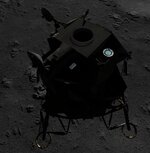 AMSO Cyan Bright Docking Target.jpg
 -
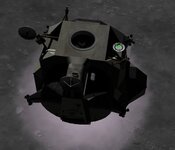 AMSO Green Bright Docking Target.jpg
 -
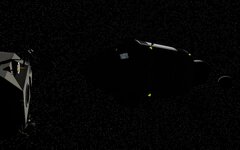 AMSO Orange Bright Docking Target.jpg
 -
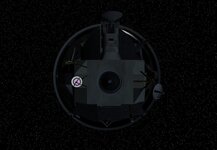 AMSO Purple Bright Docking Target.jpg
 -
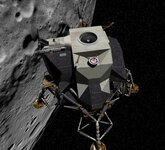 AMSO Red Bright Docking Target.jpg
![[Celestial Background] New stars are born](https://cdn.orbiter-forum.com/data/resource_icons/5/5609.jpg?1726869948)