Project Space Shuttle Vessel

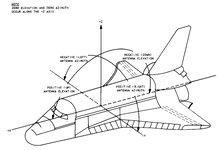
The title at the top says it all: it displays the Ku-Band antenna rates (in the EL/AZ coordinates), as it tracks a target, so you can tell which direction the target is going.
It shakes too much currently, but it is still usable. An improvement is on the todo list.
So it's called the line of site rates display....didn't think it would be that easy coming from a government agency. 😄

So how is it used? Do you put the DAP in lvlh alt modes then use rcs translation? Assuming top and bottom is prograde and retrograde, or is that the z axis?
 
So it's called the line of site rates display....didn't think it would be that easy coming from a government agency. 😄

So how is it used? Do you put the DAP in lvlh alt modes then use rcs translation? Assuming top and bottom is prograde and retrograde, or is that the z axis?

This is the EL/AZ coordinate system, so looking at that display is like looking up thru the overhead windows.
1780561706626.png

E.g., if the AZ needle is to the left, it means the target is moving towards the left, not where it is, but just the direction of relative motion.

As for usage... I'm not sure it had much use. AFAIK, it is the only way to find out where the target is moving towards while approaching during the night, but the system is so good that this probably used just to confirm that the rates are low, i.e., the relative motion is mostly radial.
 
I need some tips. Help me save myself from pulling up the default docking MFD and cheating.

I get to the MC4 burn, and all is well. Testing out the results of the burn and just monitoring to see what happens, I'll end up around 500 feet below the ISS, and less than 1.0 on the R based on the values shown in SPEC 33. Then of course, I start diverging, try to correct, and things go south from there.

I'm struggling with the visual portion. Station keeping at this point is eluding me. Visually fine tuning my orbit to be in the same orbit as the ISS is a mystery right now.

Any advice is welcome, no matter how obvious it may seem to you, it may turn on the light switch for me.
 
I need some tips. Help me save myself from pulling up the default docking MFD and cheating.

I get to the MC4 burn, and all is well. Testing out the results of the burn and just monitoring to see what happens, I'll end up around 500 feet below the ISS, and less than 1.0 on the R based on the values shown in SPEC 33. Then of course, I start diverging, try to correct, and things go south from there.

I'm struggling with the visual portion. Station keeping at this point is eluding me. Visually fine tuning my orbit to be in the same orbit as the ISS is a mystery right now.

Any advice is welcome, no matter how obvious it may seem to you, it may turn on the light switch for me.
I think the Rendezvous checklist has a page or 2 with the procedures following MC-4: RPM, TORVA, etc.
Not having anyone else to help, I find it easier to bypass the UNIV PTR display and put the DAP in B, LVLH, VERN, and translation PULSE, and that keeps the attitude in relation to the ISS (which should be in LVLH) and gives fine translational control (0.1fps, I think). For now focus on the basics and bypass the RPM and proceed to the TORVA.
Put the centerline camera view in one TV, which is visible from the aft pilot station. Take your time, it isn't supposed to be like the Apollo 13 movie, with thrusters firing all over the place, the trajectory is designed to have the orbital mechanics help and to save prop. When you get to the V-bar, go full zoom in on the centerline camera, to see the target and got a decent alignment for far out, and then bring it in (don't forget to power the APDS).
 
I need some tips. Help me save myself from pulling up the default docking MFD and cheating.

I get to the MC4 burn, and all is well. Testing out the results of the burn and just monitoring to see what happens, I'll end up around 500 feet below the ISS, and less than 1.0 on the R based on the values shown in SPEC 33. Then of course, I start diverging, try to correct, and things go south from there.

I'm struggling with the visual portion. Station keeping at this point is eluding me. Visually fine tuning my orbit to be in the same orbit as the ISS is a mystery right now.

Any advice is welcome, no matter how obvious it may seem to you, it may turn on the light switch for me.
One thing I have found (and the Shuttle Crew Operations Manual actually does mention this) is that it's easy to forget about range rate while focusing on the COAS/crosspointer. Especially since you are approaching from below and the orbits "want" to diverge. You have to keep thrusting at the thing to sustain a decent closing rate. Other than that, take it slow and steady. Follow the closing rates specified in the checklist (lock the Ku antenna on and put the display in range/rate mode) and keep it centered in the COAS while you slowly close in. TORVA is pretty easy if you just let UNIV PTG handle the rotation, and translate to keep the target centered and closing. Then you just keep on easing in. Hope that helps!
 
One thing I have found (and the Shuttle Crew Operations Manual actually does mention this) is that it's easy to forget about range rate while focusing on the COAS/crosspointer. Especially since you are approaching from below and the orbits "want" to diverge. You have to keep thrusting at the thing to sustain a decent closing rate. Other than that, take it slow and steady. Follow the closing rates specified in the checklist (lock the Ku antenna on and put the display in range/rate mode) and keep it centered in the COAS while you slowly close in. TORVA is pretty easy if you just let UNIV PTG handle the rotation, and translate to keep the target centered and closing. Then you just keep on easing in. Hope that helps!

Thanks for that tip. I’m going to add it to my SSV/FDO tips and tricks document, which is just a mish mash of words of wistom I’ve been collecting over time. Appreciate it.
 
I recently had a person DM me ask me a couple things, so I thought I'd drop some of my response here, because it got me thinking about some stuff.

"What I’m finding with the FDOMFD is that it requires a fair amount of trial and error, but unfortunately, for trial and error to be effective, you need to have a very good understanding of what the burns are, and especially what the secondary constraints are. Speaking of secondary constraints, you need to know when they can be deleted, or have to be deleted. Along with that, you need to be able to decide if a burn can be removed if it’s not needed, or if another burn needs to be added. Essentially, the FDOMFD gives you a ton of info, and then it’s up to you to decide how that info is used, or in some cases ignored.

So what I started working on over a month ago, are two documents. One is a condensed version of the STS-126 OMP walk through in the FDOMFD user manual. I’ve taken the 20 pages in the FDO manual that cover the walk through, and boiled it down to an easily digestible 5 pages, broken down by burns. Then I took the 5 page condensed version, and turned it into an even more condensed checklist style document that you can graduate to once you know what you’re doing with the condensed document. So essentially, a person needs to really study the FDO manual, and fail over and over in the SSV. Once concepts are learned, moving to the condensed version of the walk through can be done, and once everything is really well learned from the condensed version, the checklist version that contains no real explanations other than the sequence of events can be used.

But….here’s the problem. The walk through in the FDO manual won’t translate to every space shuttle rendezvous mission to ISS, MIR, or Hubble. That walk through is specific to STS-126. I’ve been trying to apply my two documents to STS-101 for the past month, but with little success. Sometimes it works, sometimes not.

I’m starting to think that what’s actually needed is for a package of launch scenarios to the ISS, MIR, and HST, that are individualized for each historic mission; custom SSV mission.json file, SSV scenario.scn file, and FDOMFD mission.txt file. Actually, a dual package would be better, one mission pack that’s just the shuttle, with no payload, so you don’t have to download and install anything other than the SSV, and can just practice rendezvous procedures, and another mission package with the historical payloads, for those that want to advance to the next level.

My goal is to eventually get my documents to the point that they can be used by new users, to lower the learning curve, lower the bar to entry, and open up the amazing SSV + FDOMFD to more people. There are tons of people that just want to run some rendezvous missions, but don’t want to put in 3 months of study, and research to almost get there. I’ve been hitting Orbiter/SSV/FDO pretty hard the past couple months, and I’m getting burned out. So I’m actually going to pull back a bit, take a little break from SSV and FDO, and let things ruminate. I’m going to lick my wounds, head back to flight sim land, and enjoy the experience of flying that I actually know how to do….LOL."

 
  • Like
Reactions: GLS
Back
Top